![[PukiWiki]](./skin/BAKIN_logo_92.png "[PukiWiki]")
In Bakin, you can create a wide variety of events by combining different "Event Panels", each with their own unique functions.
Let’s try creating an event without using an event template.
Move to another map, "Change the BGM," "Add a new member to the party," "Have cast members talk to each other"—
All of these are events.
Recover at an inn, "Briefly show a cast member's image when magic is used," "Have enemies roam around the map"—
These are also all events.
An event consists of three parts: “the conditions for executing the event,” “the trigger that causes the event to start,” and “what happens when the event runs.”
When the specified conditions are met and the designated trigger occurs, the set actions are executed.
This is the basic idea behind how events work.
First, let’s take a look at what kind of event panels are used in the event template that moves the player between maps.
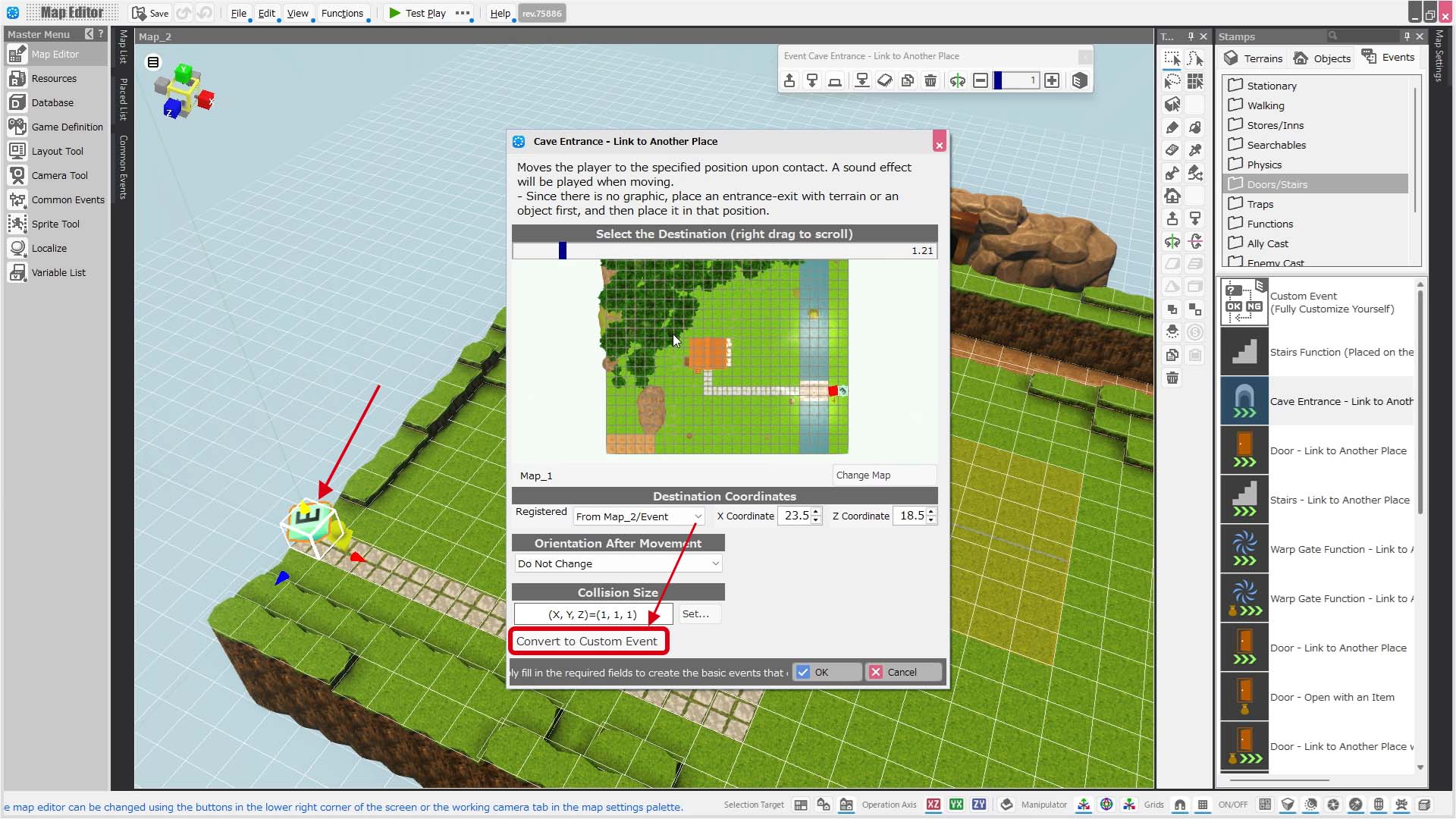
Double-click the event symbol (the marker with an "E") placed on Map_2 to open the event template.
In the dialog that opens, click the "Convert to Custom Event" button in the bottom-left corner, then click OK in the dialog that appears.
Next: Creating an Event 2
Previous: Changing Battle BGM and Transition Effects


