Player†
Teleport Player†
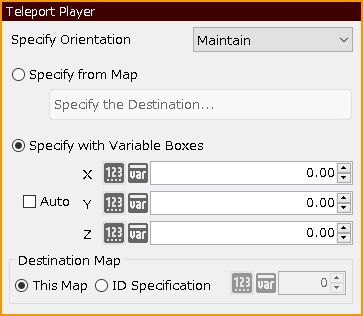
Move the player to the specified location.
- Specify Orientation
Select the orientation of the player after the move.
- Maintain
Keep the orientation before the move.
- Upward/Downward/Leftward/Rightward
After moving, turn to the specified orientation.
- Specify from Map
Specify the destination from the map you have already created.
- Registered Destinations
If a destination has already been registered for another event, you can select that destination from here.
- X/Z Coordinates
Specify the coordinates of the destination by entering numerical values.
- Specify with Variable Boxes
The value of the specified variable box is entered into the coordinates and used.
Change Player Orientation†
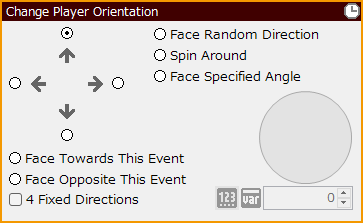
Change the player's orientation to the specified direction.
- Up/Down/Left/Right
Change the direction in which the radio button is checked.
- Face Random Direction
Change the orientation to either up, down, left, or right.
- Spin Around
Make one rotation on the spot.
- Face Specified Angle
Change the orientation to the specified angle.
- Face This Event
Turn the player in the direction of this event.
- Face Opposite
Turn the player in the opposite direction from which this event is located.
- 4 Fixed Directions
When checked, the orientation is always four directions (up, down, left, right) when changing the orientation.
Make Player Walk†
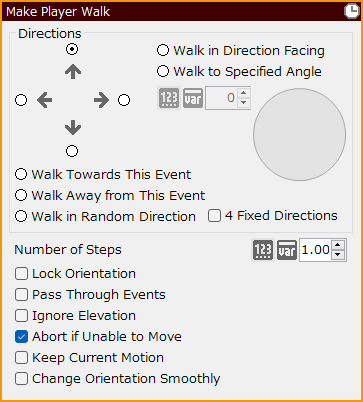
Make the player walk in the specified direction.
- Directions
- Walk in Direction Facing
- Walk to Specified Angle
- Walk Towards This Event
- Walk Opposite This Event
- Walk in Random Direction
- Number of Steps
Specify the number of steps between 0.01 and 100. Up to two decimal places can also be used.
- Lock Orientation
If checked, it moves with the orientation fixed.
- Pass Through Events
If checked, it will move through all other events.
- Ignore Elevation
If checked, it moves ignoring steps.
- Abort if Unable to Move
If checked, event execution will be aborted if it collides with another event or terrain and cannot proceed any further.
- Keep Current Motion
If checked, the specified animation will play and move.
- Change Orientation Smoothly
If checked, the camera will smoothly turn to the specified direction by the end of the specified number of steps.
Change Player Movement Speed†
Change the speed at which the player moves to any desired speed.
- Speed Type
- -3: Slowest
- -2: Slower
- -1: Slow
- 0: Normal
- 1: Fast
- 2: Faster
- 3: Fastest
Make Player Invisible/Visible†
Make the player's graphic invisible or return to its original state.
#ref(): File not found: "Make_Player_InvisibleVisible.png" at page "Player"
- Invisible
Make the player transparent and invisible.
- Visible
Restore the player's graphic to its original state.
Change Cast Graphic†
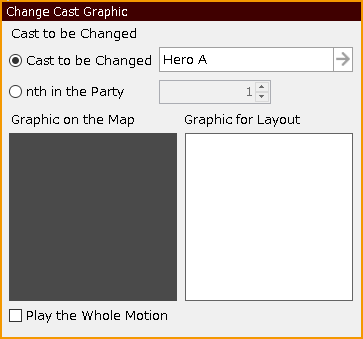
Change the graphic and motion of the cast on the screen.
- Cast to be Changed
Select from the casts already created.
- nth in the Party
Change the graphic of the cast at the specified index in the party.
- Graphic on the Map
Select the cast graphic to be changed.
- Graphic for Layout
Select the cast face graphic to be changed.
- Play the Whole Motion
If checked, the system will not perform any motion changes (move, wait, run) until the motion is completed or circled.
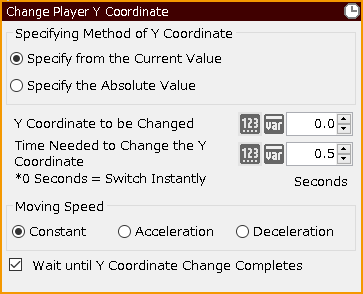
Change Player Y Coordinate†
Change the Y coordinate (height) of the player.
- Specifying Method of Y Coordinate
- Specify from the Current Value
Select this option to specify that the height the player is currently at is 0 and how much to change from there.
- Specify the Absolute Value
Select this option when setting the bottom of the map as 0 and specifying how much to change from there.
- Y Coordinate to be Changed
Specify a value between 0.1 and 50 for the change.
- Time to Change
Specify the time between 0.1 and 120 seconds to make the change; if 0 seconds is specified, the change is made instantly.
- Moving Speed
Specify acceleration/deceleration during movement.
- Constant
Move at a constant speed.
- Acceleration
Move with acceleration.
- Deceleration
Move with deceleration.
- Wait until Y Coordinate Change Completes
If checked, the next event will not be executed until the move is complete.
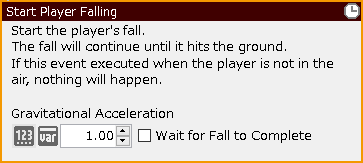
Start Player Falling†
When the player is in the air, executing this event will initiate the player's fall.
- Gravitational Acceleration
Specify a value between 0.01 and 100. The standard is 1. The higher the number, the faster the fall speed.
- Wait for Fall to Complete
If checked, the next event will not be executed until the fall is complete.
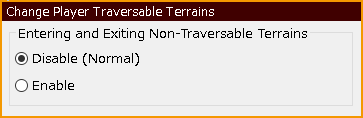
Change Player Traversable Terrains†
Change the passage attributes specified for the "Terrains."
- Entering and Exiting Non-Traversable Terrains
- Disable (Normal)
The player will be impassable.
- Enable
The player will be able to pass through.
Passage attributes can be referenced and modified in "Resource Management" > "Terrains" > "Terrain Model Attributes".
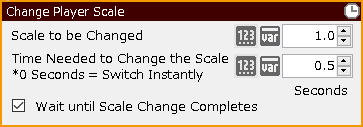
Change Player Scale†
Change the scale (size) of the 3D model specified for the player by the specified magnification and time.
- Scale to be Changed
It can be specified between 0 and 50.
- Time to Change
It can be specified between 0 and 120 seconds; if 0 seconds is specified, the scale is changed instantly.
- Wait until Scale Change Completes
If checked, the next event will not be executed until the scale change is complete.
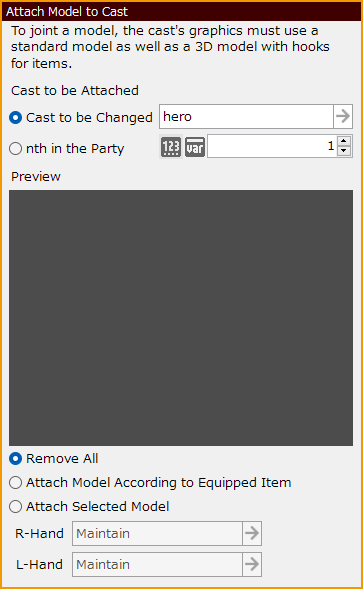
Attach Model to Cast†
If the 3D model with hooks for items is used, the item model can be attached to the 3D model.
- Cast to be Attached
Specify how to set the cast to be attached.
- Cast to be Changed
Select from the casts already created.
- nth in the Party
Specify the model for the cast to which you want to attach the item by indexing it in the party.
- Preview
Preview the specified settings.
- Remove All
Remove all jointed models.
- Attach Model According to Equipped Item
Joint a 3D model that is specified in the "Items" section of the database.
- Attach Selected Model
Joint any 3D model, regardless of equipment.
Enable/Disable Player Orientation Change†
Allow or prohibit the player to change direction.
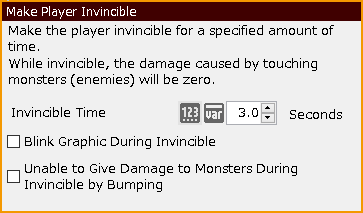
Make Player Invincible†
Make the player invincible for a specified period of time.
- Invincible Time
Specify the length of time the player will be invincible, from 0 to 60 seconds.
- Blink Graphic During Invincible
If checked, the graphic flashes during the invincibility time.
- No Damage to Enemies by Bumping During Invincible
If checked, the cast will not give any damage when it hits enemies by body hits.
Snap Player on Grid†
Fit the player to the nearest grid (square).
#ref(): Usage:([pagename/]attached-file-name[,parameters, ... ][,title])
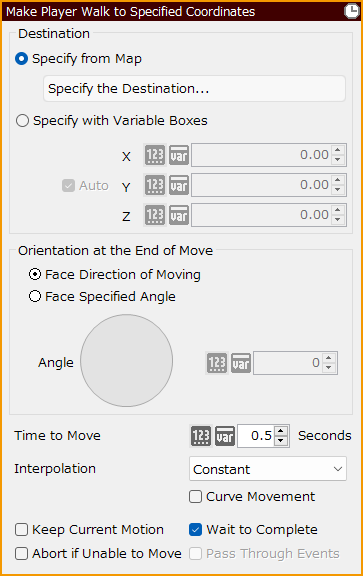
Make Player Walk to Specified Coordinates†
The coordinates of the map are specified and the player is made to walk.
- Specify the Destination
Specify the destination of the player from one of the following methods.
- Registered Destinations
If a destination has already been registered for another event, you can select that destination from here.
- X/Z Coordinates
Specify the coordinates of the destination by entering numerical values.
- Orientation at the End of Move
Specify the orientation at the end of the move from one of the following methods.
- Face Direction of Moving
Turn it to face the direction of movement.
- Face Specified Angle
Enter the angle directly as a number or specify the angle by clicking on the direction you want to face in the circle.
- Time Required for Move
Specify between 0 and 60 seconds.
- Interpolation
Specify acceleration/deceleration settings during the move.
- Constant
It always moves at a constant speed.
- Acceleration
It moves with gradual acceleration.
- Deceleration
It moves with gradual deceleration.
- Acc. to Decel.
It accelerates at the start of the movement and decelerates as it approaches the end point.
- Keep Current Motion
If checked, the specified animation will play and move.
- Wait to Complete
If checked, the next event will not be executed until the move is complete.
Change Cast's Equipment†
Change the equipment of the specified cast forcibly.
#ref(): File not found: "Change_Cast's_Equipment.png" at page "Player"
- Cast to be Changed
Select from the casts already created.
- nth in the Party
Specify a cast member in the party whose equipment you wish to change by indexing them in the party.
- Equipment Type
Specify from one of the following: Weapon, Arm Armor, Headgear, Body Armor, Accessory 1, or Accessory 2.
- Item to be Equipped
Specify the item to be equipped.
Change Cast's Class†
Change the class of the cast.
#ref(): File not found: "Change_Cast's_Class.png" at page "Player"
- Cast to be Changed
Select from the casts already created.
- nth in the Party
Specify the cast whose class will be changed by indexing them in the party.
- Change Target
Select either a class or a subclass.
- Transfer of Grown-Up Status
Specify whether or not to carry over the grown status from the previous class.
Rotate Player†
Rotate the player's orientation and angle, which can be specified for each of the XYZ axes.
#ref(): File not found: "Rotate_Player.png" at page "Player"
Move Player with Physics Engine†
Inertia is applied when the player moves.
![[PukiWiki]](./skin/BAKIN_logo_92.png "[PukiWiki]")