Variable Boxes (assignment and calculation), String Variables (assignment and text input)†
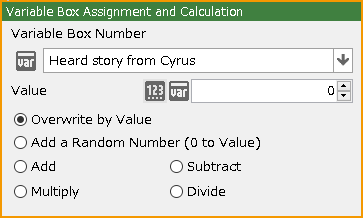
Variable Box Assignment and Calculation†
Assign a value to a numeric variable that has been specified in a specified manner.
- Variable Box Number
Specify the variable box to be used.
- Variable Box Type
- Value
The value to be used can be specified between -9999999 and 9999999.
- Text
Used to specify a string variable.
- Local Value
Used to specify a local variable.
- Array Variable
Used to specify an array variable.
- Pointer
Specify a pointer to be specified from an integer or variable box.
- Value
Assign an integer between the specified values in the following manner
- Overwrite by Value
Assign a value.
- Add a Random Number (0 to Value)
Add a random number from the range of 0 to the specified number.
- Subtract
Subtract the value.
- Multiply
Multiply the value.
- Divide
Divide by the value.
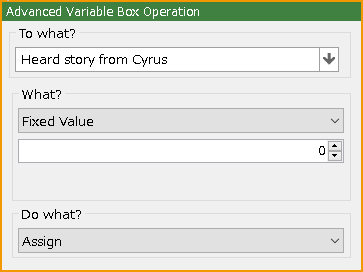
Advanced Variable Box Operation†
Assign the specified parameter to a numeric variable in the specified manner.
- To what?
Specify the variable box to be used.
- What?
Specify the parameter to be assigned by selecting one of the following
- Fixed Value
An integer from 0 to 9999999 can be entered.
- Random Number
Any integer from -9999999 (minimum) to 9999999 (maximum) can be entered.
- Variable Box
Specify the variable box to be used.
- Money in Possession
Refer to the current money in possession.
- Number of Items Possessed
Refer to the number of the specified item in the possession.
- Cast Status
Refer to various statuses of the specified cast. The statuses that can be referenced are as follows
- LV
- Current HP
- Current MP
- Maximum HP
- Maximum MP
- Current HP(%)
- Current MP(%)
- Attack Power
- Magical Power
- Defense Power
- Accuracy
- Evasion Rate
- Agility
- EXP
- State Changes
- Class Level
- Subclass Level
- nth in the Party
- nth Status in the Party
You can refer to the entries without "nth in the Party" from the entries that can be referred to in "Cast Status".
- Event Status (For Cast-based Event)
If the specified event is a cast-based event, its status is referenced. The statuses that can be referenced are as follows:
- Current HP
- Current MP
- Maximum HP
- Maximum MP
- Current HP(%)
- Current MP(%)
- Attack Power
- Magical Power
- Defense Power
- Accuracy
- Evasion Rate
- Agility
- EXP
- G
- Current Time
Year, Month, Day, Day of the Week, Hour, Minute, Second
- Play Time
Hour, Minute, Second
- Map ID
The map ID can be specified in the Map Editor > Map Settings palette > Basic tab.
The map ID for each map is also listed on the Map List palette.
- Operation Key
Up, Down, Left, Right, Decision, Cancel, Dash, Camera: Rotate Up, Camera: Rotate Down, Camera: Rotate Left, Camera: Rotate Right, Camera: Zoom In, Camera: Zoom Out, Camera: Reset, Up (Repeat), Down (Repeat), Left (Repeat), Right (Repeat), Menu, Jump, Action 1, Action 2, Action 3
- Camera Settings
X Rotation, Y Rotation, Angle of View, Distance, X Coordinate, Y Coordinate (Elevation), Z Coordinate
- Coordinate Information for This Event
X Coordinate, Y Coordinate (Elevation), Z Coordinate, X Coordinate on the Screen, Y Coordinate on the Screen, X Rotation, Y Rotation (Orientation), Z Rotation, Orientation/4 Direction (U: 0, D: 1, L: 2, R: 3)
- Coordinate Information for Player
The same settings as "Coordinate Information for This Event" can be specified.
- Mouse Information
Mouse Pointer X Coordinate, Mouse Pointer Y Coordinate, Left Click, Right Click, Center Click, Wheel Rotation
- Elapsed Time from Previous Frame
- Player Operation Locked State (0=Unlocked)
- nth Parameter in the Inventory
The parameters that can be obtained are as follows:
- Consumables Specified
- Weapons Specified
- Armors Specified
- Enhanceable
- Equipped Part Number
- Level
- Price
- Original Price
- Attack Range
- Original Attack Range
- Attribute Attack Power
- Original Attribute Attack Power
- Critical Rate
- Original Critical Rate
- Max Damage/Recovery Amount
- Original Max Damage/Recovery Amount
- HP Recovery Amount
- Original HP Recovery Amount
- HP Recovery Rate
- Original HP Recovery Rate
- MP Recovery Amount
- Original MP Recovery Amount
- MP Recovery Rate
- Original MP Recovery Rate
- Maximum HP
- Original Maximum HP
- Maximum MP
- Original Maximum MP
- Attack Power
- Original Attack Power
- Defense Power
- Original Defense Power
- Magical Power
- Original Magical Power
- Agility
- Original Agility
- Accuracy
- Original Accuracy
- Evasion Rate
- Original Evasion Rate
- Parameter for Item (for Item-base Only)
If this event is an item-based event, you can get a parameter of the item.
The parameters that can be obtained are the same as those in "nth Parameter in the Inventory".
- Do what?
- Assign
Assign the parameter.
- Addition
Add the parameter.
- Subtraction
Subtract the parameter.
- Multiplication
Multiply the parameter.
- Division
Divide the parameter.
- Assign Remainder of Division
Assign the remainder of dividing the parameter.
- Assign with Decimals Rounded Down
Assign a parameter with the decimal point rounded down to the nearest integer.
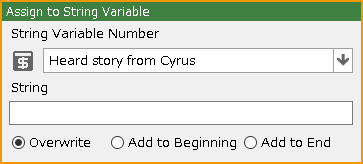
Assign to String Variable†
Assign a string to a string variable in the specified manner.
- String Variable Number
Specify the variable box to be used.
- String
Specify the string to be assigned.
- String Assigning Methods
- Overwrite
Overwrite and assign a string.
- Add to Beginning
Add the string to the beginning.
- Add to End
Add the string to the end.
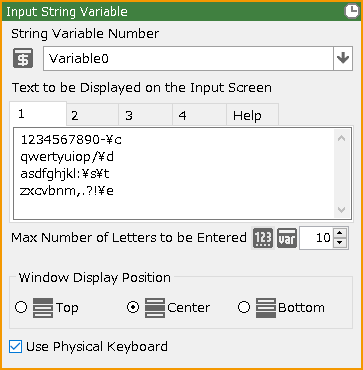
Input String Variable†
Open a panel for entering strings. The string the player enter is assigned to a string variable.
The layout when using this event panel, including the size and position of the text input panel, can be created in the Layout Tool > Input String screen.
- String Variable Number
Specify the variable box to be used.
- Text to be Displayed on the Input Screen
The letters to be displayed in the input panel can be specified.
Text input panels can be created by specifying the special format \inputstrings for a text panel in the Layout Tool > "Input String" screen.
Please refer to the "Help" tab for information on how to display the decision button, the tab switching button, etc.
Up to four tabs can be set.
This allows you to use tab 1 in lowercase, tab 2 in uppercase, and so on.
- Max Number of Letters to be Entered
Specify the maximum number of letters that can be entered between 0 and 65536.
- Window Display Position
You can specify the position of the Input String Window.
The position is determined according to the "special coordinate specification tag" specified in the container's properties in the Layout Tool > Input String screen.
Please refer to the default layout on the same screen.
- Use Physical Keyboard
Allows direct input of strings from the keyboard during event execution.
When this function is turned on, it is no longer necessary to use the text panel with the special format \inputstrings in the Layout Tool > "Input String" screen.
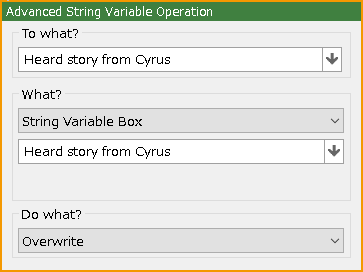
Advanced String Variable Operation†
Assign a specified parameter to a string variable in a specified manner.
- To what?
Specify the variable box to be used.
- What?
Specify the content to be used.
- String Variable Box
Specify the variable box to be used.
- Current Map Name
Use the current map name.
- Cast Status
Specify the following for the specified cast member: cast name, class, subclass, weapon name, arm armor name, headgear name, body armor name, accessory name 1, accessory name 2.
- nth Status in the Party
The same settings as in "Cast Status" can be specified.
- This Event's Name
The name of the event itself can be obtained.
- Name of Shooting Source
The name of the event from which this event was generated can be obtained.
- nth Parameter in the Inventory
The parameters that can be obtained are as follows:
- Name
- Attack Attribute
- Parts
- Parameter for Item (for Item-base Only)
If this event is an item-based event (specified in Database > Items), you can retrieve a parameter for the item.
The parameters that can be obtained are the same as those in "nth Parameter in the Inventory".
- Name of the Last Item Obtained
- Do what?
- Overwrite
Overwrite and assign a string.
- Add to Beginning
Add the string to the beginning.
- Add to End
Add the string to the end.
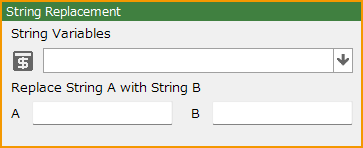
String Replacement†
Replaces string variable A in the specified variable box with string B.
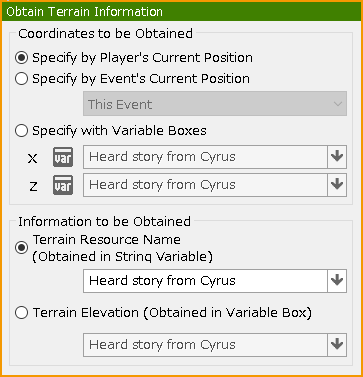
Obtain Terrain Information†
Obtain terrain information for the current position of the player or event or for the coordinates specified in the variable box.
- Specify by Player's Current Position
Obtain terrain information for the player's current location.
- Specify by Event's Current Position
Obtain terrain information for the current location of the event.
- Specify with Variable Boxes
Use the value in the variable box as the coordinate to get the terrain information for that coordinate.
- Terrain Resource Name
Obtain the name of the resource used in the terrain as a string variable.
- Terrain Elevation
Obtain the elevation of the terrain in the variable box.
Obtain Cast Status†
Please read the Statuses > Obtain Cast Status section for more information.
Obtain Item Parameter†
Please read the Statuses > Obtain Item Parameter section for more information.
![[PukiWiki]](./skin/BAKIN_logo_92.png "[PukiWiki]")