Various Branches, Screen Display and Result Confirmation (Battle, Store, Inn)†
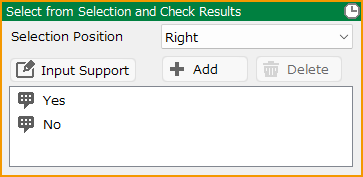
Select from Selection and Check Results†
Make selections.
- Selection Position
Select the position where the selection will be displayed.
It corresponds to the Special Coordinate Specification Tag specified in the menu container of the Layout Tool > Selection screen.
ex. "Center" will display a menu container with "Center" specified in the Special Coordinate Specification Tag.
- Cancelable
It is possible to cancel the selection itself by pressing the Cancel button.
It is also possible to specify the behavior of the canceled selection.
- Initial Cursor Position
Specify the initial cursor position when the selection window is opened.
- Add/Delete
Add or delete selections. Up to ten selections can be added.
Alternatively, you can limit the selections to just one choice.
- Text Commands
Text Commands can be used for the text of the selections, to display the text decoration, the contents of variables, and cast names.
For a list of Text Commands, see the Text Formatting and Text Commands page for more information.
The type of Text Commands that can be used depends on the contents of the event panel.
- Text
Enter the text that will appear as selections.
- Display Conditions
Conditions for displaying selections can be set using event switches and variables.
If a switch is specified, the selections will not be displayed if the value in the switch is 0 (off).
This function makes it easy to create events such as "if they have a certain item, they will have an additional selection".
- Enabling Conditions
Conditions for activating a selection can be set using event switches and variables.
If the condition is not met, the selection will be displayed in an invalid color and will be skipped when moving the cursor.
| Display Conditions | If the conditions are not met, the selections will not be displayed. |
| Enabling Conditions | If the conditions are not met, the selection cannot be made. However, the selection is indicated by an invalid color. |
Battle with Enemy Party†
Execute a battle with the enemy party and performs branching based on the result. You can separate the processing for when the player wins and when the player loses.
- BGM
Set the BGM used during the battle. If set to "Do Not Change," the normal battle BGM will be played.
- Options
- Inescapable
If checked, the player will not be able to escape from the battle.
- No Game Over Even If Defeated
Even if the party is wiped out in battle, the game will not transition to a Game Over.
By turning off "Inescapable" and turning on "No Game Over Even If Defeated," you can run a battle where the player can escape and the game will not result in a Game Over.
- No Monster Appearance Message
When monsters appear, the system message will not be displayed.
- Enemy Party to Appear
Specify the enemy party that will appear in the battle.
- Battle Test
Run a battle test using the configured settings.
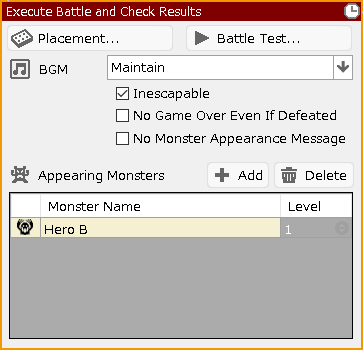
Execute Battle and Check Results†
Execute a battle and handle the branching of winning and losing. The process can be performed for winning and losing separately.
(!)When setting up battles against enemy parties, use the Battle with Enemy Party panel instead of this one.
- Placement
Select the map to be used during the battle and specify the placement of allies and enemies.
- Delete Placement
Discard the battle layout set in this panel and return to using the system default battle layout.
- Battle Test
Execute the battle test with the specified details.
- BGM
Specify the BGM to be used during battle." If you specify "No Change," the normal battle BGM will be played.
- Inescapable
If checked, the player will not be able to run away from the battle.
- No Game Over Even If Defeated
Even if they are annihilated in battle, the game does not transition to game over.
By turning off "Inescapable" and turning on "No Game Over Even If Defeated," you can execute a " escapeable and no game over" battle.
- No Monster Appearance Message
No system message is displayed when monsters appear.
- Enemy Party to Appear
Add/delete monsters that appear in battles. The level of each monster can also be specified.
The maximum number of enemies that can appear at the same time is eight.
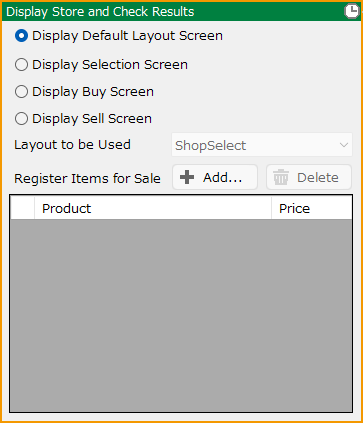
Display Store and Check Results†
Display a screen of store where items can be traded. The process can be performed independently for when the store is used or not used.
It is also possible to display a screen to select items to be bought/sold without going through the screen to select whether to buy/sell them in the store.
- Layout to be Used
Select which layout to use when displaying Selection Screen, Buy Screen, and Sell Screen.
- Register Items for Sale
Configure the items sold in the store, their prices, and stock quantities.
- Price Settings
Specify the price of the product. If anything other than "None" is selected, a numeric input field will appear.
The price set in Database > Items is used as the "Base Price."
| None | Base Price |
| Rate (%) | A price calculated by multiplying the Base Price by the specified percentage (%). If the entered value is "20", the price will be "20% of the Base Price". |
| Fixed Value | The price is exactly the specified value. |
| Variable Rate (%) | A price calculated by multiplying the Base Price by the value of the specified variable. If the variable value is "20", the price will be "20% of the Base Price". |
| Variable | The price is exactly the value of the specified variable. |
- Inventory
Set the stock quantity for the product. If anything other than "None" is selected, a numeric input field will appear.
| None | There is no limit on the number of items that can be sold. |
| Fixed Value | The item will have the specified amount of stock. (When set as a fixed value, an internal local variable is generated. This variable appears in the debug window's variable monitor, but it cannot be manipulated within events.) |
| Variable | The item will have stock equal to the value of the specified variable.
Items that are out of stock will disappear from the list of goods in the "Store Buy" screen.
If the variable contains a negative value, it will be treated the same as "None" (no stock setting). |
| Variable (Disable When Sold Out) | The item will have stock equal to the value of the specified variable.
Items that are out of stock will be displayed in a disabled color in the list of goods on the "Store Buy" screen.
If the variable contains a negative value, it will be treated the same as "None" (no stock setting). |
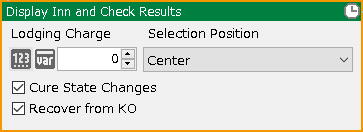
Display Inn and Check Results†
Display an innkeeper. The process can be performed differently for when it is used or not used.
- Lodging Charge
Specify a lodging charge between 0 and 9999999.
- Selection Position
Select the position where the selection will be displayed.
- Cure State Changes
If checked, their state changes will be restored.
- Recover from KO
If checked, they will recover from KO state.
- Include the Reserve as well
Reserve members are also subject to the influence of the inn.
Check Event Switch†
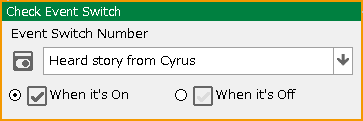
Check the on/off of the specified event switch.
Check Variable Box†
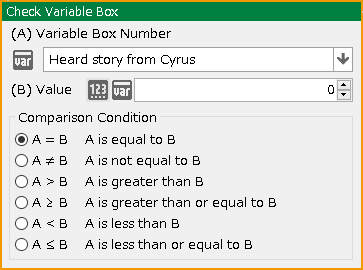
Check the specified value variable.
- Variable Box Number
Specify the variable box to be referenced.
- Value
Enter a value to be compared or specify a variable box to specify the comparison condition.
- Ignore Small Differences
If the difference between A and B being compared is smaller than the specified value, it will be ignored when producing the result.
Example: If the comparison condition is "A equals B" and this field is set to "0.01", then when comparing A and B, any difference less than 0.01 will be treated as "equal".
Check String Variable Box†
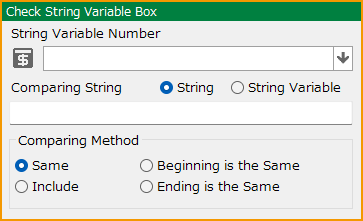
Check the specified string variable.
- String Variable Number
Specify the string variable box to be used.
- Comparing String
Specify the string input or string variable to be compared and the comparison condition.
Check Party Cast†
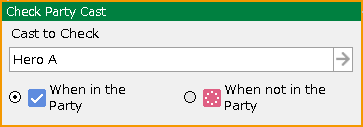
Check if the specified cast is included in the party.
- Include the Reserve as well
Reserve members will also be subject to check.
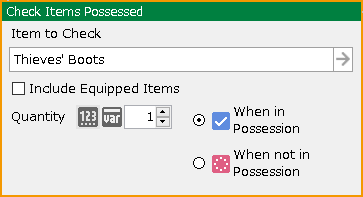
Check Items Possessed†
Check if the specified item is in possession.
- Item to Check
Specify items to be checked. If you want to include items that the casts are equipped with, check the "Include Equipped Items" checkbox.
- Quantity
Specify the number of items.
- When in Possession/When not in Possession
Specify one of the conditions.
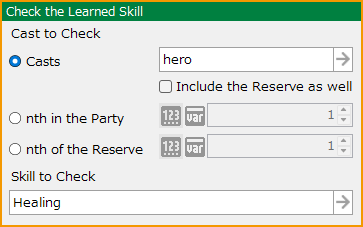
Check the Learned Skill†
Check to see if the target cast member has learned the assigned skill.
- Cast to Check
Assign a cast to be checked.
- Include the Reserve as well
Reserve members will also be subject to check.
- nth in the Party
- nth of the Reserve
Check the cast members at the specified index within the party/ reserve members.
- Skill to Check
Assign a skill to be checked if it is learned.
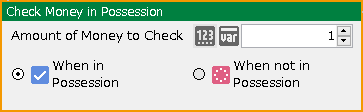
Check Money in Possession†
Check the amount of money in possession.
- Amount of Money to Check
Specify the amount of money in possession to be checked.
- When in Possession/When not in Possession
Specify one of the conditions.
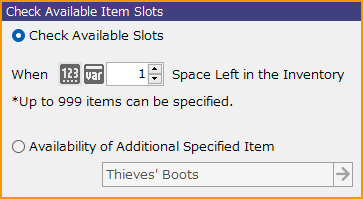
Check Available Item Slots†
Check the availability for the item inventory.
- Check Available Slots
Check to see if there is space to add one or more items to the Inventory.
- Availability of Additional Specified Item
Check if there is space in the Inventory to add at least one of the specified item(s).
Check Whether in Battle (Available only for battle events)†
Check if a battle is in progress.
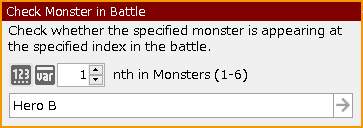
Check Monster in Battle†
During a battle, it checks to see if the specified monster is in the specified location.
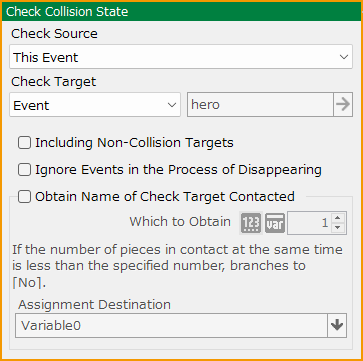
Check Collision State†
Check if the player or event is in contact with any terrain, object, player, or event.
- Check Source
Select either the player or this event.
- Check Target
Select terrain (landed or not), object, player, event, cast (individual), ally cast, or enemy cast.
If you select cast (individual), select the target cast.
- Including Non-Collision Targets (Available only when Player/Event/Cast is selected in "Check Target")
The condition will be fulfilled even if there are overlapping events or player that are not targeted for detection.
- Ignore Events in the Process of Disappearing (selectable only when the check target is an event/cast)
Ignore events during the disappearance process when checking collision state.
- Obtain Name of Check Target Contacted (Available only when Event is selected in "Check Target")
Available only when Event is selected as the Check Target.
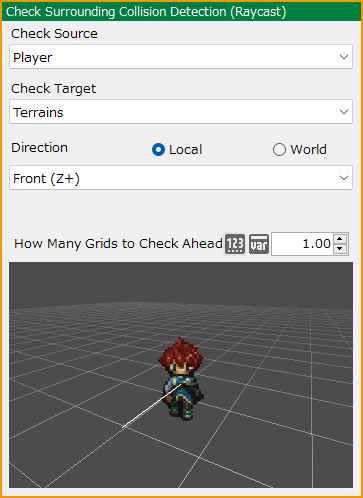
Check Surrounding Collision Detection (Raycast)†
Extend a raycast (linear collision detection) from the check source to the specified target and check if it touches the object to be checked.
- Check Source
Select either the player or this event.
- Check Target
Select terrain, object, player, event on the map, generated event, or all events.
- Direction
Specify whether local (check source) or world is used as the basis.
After determining the basis, specify the direction in which to extend the raycast from the following.
- Front, Left, Right, Up, Down, Behind, Specified Angle
- Offset
Specify the offset value from the origin of "Check Source".
Depending on the value set, the ray will extend further away from the origin of the "Check Source".
- Obtain Intersection
The X/Y/Z coordinates of the intersection of the raycast and the checkpoint can be assigned to the specified variables.
- Obtain Distance
Assign the distance from a raycast to the intersection point with the target to the specified variable.
- How Many Grids to Check Ahead
Specify the length of the raycast. The unit is grid.
Raycast is determined by touching the check target collision. If you feel it is not detected, try adjusting the length.
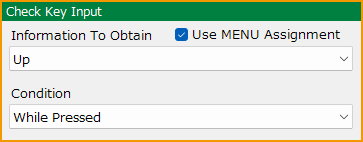
Check Key Input†
Check how a specific input key or button is being pressed, and branches the process accordingly.
- Information to Obtain
Specify the input key or button you want to check.
- Use MENU Assignment
When enabled, it obtains information for the “MENU” key (the key assigned for menu operation).
When disabled, it obtains information for the “WALK” key (the key assigned for map movement operation).
Please refer the Assign Input Device section.
- Condition
Specify the condition of the key or button input.
Branching occurs when the key/button is in the specified state:
| While Pressed | Responds continuously from the moment the button is pressed until it is released. |
| On Press | Branches only at the moment the input is detected. |
| On Release | Branches only at the moment the button is released. |
| Repeated Input | Unlike "While Pressed", this does not respond continuously. Instead, it starts responding intermittently (every 0.06 seconds) after approximately 0.5 seconds of holding the key or button. Commonly used for things like menu cursors. |
![[PukiWiki]](./skin/BAKIN_logo_92.png "[PukiWiki]")