Map Settings Palette†
Specify basic settings such as map size and background music to be used, as well as rendering settings and enemy distribution settings.
Basic†
Specify basic information about the map you are editing.
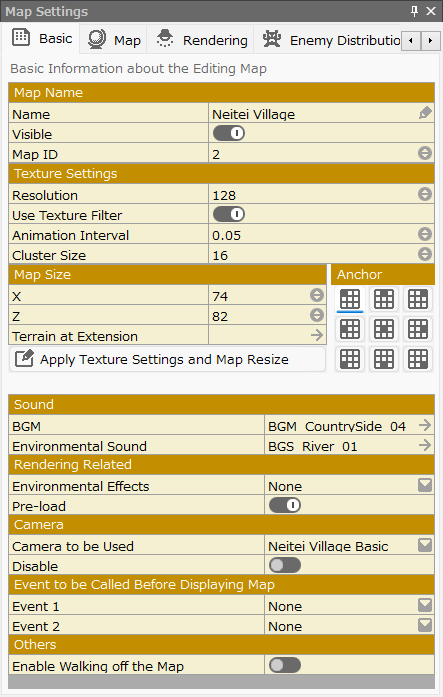
- Map Name
Specify settings for the name of each map.
- Name
Specify the name of the map being edited.
- Map ID
An ID that can be assigned to each map in the project. This ID can be referenced from events.
The ID is automatically assigned when the map is generated, but can be changed in this field.
However, duplicate IDs cannot be assigned.
- Visible
When the switch is turned on, it will automatically display the " Map Name" during gameplay.
The map is displayed according to the layout specified in the Layout Tool > "Display Map Name" screen.
- Texture Settings
Specify settings related to textures to be used on the terrains.
A value smaller than the texture of the terrain stamp results in a rough resolution rendering.
- Resolution
Specify the basic size of the texture to be used on the terrain.
A value smaller than the texture of the terrain stamp results in a rough resolution rendering.
- Use Texture Filter
When turned on, the terrain texture is filtered to make the pixels less noticeable.
- Animation Interval
Specify the animation speed of animated terrain used for fluids, etc.
- Cluster Size
This function divides the terrain into several blocks (clusters) to avoid rendering unseen terrain and improve rendering performance. The appropriate size depends on the field of view of the camera in the game.
In addition, the differences by value are as follows:
- High in Value
Large block size. Local light effect allocation may be limited.
- Low in Value
Small blocks. Local lights may be fully effective, but rendering load may be high.
- Map Size
Specify the size of the map.
- X
Specify the size in the X-axis direction.
- Z
Specify the size in the Z-axis direction.
- Terrain at Extension
Specify the terrain to fill the extended area.
- Apply Texture Settings and Map Resize
Click to apply the information you have changed in the texture specs and map size to the current map.
- Sound
Specify the background music and environmental sound for this map.
- BGM
Specify the background music to be played on map.
In the "Resources" menu Sounds (Resources), you can select from those whose property "Type" is specified as "BGM".
- Environmental Sound
Specify the Environmental Sound to be played on map.
In the "Resources" menu Sounds (Resources), you can select from those whose property "Type" is specified as "Environmental Sounds".
- Rendering Related
Specify settings related to rendering on this map.
- Environmental Effects
Specify the particle effects to be displayed on this map.
Environmental effects are always rendered closest to the foreground.
In the Resources menu, select Particles, and select from those for which the property "Environmental Effects" is specified to be ON.
- Pre-load
When the switch is turned on, this map will be preloaded in the background when events on other maps include a transfer of location to this map.
- Camera
Specify settings for the camera on this map.
Specify the default camera for this map.
Select the camera work created in the Camera Tool.
- Camera to be Used
Select the camera work created in the "Camera Tool".
- Disable
Prohibit the player from manipulating the camera.
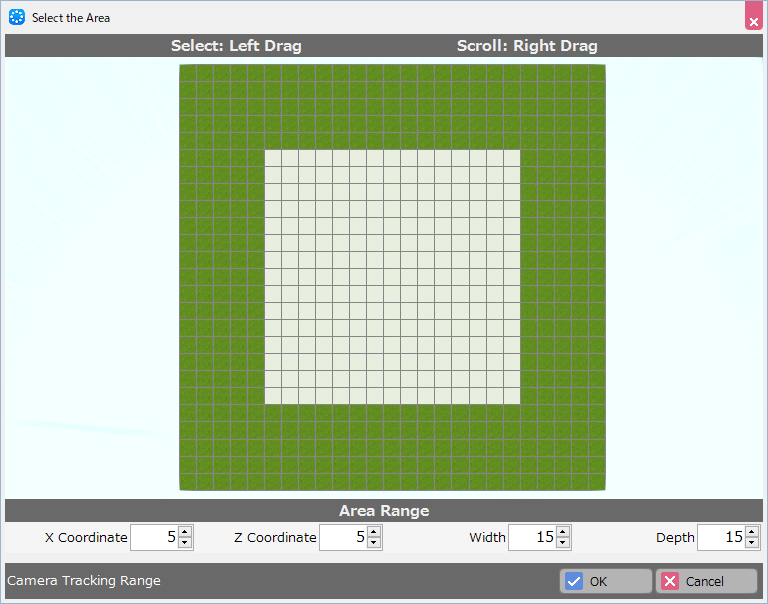
- Camera Tracking Range
A camera with the gazing point specified as "player" will stop moving within the assigned range.
This function is designed to meet the need to avoid showing the edge of maps when walking to the edge of the map.
- Event to be Called Before Displaying Map
Specify the common event to be used before this map is displayed.
You may select from among the common events specified in the Common Event Palette.
- Event 1
Select the first common event.
- Event 2
Select the second common event.
- Others
- Enable Walking off the Map
If turned on, the player will be able to go outside of the map range.
Map†
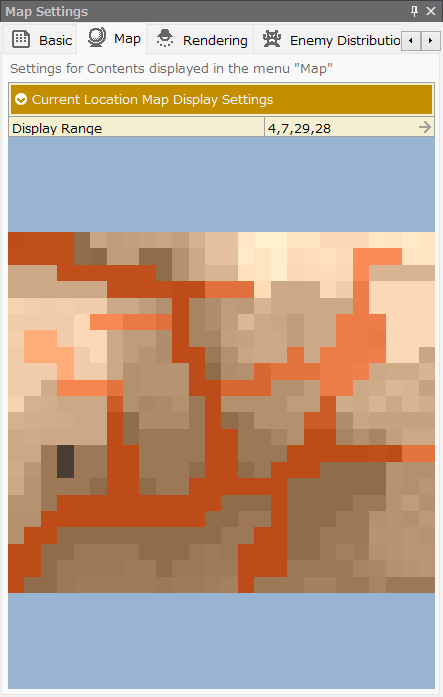
Specify the map screen to be displayed in the "Map" menu during the game.
The "Map" section displays an image of the "map" the player is currently on, viewed from above.
This tab allows you to specify the display range of that "map".
("map" is displayed when the special format \mappreview is specified in the Layout Tool with the panel for rendering strings).
In some cases, there are areas of the map that you do not want the player to see in order to create a visual effect that expresses the depth of the map, or for the purpose of producing effects or events.
By specifying values on this tab, you can limit the area of the "map" that is displayed during the game.
- Display Range
A dialog box opens to specify a display range, which can be specified by dragging a range.
- Preview
A preview of the specified display range will be shown.
Rendering†
Various post-effects can be specified to enhance the look of the map.
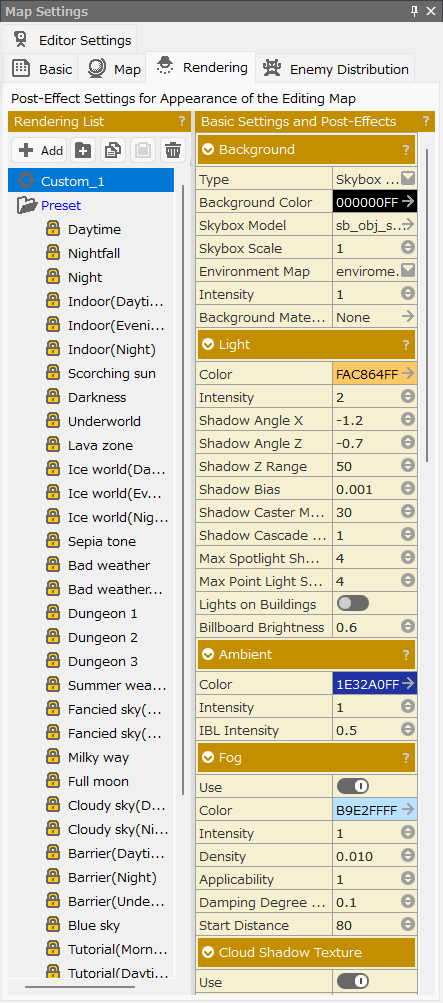
- Rendering List
A list of rendering settings will be displayed.
- Functions
- Add Button
Add a new rendering setting.
The added rendering setting can be renamed by clicking twice on its name.
- Folder Button
Create a new folder.
Folders can also be created under folders.
- Copy Button
Copy the selected rendering settings.
- Paste Button
Paste the copied rendering settings.
- Delete Button
Delete the selected rendering settings and folders.
- Presets Folder
The folder contains a variety of pre-prepared rendering settings. The preset data are given names such as "evening," "sepia tone," "dungeon," and so on.
You can also create a new rendering setting based on the preset data.
- Basic Settings and Post-Effects
Specify basic background and post-effect settings.
- Background
Specify settings for background color, skybox model, environment map, etc.
- Type
Choose whether to specify a skybox model or render in a single color.
- Background Color
Specify a background color. Click to display the color picker.
- Skybox Model
Select the skybox model to be used from the asset picker.
- Skybox Scale
Specify the scale of the skybox.
- Environment Map
If there are reflective effects in models used in the map, specify the environment map that will be used for the reflective color calculation delegate.
- Intensity
The degree to which the environment map is applied. The higher the value, the more reflection component is added to the rendering.
- Background Material
Specify a material to fill in the unrendered areas after rendering opaque.
- Light
Specify the light settings to be applied to the entire map.
- Color
Specify the color of the parallel light source. Click to display the color picker.
- Intensity
Intensity of the parallel light source. It is multiplied by the color.
- Shadow Angle X
Specify the orientation of the parallel light source (X).
- Shadow Angle Z
Specify the orientation of the parallel light source (Z).
- Shadow Z Range
Specify how far away from the camera position the shadow of the parallel light source should be displayed.
Shadows farther away than this value will not be displayed. The larger the value, the blurrier the shadow.
- Shadow Bias
This value is used to determine if the pixel will be shadowed.
If the value is large, the area that should have a shadow will not have a shadow. If the value is small, a moiré pattern will appear.
- Shadow Caster Margin
Specify to what extent the models are enabled to cast shadows that are out of view of the camera.
A large value will affect the correctness of the shadow determination. If it's small, the shadow of the off-screen models will not be displayed.
- Shadow Cascade Count
The quality of the shadows can be increased by writing shadows in different shadow maps depending on the distance from the camera.
Specify the number of shadow maps to be used between 1 and 4.
- Shadow Cascade Border
For each cascading shadow, enter the descriptive distance to be assigned.
- Lights on Buildings
Select this option to turn on the lights of the windows and streetlights of buildings where light animations are specified.
- Billboard Brightness
Adjust the degree of influence of the lights on 2D stamps (billboards) placed on the map.
- Ambient
Specify the ambient color settings.
- Color
Specify the color of the light. Click to display the color picker.
- Intensity
Specify the intensity of the color that will be multiplied by the color of the light.
- IBL Intensity
Specify the amount of ambient light to be applied when calculating the ambient light by considering the environment map as an IBL (Image Based Lighting) image.
- Fog
Specify the fog (fog effect) setting.
- Use
Turn on/off the fog used on the map.
- Color
Specify the fog color. Click to display the color picker.
- Intensity
Specify the brightness of the fog. The "color" of the fog is multiplied by this value.
- Density
Specify the fog density. The higher the value, the thicker the fog.
- Applicability
Specify the degree to which the fog is applied; setting it to 0 is equivalent to turning it off.
More than 1 can also be specified.
- Damping Degree by Y Coordinate
Using height 0 as a reference, the higher the height, the thinner the fog.
If this value is 0, the density is determined by the distance from the camera, regardless of height; a value greater than 0 will narrow the density in the height direction.
- Start Distance
Specify the distance from the camera at which the fog will begin to be applied.
- Auto Exposure Settings
Specify the settings for the auto exposure function.
- Use
Turn the auto exposure function on or off.
- Standard Brightness
The brightness of the entire screen approaches this value.
- Minimum Scale
If the screen is brighter than the standard brightness, the entire screen is darkened, but the lower limit is specified.
- Maximum Scale
If the screen is darker than the standard brightness, the entire screen is brightened, but the upper limit is specified.
- SSAO
This is the Screen-Space Ambient Occlusion setting.
It expresses pseudo shadows by guessing the pixels that are considered to be in the back areas of the screen and darkening them.
- Use
Turn the SSAO function on and off.
- Color
Specify the color of the shadow to be written. Click to display the color picker.
- Radius
Specify the size of the area where surrounding pixels are inspected to determine if the area is likely to be in shadow.
Specify as a percentage of the resolution to be rendered.
- Number of Samples
Specify the number of times to inspect whether surrounding pixels cast shadows on the pixel being judged.
The higher the number, the higher the processing load.
- Minimum Difference
Specify the lower limit of the distance between surrounding pixels and each other that determines whether the pixel being judged is in a shadow casting relationship with the surrounding pixels.
- Maximum Difference
Specify the upper limit of the distance between surrounding pixels and each other that determines whether the pixel being judged is in a shadow casting relationship with the surrounding pixels.
- Darkness
Specify the degree to which the SSAO function is applied.
- Contrast
Specify the final shadow writing spread.
- BLOOM
Apply a filter to the bright pixels to produce the effect of light scattering.
- Use
Turn the BLOOM function on and off.
- Intensity
Specify a value for how much of the filtered bright pixels will be superimposed on the original image.
- Threshold
Specify the threshold that determines how bright pixels should be filtered.
- DOF
Specify the depth of field.
Focus only on the area you want to draw attention to, giving the effect of blurring out the surrounding area.
- Use
Turn the DOF function on and off.
- Focal Point
Specify the distance from the camera to the focus position.
- Focal Range
Specify the range of focus around "Focal Point" as a percentage of the resolution.
A standard value is about 0.5 to 1. Larger values will result in block artifacts.
- Blurring Radius
Specify the degree of blurring of out-of-focus pixels.
- VIGNETTE
Specify the setting for the vignette effect, in which the area around the screen is darkened.
- Use
Turns the VIGNETTE function on and off.
- Intensity
Specify how much to darken the surroundings and narrow the field of view.
- LUT
Replace the colors in the final resulting image with the color placement of the specified 3D texture.
- Definition File
Specify a 3D texture file from the asset picker.
- Chromatic Aberration
Represent the chromatic aberration of a lens caused by the difference in refractive index at different wavelengths.
It is a color-shifted representation of each RGB and differs from real-world chromatic aberration.
- Use
Turn the chromatic aberration function on and off.
- Size
Specify the degree of displacement at both ends of the screen. It is calculated as a percentage of the screen size. If the value is 0.1, there will be a 0.1% deviation.
- SSSSS
Specify the Subsurface Scattering settings. A shader that computationally represents the internal reflection of light on translucent materials.
- Use
Turn the SSS function on and off.
- Radius
Specify the sampling radius in the view coordinate system.
- Applicability
Specify how much of the SSS results will be multiplied in the post-process.
- Number of Samples
Specify the number of diffuse random samplings for the SSS.
- Sharpen
Sharpening can be applied to the screen. Can be adjusted.
- Use
Turn the Sharpen function on and off.
- Intensity
Specify the sharpening strength in the range of 0 to 0.1.
- Distance
Specify the distance to apply sharpening in the range of 0 to 1.
- FXAA
Specify whether to use FXAA (anti-aliasing).
- Use
Turn FXAA on and off.
Enemy Distribution†
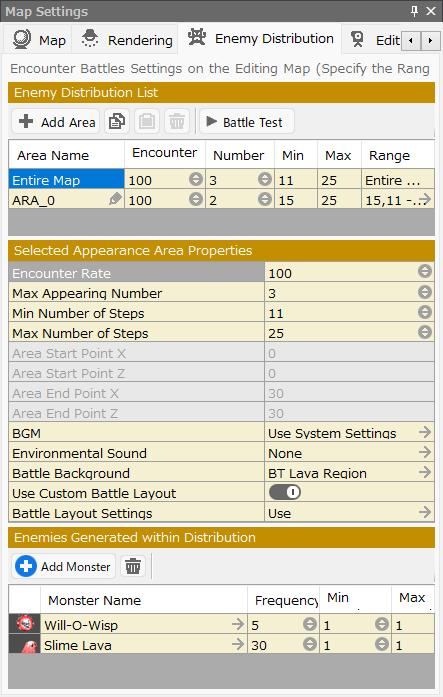
Specify the areas, enemy groups, and appearance rates for encounter battles within the map you are editing.
- Enemy Distribution List
Create areas on the map where enemies will be encountered.
- Add Area Button
Add the area of appearance.
- Copy Button
Copy the selected area.
- Paste Button
Paste the copied area.
- Delete Button
Delete the selected area.
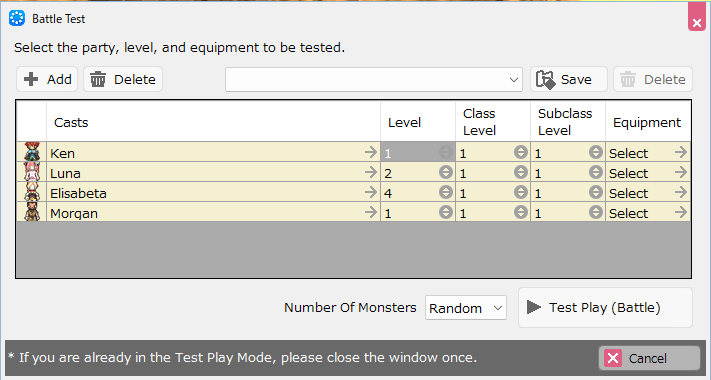
- Battle Test
You can perform a battle test applying the specifications here.
- Add
- Delete
Add/delete party cast members to be included in the battle.
- Save
- Delete
You can save/delete your battle test settings.
Please use this function when repeating the test under the same conditions.
- Battle Test Settings
- Casts
Select the party casts to be included in the test.
- Level
Specify the level of casts.
- Equipment
Specify the equipment of casts.
- Number of Monsters
You can specify the number of monsters that will appear in the test within the maximum number of appearances specified for the area where the battle test is to be conducted.
- Test Play (Battle)
Start a battle test.
- Area Name
The name of the area where the enemies appear.
- Encounter
Specify the probability that enemies will appear while the main casts are on the move while the conditions are met.
- Number
Specify the maximum number of enemies that can appear in one battle within this area.
The maximum number of enemies that can appear at the same time is eight.
- Min
Specify the minimum number of steps that enemies will appear in this area when the player moves a certain number of steps.
The number of steps is the same as the grid number on the map editor.
- Max
Specify the maximum number of steps that enemies will appear in this area when the player moves a certain number of steps.
The number of steps is the same as the grid number on the map editor.
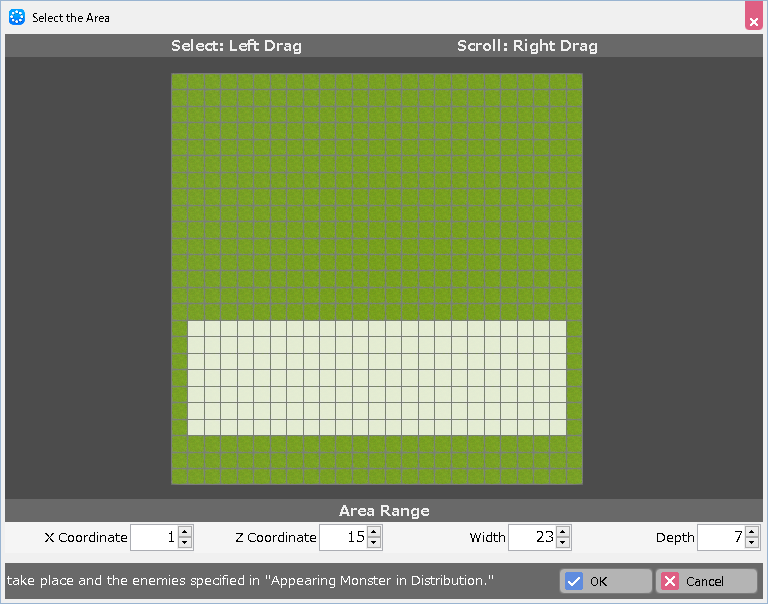
- Range
Coordinates representing the range of the area.
Click to display the "Area Selection Dialog".
- Select Area
A view of the entire map from directly above is displayed. The overall view can be scrolled by dragging the right mouse button and enlarged or reduced by rotating the mouse wheel.
Left-drag to specify the area you wish to designate as an area.
Terrain that is impenetrable to the player is not selected.
- X Coordinate
X coordinate of the area range. The coordinates specified in the preview screen will be displayed. You can also enter a numerical value directly.
- Z Coordinate
Z coordinate of the area range. The coordinates specified in the preview screen will be displayed. You can also enter a numerical value directly.
- Width
The width of the area range. A numerical value of the width specified in the preview screen will be displayed. You can also enter a numerical value directly.
- Depth
The depth of the area range. A numerical value of the depth specified in the preview screen will be displayed. You can also enter a numerical value directly.
- Selected Enemy Distribution Properties
Specify the detailed settings for the selected area.
- Encounter Rate
Specify the probability that enemies will appear.
- Max Appearing Number
Specify the maximum number of enemies that can appear at the same time in one battle.
The maximum number of enemies that can appear at the same time is eight.
- Min Number of Steps
Specify the minimum number of steps to walk before enemies appear.
- Max Number of Steps
Specify the maximum number of steps to walk before enemies appear.
- Area Start Point X
Specify the starting point of the X coordinate for this area.
The settings specified in the "Area Selection Dialog" will be applied.
- Area Start Point Z
Specify the starting point of the Z coordinate for this area.
The settings specified in the "Area Selection Dialog" will be applied.
- Area End Point X
Specify the end point of the X coordinate for this area.
The settings specified in the "Area Selection Dialog" will be applied.
- Area End Point Z
Specify the end point of the Z coordinate for this area.
The settings specified in the "Area Selection Dialog" will be applied.
- BGM
Use System Settings" uses the background music specified in "System Resources" -> "System BGM Settings" in the Resources menu.
To use other background music, select it from the asset picker.
- Environmental Sound
To play environmental sound, select it from the asset picker.
- Battle Background
Specify the battle background to be used in this area.
The default setting is to use the current map as is.
- Use Custom Battle Layout
Turning this setting off will use the game's default battle layout (ally/enemy placement) as specified in "Use Default Battle Layout" and "Battle Layout Settings" under Game Definition > Rules and Rendering.
If turned on, specify the battle layout for the battles that occur in this area in the "Battle Layout Settings" section.
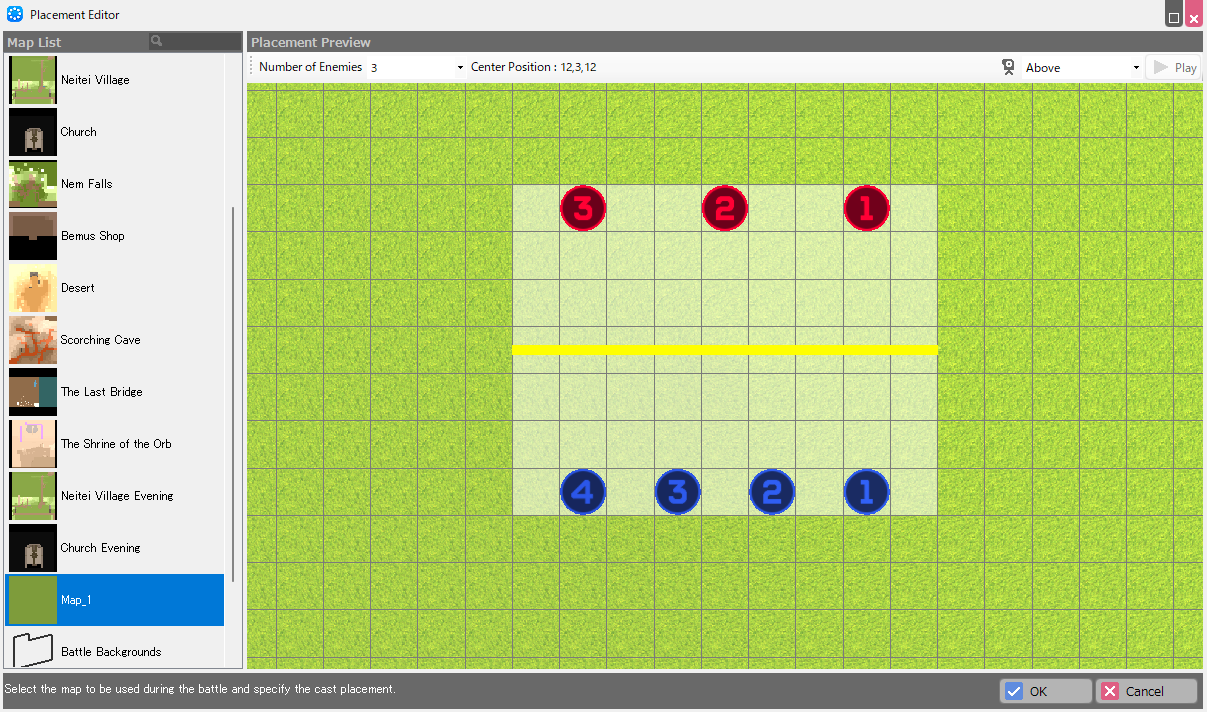
- Battle Layout Settings
Specify the placement of enemies and the party members in battles.
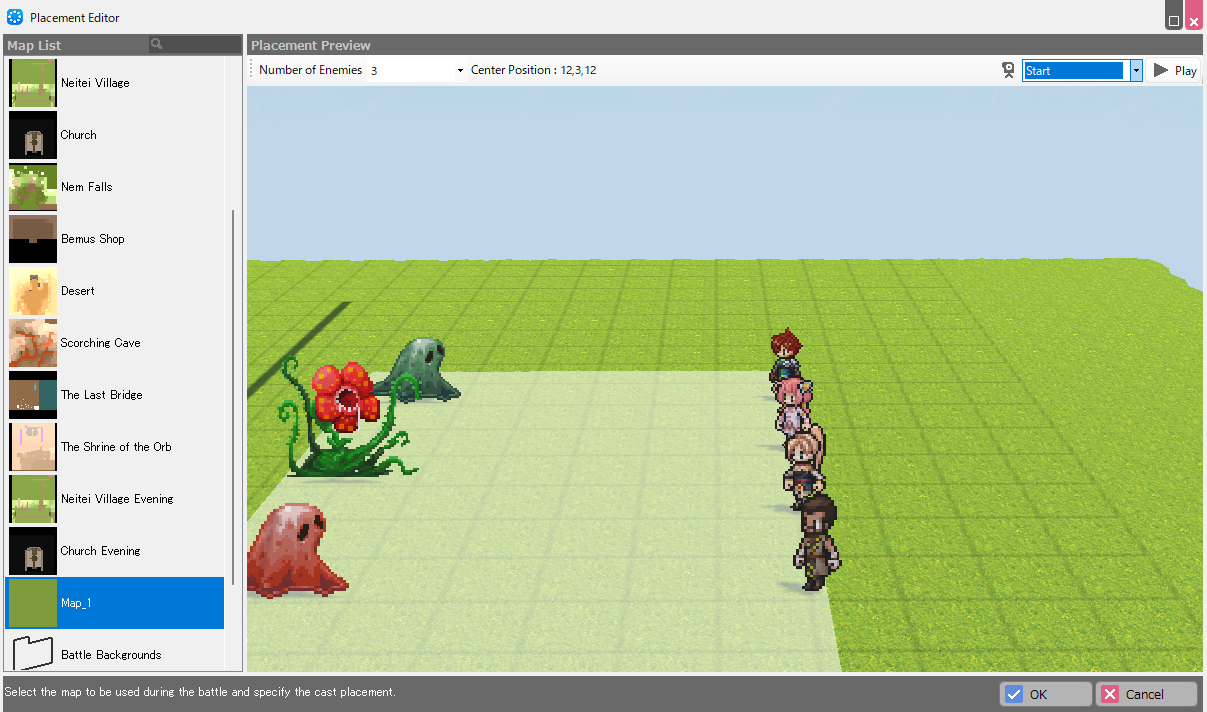
- Map List
From the list, select the map that will be the background during battles in this area.
- Placement Preview
You can place the casts and see a preview of the battle scene.
The placement area (white translucent rectangle), which is displayed as a guide for placement, can be dragged and moved.
- Number of Enemies
You can change the number of enemies to be displayed in the editor within the "Max Appearing Number" of enemies specified in the area for placement.
- Center Position
Indicate the center coordinates of the placement area (the center of the yellow line).
- Camera
If you choose "Above," you can specify the placement of enemies and the party members on the preview screen.
Red numbers are enemies and blue numbers are main casts. Drag to specify placement.
Casts can also be placed outside the placement area.
For cameras other than "Above," the angle for each situation specified in the "Battle" section of the "Camera Tool" section will be applied.
- Play
You can preview the image when anything other than "Above" is selected in the camera.
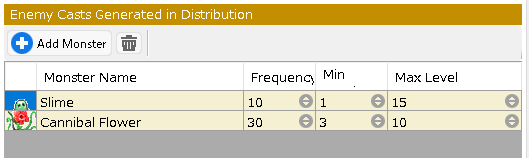
- Enemy Casts Generated in Distribution
Specify the enemies that will be generated within this area.
- Add Button
Add a new enemy.
- Delete Button
Delete the selected enemy.
You can select multiple monsters by holding down the Shift or Ctrl key while clicking on the icon portion of the list, and then delete them all at once with the Delete button.
- Monster Name
Name of the enemy.
- Frequency
Specify the percentage at which this enemy will appear.
If there are two types of enemies, A and B, and if A is specified as 10 and B as 30, the percentage of A appearing is 10/(10+30)=25%.
- Min
Specify the minimum level of enemies that will appear.
- Max Level
Specify the maximum level of enemies that will appear.
Editor Settings†
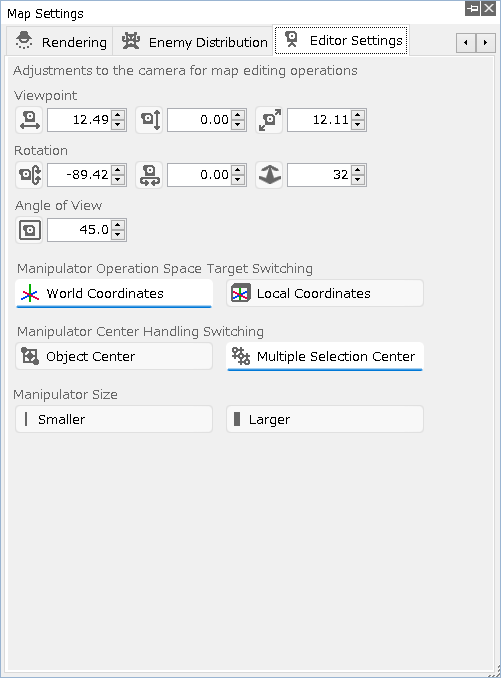
Adjustments to the camera for map editing operations.
- Adjustments Related to the Camera in Map Editing
- Viewpoint
Specify the viewpoint position in each of the X, Y, and Z axes.
Left-click on the icon to increase the value, right-click to decrease it.
You can also enter a value directly.
- Rotation
Specify the camera rotation in the X, Y, and Z axes respectively.
Left-click on the icon to increase the value, right-click to decrease it.
You can also enter a value directly.
- Angle of View
Specify the camera zoom in and out.
Left-click on the icon to increase the value, right-click to decrease it.
You can also enter a value directly.
- Manipulator Operation Space Target Switching
- World Coordinates
Specify world coordinates. When in world coordinates, +Y is always on up no matter how the model is rotated.
- Local Coordinates
Specify local coordinates.
- Manipulator Center Handling Switching
- Object Center
The manipulator is displayed at the center of objects.
- Multiple Selection Center
When multiple objects are selected, manipulators are displayed at their centers.
- Smaller
Each click reduces the size of the manipulator.
- Larger
Each click increases the size of the manipulator.
![[PukiWiki]](./skin/BAKIN_logo_92.png "[PukiWiki]")