RPG Developer Bakin Update History†
Ver. 2.3.0.3 3/24/2026†
Bug Fixes†
Events†
- Fixed an issue where specifying mouse buttons as detection targets in the “Check Key Input” panel did not work correctly in Ver. 2.3.0.1 and later.
- Fixed an issue where local variables could not be used as the source for “Distance” in the “Check Surrounding Collision Detection (Raycast)” panel.
Database†
- Fixed an issue where enemy party folder names could not be renamed.
Resources†
- Fixed an issue in Ver. 2.3 and later where some stamps did not function correctly with “Linked to Building Lights.”
- Fixed an issue in Ver. 2.3 and later where footstep sounds assigned via “Terrain Assignment” in “Physics Settings” would not play.
- Fixed an issue in Ver. 2.3 and later where selecting “Mesh” for simple collision in stamp settings and leaving the mesh selection empty caused an exception when moving maps or ending test play.
Camera Tool†
- Fixed an issue where an exception would occur when opening the camera tool if the cast displayed in the battle camera preview had been deleted from the database.
Published Works†
- Fixed an issue where performance load increased on maps heavily using slopes and stairs, occurring only in exported (published) builds.
Ver. 2.3.0.1 3/19/2026†
Bug Fixes†
Events†
- Fixed an issue where some key inputs could not be detected after adding the "Check Key Input" panel in Ver. 2.3.0.1 or later.
Others†
- Fixed an issue where an exception would occur when opening the database while using a language pack from Ver. 2.3 or earlier.
- Updated the plugins/language/en-us.tsv language pack included as a sample for translation.
Known Issues†
The following issues have been identified and are scheduled to be fixed in an upcoming update.
- Since Ver. 2.3, the "Linked to Building Lights" setting for light sources is not functioning for some building objects.
This issue has been observed in older types of buildings included in the SMILE GAME BUILDER Pack.
- Since Ver. 2.3, footstep sounds do not play on map objects that use "Accurate Collision Setting".
- Since Ver. 2.3, An exception occurs in the Battle Camera preview of the Camera Tool if the monster designated for the preview has been deleted.
Ver. 2.3.0.1 3/18/2026†
Bug Fixes†
Resources†
- Fixed an issue where, since Ver. 2.3, settings would not be applied when using "Installed Fonts" among font resources.
(!)Please note that when using installed fonts, if the player’s PC does not have the same font installed when the game is distributed, it will be displayed using the default font set in Windows.
Therefore, if you plan to distribute your game widely, we recommend selecting fonts from OTF/TTF files.
- Fixed an issue where opening a motion set would take an extremely long time when multiple models were using the same motion set.
- Fixed an issue where an exception could occur, since Ver. 2.3, when setting Disable Nodes of a model in motion data.
Enemy Party†
- Fixed an issue where an exception could occur when creating a new enemy party depending on the data state of the battle camera set.
This issue only occurred in projects where battle camera sets with duplicate names (which can no longer be created) already existed.
- Fixed an issue where a description field with no current purpose was being displayed on the enemy party edit screen.
Camera Tool†
- Fixed an issue where an exception would occur, since Ver. 2.3, when pressing the capture button (the button that launches the camera tool) at the top of the layout preview.
Battle†
- Fixed an issue where using sprite-based stamps in battle could cause the battle to stop progressing, such as when taking damage.
Events†
- Fixed an issue in the "Recover/Reduce Battle Cast's Consumption Status" panel where effects would not be applied to reserve members when "Entire Party" + "Include the Reserve as well" was selected as the target.
- Fixed an issue in the "Make/Cure Battle Cast State Change" panel where effects would not be applied to reserve members when "Entire Party" + "Include the Reserve as well" was selected as the target.
- Fixed an issue in the "Make/Cure Battle Cast State Change" panel where the "Motion When Applied" set in the database was not being reflected when a state was changed.
- Fixed an issue, since Ver. 2.3, where the following would not retrieve correct input information when added to events:
- Retrieving camera operations, menu, and jump key inputs via the "Advanced Variable Box Operation" panel
- Retrieving the input states of "Action 1–3 (MENU)" via the "Check Key Input" panel
Database†
- Fixed an issue where changes to cast/item names were not immediately reflected in the event editor for cast/item events.
Map Editor†
- Fixed an issue where placing an event on terrain with elevation "0" (pressing the Q key after placement) would position it at a Y value of 0.25.
DLC: Localization Toolkit†
- Fixed an issue where cells containing only numeric values would become blank when importing from Excel files.
- Fixed an issue where translations for state change messages (e.g., MessageAlly) would become blank when reopening the dialog.
- Fixed an issue where a progress bar was displayed during filtering, which instead increased processing load.
- Fixed an issue where translations were not supported for "Habitat" and "Description" in Database > "Casts", as well as "Description" in "Items" and "Skills".
- Fixed an issue where translations were not supported for the standby message in the "Specify Battle Cast Action" panel.
- Fixed an issue where translations were not supported for enemy-exclusive battle events.
Ver. 2.3.0 3/12/2026†
New and Improved Features†
Enemy Party†
Database†
- Added the “Enemy Party” menu.
You can pre-create combinations and placements of enemies that will appear.
You can also create unique battle events for each enemy party.
Created enemy parties can be added to the map encounter settings or made to appear from events using the “Battle with Enemy Party” panel.
Map Editor†
- When specifying appearing monsters in Map Settings > Enemy Distribution tab, you can now specify an enemy group.
Events†
- Added the “Execute Battle” panel. This panel is used to configure event battles with enemy parties.
Camera Tool†
- When configuring battle camera settings, you can now specify the monsters or enemy groups that appear in the preview.
The settings dialog can be opened from the battle layout switch button.
Conversation & Message Preview†
Events†
- Added a feature to the Conversation, Message, and Ticker panels that allows you to preview how they will appear on the actual screen.
Pressing the Preview button opens the Message Editor.
By specifying layout data, you can check how the entered text will appear in the game.
Store-Related Feature Additions†
Events†
- Added the following features to the “Display Store and Check Results” panel.
- Price Adjustment Function
- Specify a percentage (%) rate of change from the price set in the Database
- Specify the price using a variable
- Specify the percentage (%) rate of price change using a variable
- Inventory Management Function
When set to “Direct Value,” a local variable is automatically generated for the event at runtime.
If a negative value is entered into the variable, stock becomes infinite.
Layout Tool†
- Added the special format \shopitemstock to display the stock quantity of items in the store.
Cast / Item / Skill Description†
You can now set multiple descriptions for each database entry and display them from the layout. Text decorations and variable display are also supported. This makes it possible to change flavor text based on game progression or gradually unlock additional flavor text as the game advances.
Database†
- A new “Description” field has been added to the “Other” tab for Casts, Items, and Skills.
- Up to five descriptions can be entered.
The description field that previously appeared below the name of each entry has been removed. Existing descriptions have been automatically converted to Description 0 in the new system.
- You can use Text Commands to add formatting such as bold and italics, or to display variables.
Layout Tool†
- A new special format command \(xxxx)desc[] has been added to display the database description fields.
As a result, the previous command \(xxxx)des has been removed from the special format list. However, if you are already using \(xxxx)des, no changes are required.
- For example, the previous \itemdes works the same as \itemdesc[0].
You can also pass variables as arguments in the special format:
- The text panel has a limitation that only one decorated special format can be displayed at a time.
Therefore, if you wish to display multiple description texts, such as \itemdesc[0] and \itemdesc[1], please use separate text panels.
Skill Critical†
Database†
- A Critical category has been added to skill abilities, including the following new settings:
- Skill Critical Rate
- Additional Damage Formula
- Critical Effect
- (!) Skills without a “Skill Critical Rate” set will never trigger critical hits.
- (!) If a skill’s behavior is implemented using Common Events, you must obtain critical hit information within the event (for example using the “Obtain Battle Information” panel) and handle damage increases or critical hit effects manually inside the event.
- (!) Currently, critical hits can be triggered either within the common event called by the skill or using the battle event trigger “At the End of Action”.
- (!) Please note that when a critical hit occurs, the “Critical Damage Rate” defined in Game Definition > Rules and Rendering > Status Related is multiplied at the end of damage calculation.
- Two new customizable skill messages have been added to the Basic tab: When Skill Is Activated and When Critical Hit Occurs.
If no text is set for these options, the text defined in Game Definition > Common Terms will be displayed as battle messages.
- The “Critical Hit Rate (%)” ability in State definition now supports tag specification, allowing you to increase or decrease the critical rate of specific skills.
- A new keyword “Critical Hit Check” has been added for use in formulas.
This value will be:
- 1 when a critical hit occurs
- 0 otherwise
Game Definition†
- A new option “Critical Damage Rate Target Tag” has been added under Rules and Rendering.
Critical Damage Rate is a multiplier applied to damage at the end of the damage calculation.
This setting allows you to specify which tags the multiplier should apply to.
By default, the #Skill tag is specified, affecting the critical damage of all skills.
If you wish to apply this value only to physical attack skills, create a new tag in the Database and specify that tag in this field.
Feature Additions to Variable List†
Variable List†
- Added and improved the following features.
- When double-clicking a row in the variable list to open the Event Editor, the panel/row that operates the variable is now focused.
- Added a context menu. If an event that operates a variable exists on a map, it can now be focused on the map, and the event name can be copied.
Feature Additions to Cast Parameter Check View†
Test Play†
- Added and improved the following features in the Cast Parameter Check View:
- Added status display for reserve members
- Added the ability to jump by cast unit or group unit
- Horizontal scrolling with mouse wheel button drag
- Save Option menu settings
- Disable key input on the Test Play window while active
Events†
- Added logical OR to the Event Sheet's condition panel.
You can now set conditions to execute the Event Sheet when either A or B occurs.
- Added negative-form options to the string condition panel in the Event Sheet.
The following options have been added: “Is Not Equal To”, “Does Not Start With”, “Does Not End With”, and “Does Not Contain”.
- Added the ability to specify variables for the random number range when “Random” is selected in the “Advanced Variable Box Operation” panel.
- Added the "Number of Steps" option to the "Advanced Variable Box Operation" panel.
The application of steps to conditions for state release will be implemented in a future update.
- Added the ability to obtain the “Management Tag” of equipped items in the “Advanced String Variable Operation” panel.
- When retrieving key input in the “Check Key Input” panel or the “Advanced Variable Box Operation” panel, you can now choose whether to use the key assigned to “MENU” or “WALK”.
- Added an option to ignore differences of up to n decimal places in the “Check Variable Box” panel.
- When using “Display Item Selection Screen”, you can now skip selecting the target of item usage.
- This update enables the functionality implemented in the Layout Tool in Ver. 2.2 to also work when accessed through the Event Panel.
In the Submenu Container of the Item Selection Screen, set Action to "Display Item Target Selection" and Layout to be Opened to "None" to skip the target selection step.
However, with this method, the item will be used without confirming whether the player actually wants to use it.
Therefore, it is recommended to create a layout in the Item Target Selection Screen that allows the player to confirm whether to use the item or not.
- Added a “Restore Default” function to the “Change Layout to be Used” panel.
- Added the ability to define label names as strings in the “Label Definition” and “Label Jump” panels.
In addition, when using a fixed-value label jump, the destination is now displayed in the Event Editor.
- Added a feature to the “Check Surrounding Collision Detection (Raycast)” panel that allows you to retrieve the distance to the hit point.
- Added the ability to specify the destination using relative coordinates in the “Make Player/Event Walk to Specified Coordinates” panel.
- Added apostrophes and double quotation marks (opening and closing quotes) to the line-end prohibition rules for messages.
- Reorganized the handling of BGM and BGS (environmental sounds) fade behavior.
- When starting or stopping BGM/BGS from an event (0 seconds = immediate reflection), any previously running fade will be cleared (previously, fades were prioritized).
- When starting or stopping map BGM/BGS, any previously running fade will be cleared (previously, fades were prioritized).
- However, if map BGM/BGS is set to “Maintain”, the fade will continue (unchanged from previous behavior).
- In all three of the above cases, “Play Fanfare” will be interrupted (unchanged from previous behavior).
- Added the ability to specify the nth reserve member in the “Add/Remove Party Member” panel.
- Added party-wide/reserve-wide specification to the “Make/Cure Battle Cast State Change” panel.
- Added party-wide/reserve-wide specification to “Recover/Reduce Battle Cast’s Consumption Status”.
Layout Tool†
- Improved the selection UI in the “Actions” option of the submenu container so that the actions available for the current screen are clearly identifiable.
- Added the ability to change the font used for display in the properties of Spin Panel and Slider Panel.
- Fixed an issue where importing a lyrbr file while the logical resolution differs from the file’s assumed resolution now opens a confirmation dialog asking whether to convert it.
A lyrbr file is a layout data file exported from Bakin.
Gameplay†
- Improved Party Train processing so that party members no longer stop midair when falling and do not easily regroup midway on stairs.
- Implemented a push-out process for Non-Traversable Terrain.
You can specify Non-Traversable Terrain in Resources > Terrain Properties.
This process prevents the player from being pushed into Non-Traversable Terrain by events.
However, if the player is embedded in Non-Traversable Terrain by one grid or more, no corrective action will be taken.
Database†
- Casts > Equipment and Abilities tab > Added an “Edit Parts Types” button to “Initial Equipment,” which opens a dialog for editing equipment type definitions.
Settings that are only used under specific conditions have been consolidated into this dialog.
- Casts > Battles tab > “Battle Command Menu” > Added “Same Effect as Skill (Consumption)” to “Function to be Assigned.”
When a command with this function is used in-game, the associated skill is activated and the elements set for that skill (such as MP) are consumed.
- When selecting a skill in the Skill List, the tab containing configured abilities or “Effect When Used” is now automatically selected.
If both ally and enemy effects are configured, the Effect on Allies tab will open.
- Added a Show/Hide option for the change value of the Consumption Status in the skill’s “Damage to Consumption Status” ability.
After adding the ability, specify Show/Hide in the detailed settings section.
- Added a note to the item Motion settings field indicating that it is used during weapon attacks.
Map Editor†
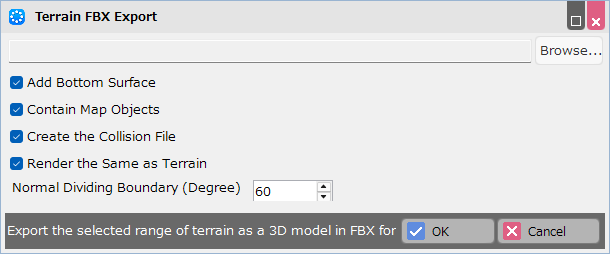
- Added new functionality to “export terrain as model.”
This feature is available from the right-click menu (context menu) in the Map Editor.
- After exporting a model, it is now automatically registered as a stamp and can be placed on a map immediately.
- Implemented the “Render the Same as Terrain” option.
When enabled, the exported model will use the same shader (map_terrain) as the terrain.
If you are exporting terrain as a model for use, please enable this option. (Default: On)
- Applied the Random Tile feature to the Fill Tool.
- This feature can be executed with "Ctrl + Alt + Fill."
- When filling, the ground will be painted using terrain assets that share the same tag as the selected “Terrain,” chosen at random.
- Terrain tags can be set in Resources > Terrains.
- This Random Tile feature can also be used with the Pen Tool.
- Added a shortcut key to place stamps with their origin aligned to the ground.
To use this feature, hold Shift + Q while placing a stamp.
When placing the stamp, it will be positioned so that the bottom of its collision aligns with the ground. (After placement, pressing the Q key will align the stamp’s origin to the ground.)
This feature was added to accommodate cases where users want to place stamps with their origin aligned to the ground.
- Added new features and improved behavior for the Placed List.
- Added “Type” to the filter criteria. As a result, the Placed List tool area (where filter buttons and similar options are located) has been expanded to two rows.
- Improved the filtering behavior for Locked and Hidden entries.
- Improved the processing speed of the Batch Rename feature. Also improved the speed when renaming multiple selected elements from the Properties panel.
- It is now possible to change the size of symbols such as events in the Map Editor. This can be configured from the following menus:
- Map Editor Top Menu > Functions > Configuration > Tools
- Map Settings Palette > Editor Settings tab
- Updated the layout of the Basic tab in the Map Settings Palette.
The Terrain Texture Settings section is now collapsible.
Additionally, the Terrain Texture Settings section is now collapsible in the dialog that appears when adding a new map from the Map List.
- Improved the responsiveness of selection and other operations within the Map Editor.
In particular, performance has been improved when selecting grouped objects.
Game Definition†
- In System Resources > Default Font Settings, you can now specify the font used to display “Miss” during battle.
- In System Resources > Battles, added a feature that allows the “Miss” display in battle to be shown using a specified image.
If no image is specified, “Miss” will be displayed using the designated font.
Test Play†
- When starting Test Play while a debug dialog or similar window is open, focus will now remain on the main Test Play window.
- In Battle Test, when defeated by an enemy, the game will now proceed to the next battle without requiring the Confirm button to be pressed.
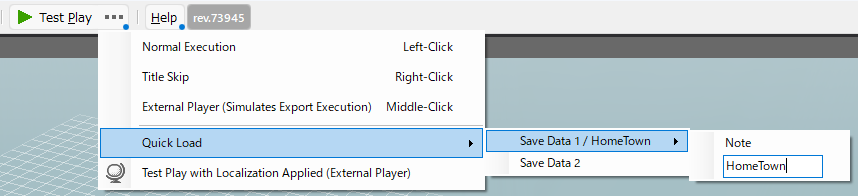
- In the feature that launches Test Play while performing a quick load of Map Editor save data, you can now attach notes to the save data you wish to load.
Right-click the save data name to open the memo entry field.
This feature is intended to improve Test Play workflow efficiency by allowing you to leave brief notes about save data contents.
Resources†
- You can now select multiple 3D Stamps in the list and change their materials in batch.
The same operations available in the “Models” menu can now also be performed in the “3D Stamps” menu.
- Added “Emitter Control” to the particle properties.
This feature affects data where the particle emission position (the “Inherit Position” property) has been set in Effekseer.
- Improved the texture search process when importing Effekseer effect (.efk) files.
- Even if the texture path specified within an .efk file is an absolute path, textures will now be copied correctly as long as they are located in the same directory level or a subfolder of the .efk file.
- Adjusted the Material settings section so that when using the mouse wheel, the shader description field no longer processes the wheel event.
Camera Tool†
- Improved the selection method when editing cells across multiple frames.
You can now select multiple frames and change the Number of Frames (the time it takes to transition from that frame to the next frame) for them all at once.
Sprite Tool†
- Improved the speed of value changes when using the mouse wheel in numeric input fields.
Game Engine†
- Implemented measures to address memory leaks in the runtime engine.
- Added and improved functionality to ensure decals are rendered regardless of camera position.
However, please note that larger decal volumes will result in higher shader load.
Plugins†
- Following the steps below will allow you to reload a map.
mapScene.mapDrawer.setRomImpl(mapScene.mapDrawer.mapRom, true, false, true);
mapScene.mapDrawer.recreateCollisions();
Sample Project†
- Added Skill Sample Project to the Game Gallery.
It contains sample skills created using common events, battle events, and database functionality.
- Adjusted lighting and other elements for the Grim Reaper stage in the “REINES DU SABBAT” project.
Assets†
- Replaced some particle resources in the preset projects “BasicSet” and “Effect Pack” with ones compatible with “Emitter Control”.
- Added attack animations to the dragons in the preset projects “2D Cast Assets,” “Basic Set,” and “Orb Stories.”
Manual†
- We have published documentation for creating shaders.
Please use it to create your own custom shaders.
DLC: Localization Toolkit†
- Added a feature to open the Event Editor from the right-click menu of event-related rows in the Usage Locations list.
- You can now right-click a message row to preview how it will actually appear on screen.
- Implemented a feature in the Test Play menu bar to retrieve and add the currently displayed conversations, tickers, and messages.
- Added a Note field. You can also assign sequential numbers from the right-click menu of the Note field. Please use this to help adjust the ordering during localization.
- You can now change the target localization language from the right-click menu of the column header.
- The Localization Editor now remembers its UI layout (window position, size, grid width, etc.).
- The expanded/collapsed state of the tree view is now preserved.
Bug Fixes†
Events†
- Fixed an issue where collision remained at the original location when a map transition occurred during an event that had "Pass Through Player/Events" enabled.
- Fixed an issue where "Check Collision Detection" in the "Change Player Y Coordinate" panel would still react to events that had "Collide with Player" turned off.
- Fixed an issue so that when subgraphics are shown or hidden by an event, their collision is now properly enabled or disabled accordingly.
- Fixed an issue where using the "Attach Model to Cast" panel would reset the player model.
As a result, motions will now continue playing smoothly without interruption when a model is attached.
- Fixed an issue where using "Display Effect" on the first line of an event sheet set to "Automatically Start" in a map event would generate duplicate effects.
- Fixed an issue where, when using slice animations with a scale other than 100% as conversation graphics, only the vertical scale would revert to 100% when the image disappeared at the end of the conversation.
- Fixed the “Obtain Battle Information” panel to assign MISSED if all skill hit checks result in misses.
- Updated the "Wait Specified Time" panel so that when "0 seconds" is specified, the summary now displays "Wait For Next Frame".
This change prevents misunderstandings that there is no wait when "0 seconds" is shown.
- Fixed an issue in the Event Editor where Undo would trigger while editing an event panel.
- Fixed an issue in the Common Event Editor where, depending on the steps taken to switch events during editing, the currently edited panel’s contents were not properly finalized.
Battles†
- Fixed an issue where the total wait time of the Damage motion during battle was calculated based on the stamp’s wait/battle_wait length.
- Fixed an issue where, if different disappearance effects were set for multiple enemies, only the effect of the last spawned monster would play.
- Fixed an issue where the target index of an enemy with "resistance to skill abilities" could not be obtained from events.
- In map battles, defeating an enemy whose cast "Category" was set to "Both" now correctly adds EXP and Money in Possession.
- Fixed an issue where enhanceable consumable items would remain in the battle item selection even after their quantity dropped to zero during combat.
- Fixed an issue where attack power altered by a “state” was not being applied to the total attack power in the calculation formula.
Layout Tool†
- Fixed an issue where status change values were not displayed when selecting "Remove" while an item was equipped.
- Fixed issues related to the "Initial Value" setting in spin panels under submenus configured with the action "Change the Value of a Variable":
- Fixed an issue where the initial value was not applied even when set.
- Fixed an issue where pressing the "Restore Defaults" button did not revert to the initial value.
- Fixed an issue where the mouse-over detection area in preview did not correctly match the scaled size when a scale was applied to a layout element.
- (Chinese version only) Fixed an issue where some action names in the submenu container were incorrect.
Test Play†
- Fixed an issue where selecting "New Game" on the title screen could start the game with values modified in the debug dialog’s variable list still retained.
- Fixed an issue where the collision display for event subgraphics would not appear in the optional collision display unless displaying object collisions was enabled.
Gameplay Issues†
- Fixed an issue where the position of 3D sounds was not updated during camera playback.
Resources†
- Fixed an issue in the 2D resource import dialog where, when importing multiple motions at once, only the settings for the first motion in the list were applied, and the others were not reflected in the imported resources.
- Fixed an issue where dropping an image file from the Explorer to import a resource did not update information according to the "Direction Order" property settings.
- Fixed an issue where an unnecessary stamp was created when a particle that had already been added was dropped from the Explorer.
- Fixed an issue where switching the selected slice animation to another slice animation in the Asset Picker incorrectly enabled the add/remove buttons in the motion list.
- Fixed an issue where the motion from before the update would sometimes play when updating the resource model.
Game Definition†
- Fixed an issue where, when selecting the player in the Map Editor and changing the start position in the Start Settings, the player’s position would move but the manipulator’s position would not update.
- Fixed an issue in the Common Terms / Text Replacement Tool where elements that had already been deleted were still displayed.
Database†
- Fixed an issue where editing the contents of the "Details" dialog for item, skill, or state effects did not correctly apply changes when multiple parameters were modified at the same time.
Map Editor†
- Fixed an issue where entries might not display correctly when filtering by multiple conditions in the Placed List.
- Fixed an issue where the stamp list was not cleared when unfiltering terrain stamps in the stamp palette.
- Fixed an issue where empty slots created when deleting registered monsters in the Map Settings > Enemy Distribution tab were not being removed.
- Fixed an issue where the "Show Terrain Attributes" feature was not updated when changing the map size or pasting terrain.
- Fixed an issue where objects in the Uncategorized category in the stamp palette could not be found in the Placed List tree after being selected with the eyedropper tool.
Camera Tool†
- Fixed an issue where terrain height was not reflected in the Battle Camera preview on the first use.
Variable List†
- Fixed an issue where switching the event editing mode in the Event Editor opened from the Variable List would cause the variable list to disappear.
Others†
- Fixed an issue where the folder structure of variables was not copied when copying events between projects.
- Updated the system to display an error dialog when loading a plugin DLL fails.
DLC: Localization Toolkit†
- Fixed an issue where button colors were difficult to see when displayed in Dark Theme.
Ver. 2.2.1.2 2/18/2026†
Bug Fixes†
Layout Tool†
- Fixed an issue where an exception could occur at the start of layout display when using multiple scrollable menu containers during gameplay.
- Fixed an issue where a menu container with page switching would return to the first page during fade-out.
- Fixed an issue where fade-in/out effects would not apply when text color was set for ticker.
Resources†
- [Chinese environment only] Fixed an issue where the slice animation setting "No Billboard Processing" was not displayed.
Events†
- Fixed an issue where an exception could occur when toggling Party Train on/off at the moment a battle starts.
- Adjusted so that when a stamp is removed in the next conversation after a dialogue, it fades out in the same direction as the previous one, regardless of the “Flip” setting.
Gameplay Issues†
- Fixed an issue where the background color of cast thumbnails on layouts could become opaque when starting a test play after opening the database or other tools in advance.
Camera Tool†
- Fixed an issue where light source settings configured in the camera were not saved in the save data.
Other†
- Fixed an issue where the function to open the log might not work correctly when a graphics error occurs during test play or tool execution.
Ver. 2.2.1.1†
New and Improved Features†
Gameplay Issue†
- Improved memory usage efficiency for collision data of maps that are no longer needed while the game engine is running.
Bug Fixes†
Test Play†
- Fixed an issue where damage caused by enemy casts’ “States” was not applied correctly when using “Always Max HP and MP in Battles” in the Debug Window’s Change Settings tab.
Resources†
- Fixed an issue where resources could not be imported correctly from a different DLC if a resource with the same filename had already been imported from another DLC.
- Fixed an issue where resources included in the BasicSet or system resources were not added correctly when importing resources from DLC.
- Fixed an issue where thumbnails were sometimes not displayed when selecting a DLC in the Asset Picker while adding resources.
- Fixed an issue in the import dialog for importing 2D images as pattern animations where, when loading multiple files at once, settings such as sRGB were only applied to the first loaded image and not to the others.
Sprite Tool†
- Fixed an issue where an exception occurred when clicking the Position Change Method while all frames of a layer were selected.
- Fixed an issue where changing some properties while multiple frames of a layer were selected caused all properties to be changed.
- Fixed an issue where an exception occurred when selecting all frames of a layer that contained frames without images and assigning an image via the Properties panel.
- Fixed an issue where the frame count field was not disabled in the properties of the final frame of a layer.
Camera Tool†
- Fixed an issue where the frame count field was not disabled in the properties of the final frame of the camera.
Ver. 2.2.1†
Bug Fixes†
Gameplay Issues†
- Fixed an issue where the execution engine would occasionally crash when moving between maps.
- Fixed an issue introduced in Ver. 2.2 where it was not possible to swap the last remaining party member with a reserve member on the Replace Members screen.
- Fixed an issue where the cursor would not appear on the newly added menu container at the destination after moving a party member to the reserve on the Replace Members screen.
- Fixed an issue where the text “Move to Party” was not displayed on the Replace Members screen during battle.
Database†
- Fixed an issue introduced in Ver. 2.2 where the selectable layouts for “Skill” and “Item” were reversed in Casts > Battle tab > Battle Command Settings.
- Fixed an issue introduced in Ver. 2.2 where the “Attachment Bone” field in the equipment slot could no longer be edited in Database > Casts > Equipment and Abilities.
Common Event Editor†
- Fixed an issue in the Common Event Editor where the currently edited event panel is now always properly confirmed when switching to editing another event.
Ver. 2.2.0.2†
Bug Fixes†
Sprite Tool†
- Fixed a bug where an exception occurred when attempting to use PixelSlice images in the Sprite Tool starting from Ver2.2.
Camera Tool†
- Fixed an issue where, starting with Ver2.2, opening a frame with the camera's gazing point set to an event in the Camera Tool would reset the gazing point back to “Player”.
Layout Tool†
- Fixed an issue where lines were drawn at the edges when using images with NoSlice and FILL_REPEAT settings in layouts starting from Ver2.2.
Sample Game "REINES DU SABBAT Queen of Sacrifice."(rev.72847)†
- Translation revisions for text, organization of project data, modifications to the Input Bindings screen, and event adjustments were performed.
The following issues have been resolved as of ver2.2.1.
(!)Caution
Since Ver. 2.2, there have been rare reports of the game crashing when moving between maps. We are investigating the cause and considering countermeasures.
As a temporary fix, please try setting the CCD Radius Coefficient to “0” under Game Definition > Move and Operate > Movement.
We apologize for any inconvenience caused.
Ver. 2.2.0.1†
Bug Fixes†
Events†
- Due to the fix listed below that was implemented in version 2.2.0, the behavior during execution of the event sheet “On Disappear” had changed. Considering the impact on existing projects, we have reverted this fix.
- Fixed an issue where an event’s collision would remain for a short time after the event itself disappeared, when disappearing due to “Elapsed Time” as set in Database > Casts > Others tab > Events Disappearing Conditions.
Resources†
- Fixed an issue where the default value of Textures/Images > Import File Common Settings > Direction Order, which was newly added in Ver. 2.2, was incorrect. As a result, when image files were reimported using Update Information without changing the setting, the lower half of the image would be imported with the top and bottom flipped.
If you have imported images after changing the above property since Ver. 2.2, the settings for this entry will be reset once, so please reconfigure them.
(!) Import File Common Settings are applied when reimporting the original image using the Update Information button.
Layout Tool†
- (English version only) Fixed an issue where some layout properties could not be edited when using the tool in English.
Ver. 2.2.0†
New and Improved Features†
Reserve Member†
Game Definition†
- Added “EXP Calculation Formula (Reserve)” under Rules & Rendering > Status.
The default value is exp*0, meaning reserve members do not gain EXP.
Setting it to exp*100 allows reserve members to gain the same EXP as active members.
- Added the “Swap with Reserve on Party Wipe” feature under Rules & Rendering > Battle.
When enabled, if the active party is wiped out but there are surviving reserve members, they will automatically swap in, allowing the battle to continue without a Game Over.
- Added the “Maintain Formation After Battle” feature under Rules & Rendering > Battle Effects Related.
When enabled, any party formation changes made during battle will persist after returning to the map screen.
This also disables the “Disable Rearrange” setting in Database > Casts.
- Added a “State Removal Conditions Progress” switch under Rules & Rendering > Reserve Related.
This allows you to configure whether state-removal conditions progress for reserve members.
Events†
- Added a feature allowing reserve members to be designated as targets for panel effects in the panel below.
- [Status Category]
- Change Cast's Equipment (Battle Support)
- Change Cast Status (Battle Support)
- Change Cast's Class (Battle Support)
- Make/Cure State Change (Battle Support)
- Increase/Decrease EXP
- Learn/Forget Skill
- Fully Recover Party
- [Player Category]
- Change Cast Graphic (Battle Support)
- Attach Model to Cast
- [Conditional Judgment Category]
- Display Inn and Check Results
- Check the Learned Skill
- Check Party Cast
Database†
- Added “Switch Members” to Casts > Battle Command Settings.
This allows you to assign a command that lets players switch with reserve members during battle.
- Added “All Allies (Including Reserve)” to the target options under Skills > Skill Effects > Effect on Allies.
With this option, skills such as full-party HP recovery can now also include reserve members as targets.
Changes Related to New Reserve Member Features†
- Marked the “Recover/Reduce HP or MP” panel as deprecated.
The panel will continue to function, so you may keep using it if you already do.
For future use, please switch to the “Change Cast Status” panel.
- Adjusted map behavior so that reserve members no longer receive slip damage, matching battle behavior.
Party Menu Related†
Game Definition†
- Added “Show ‘Escape’ Command” under Rules & Rendering > Battles.
This allows you to remove the “Escape” command from the battle command list.
- Added “Trigger Cancel Event with Party Leader” under Rules & Rendering > Battle Effects.
When the party leader (the first active member) performs a cancel action during their turn, the specified event will run if configured.
Set the event trigger to “Every Turn.”
Events†
- Enabled executing the “Escape” action using the “Specify Battle Cast Action” panel.
- Added the “Show Party Switch Screen During Battle” panel to the Battle category.
This is intended for use with Free Layout for Event screens where you design a custom party menu layout and call it during a battle event.
Please refer to the Party Menu for Creation Tips.
Possible menu functions include the following:
- An option that calls a common event which executes the “Escape” action via the “Specify Battle Cast Action” panel (remove “Escape ” from the battle commands.)
- An option that switches party members using the “Show Party Switch Screen During Battle” panel.
- An option that opens a status screen.
Solo-Member Party†
Layout Tool†
- Skills, items, and status actions can now be executed without requiring the user to select the activator beforehand.
This makes the UI more natural in games designed around a “solo adventure” experience.
- If no destination layout is specified, the action is now executed immediately.
- In the target-selection layout, behavior is now determined by the “Action” set in the submenu container:
Layout Tool†
- Added the \savevar special format, which allows displaying variable values stored in save data.
This can be used, for example, to store progress text in a variable and display it on the save file selection screen.
- Added the following new special formats:
- Display equipment slot names
- Display money at the time of saving
- Display the Class/Subclass levels of party members in save data
- Formats related to Store selling prices
- Added a new setting to the layout properties of the “Free Layout for Event” screen
that prevents the layout’s key handler from responding while a message is being displayed.
You can choose whether message processing or layout input takes priority.
- Enabled sorting functionality in the layout properties of the “Store – Sell” screen.
- Added “Disable Camera Operation” to the layout properties of the “Menu” screen and “Free Layout for Event” screen.
When enabled in the Menu screen, it prevents in-game camera movement from changing while assigning keys for camera operations in the Input Bindings screen.
- Added “Variable to Assign a Selection Result” and “Variable to Assign a Selection” to the layout properties of battle-related screens.
- Added new system tags for “Skills Available in Battle” to the “Filter by Tag” layout property.
- Images set in rendering containers can now use a single slice from images configured with Pixel/Count slicing in Resources > Images > Slice.
- You can now directly type special formats and tags into property input fields.
Clicking the arrow icon opens a dialog to assist with inserting special formats.
- Improved the UI of the layout export dialog.
- Optimized processing when selecting equipment items on the Equipment Item Selection screen.
- Optimized processing when selecting save data on the Save File Selection screen.
- Improved rendering performance when using images with the “Repeat” FillType property in Resources > Images as layout graphics.
Events†
- Added the “Make Display Color for Hidden Areas Invisible/Visible” panel to the “Player” category.
- Added the “Change Player Jumping Strength” panel to the “Player” category.
- In the “Display Image” panel, you can now choose whether sprite animations loop during playback.
- The “Select from Selection and Check Results” panel now supports creating a selection with only one choice.
- In the “Display Conversation” panel, it is now possible to configure conversations where neither participant speaks.
To use this feature, simply turn off both speaker checkboxes.
- The “Advanced String Variable Operation” panel can now retrieve information during battles.
- Added an option in the “Specify Battle Cast Action” panel to set a custom message when a cast performs the “wait” action.
- Moved the “Change Cast’s Equipment” and “Change Cast’s Class” panels to the “Status” category.
- Improved performance of the Event Editor in large projects.
Database†
- Added a “Correction Target” column to Casts > Equipment and Abilities > Initial Equipment.
- Added the “Multi-Weapon Modifier: mwm” keyword to formula expressions.
With this, you can specify which values are multiplied by the “Multi-Weapon Modifier” set in equipment.
When “Use a Formula” is selected as the “Correction Target,” the value of “Multi-Weapon Modifier” is assigned to the formula keyword mwm.
Resources†
- Added a button to the Delete Asset dialog to toggle all selections at once.
- Improved processing speed when changing the selection of many resources at once in the Delete Asset dialog.
- Blendshape playback now also affects subgraphics.
- Added Import File Common Settings to the Textures/Images properties.
This feature allows you to change settings such as how imported slice animation images are sliced, and the direction order of character images, even after the import.
(!)note Please note that settings made in this property only work when the Update Information button is pressed.
Game Definitions†
- Added an option to select “None” in System Resources > Battle Command Related > Numbers for Damages.
- In Move & Operate > Assign Input Device, changing key assignments now also resets the corresponding in-game assignment data.
Camera Tool†
- Added support for selecting multiple frames on the timeline using Shift + mouse click.
- Enabled batch editing of property values when multiple frames are selected.
A “Number of Frames” field has been added to the property section for multi-frame editing.
- Enabled copy & paste while multiple frames are selected.
- When pasting camera data into a battle camera, it now behaves equivalently to “Overwrite This Entry.”
Sprite Tool†
- Enabled batch editing of numeric properties when selecting multiple frames within the same layer.
When multiple frames are selected, adjust the “Number of Frames” value in the property section on the right.
Tool UI†
- Added a zoom function to previews for specifying positions and areas on the map, such as in the Camera Tracking Range Settings dialog.
Other†
- Added Simplified Chinese and Traditional Chinese versions of the readme file generated in the project folder when publishing a work.
Sample Game†
- Added “REINES DU SABBAT Queen of Sacrifice. ” as a new sample game.
Bug Fixes†
Layout Tool†
- Fixed an issue where special formats for displaying the skills a cast learns no longer worked on the Picture Book screen since Ver.2.1.
- Fixed an issue where containers set to “Hide when Menu is Opened” could still appear due to the Display Condition Switch.
- Fixed an issue in the Party Switch screen where cancel information was written to variables before the cancel action was actually completed.
- Fixed an issue where the length of sliders displaying consumable statuses could differ between maps and battles.
- Fixed an issue where tag-based filtering in the “Select Cast” screen (e.g., when using a skill) was not correctly applied to reference values in slider panels within submenu containers.
- Fixed an issue where displaying a menu container in-game could cause an exception if all submenu containers had “Disable Auto Assignment Container Management Number” enabled and the cursor target was specified.
- Fixed an issue where using an image with the “Maintain Aspect Ratio of Frame” property enabled in Resources > Images as a slider background could cause rendering errors.
- Fixed an issue where status icons for the selected cast could not be displayed when opening the status screen during battle.
- Fixed the following issues related to the “Save File Selection” screen:
- Performance slowdown when moving the cursor
- Some parts not updating correctly when switching pages
- Sliders not displaying properly in certain cases
- Fixed an issue where \dictionaryskillname-related special formats were not shown in the Special Formats Insert Support dialog.
- Fixed an issue where checking “Disable Auto Assignment Container Management Number” in a submenu container caused incorrect display only in the preview.
- Fixed an issue where panel content could be displayed at the wrong size when resizing a panel by dragging immediately after switching the displayed layout.
- Fixed an issue where the selection frame remained in the preview even after Ctrl+left-click cleared the selection in the layout parts list.
- Fixed an issue where the selection cursor could disappear on the Replace Members screen.
- Fixed an issue where the selected layout information in the Layout to be Assigned field was not properly saved when switching screens in the Screen List.
- Fixed an issue where input from a gamepad was ignored after pressing the Appearance Playback button in Preview.
This change prevents unintended behavior that could lead to tool crashes.
Events†
- Fixed an issue where performing a forced save via a common event could cause the save process to run again the next time the game was loaded.
- Fixed an issue where motions would not transition to the “wait” motion when using the “Change Movement Speed” panel to designate motions other than “walk” or “run” as the walking motion.
- Fixed an issue where portrait graphic appearance animations during conversations were played twice when an event panel without a clock icon was placed between two “Display Conversation” panels.
- Fixed an issue where displaying a layout immediately after changing maps could sometimes cause an exception due to insufficient mutual exclusion control in sound processing.
- Fixed an issue where the screen could remain bright if a map transfer occurred while the screen was being flashed using an event.
- Fixed an issue where an event’s collision would remain for a short time after the event itself disappeared, when disappearing due to “Elapsed Time” as set in Database > Casts > Others tab > Events Disappearing Conditions.
- Fixed an issue where changes to the loading screen made in the "Change Layout to be Used" panel were not applied unless at least one second had passed.
- Fixed an issue in the “Change Cast Status” panel where percentage-based consumption values were not calculated using the maximum status value as the base.
- Changed the behavior of "Attack Range" in the "Obtain Item Parameter" panel.
The original "Attack Range" parameter, which returned a value multiplied by 100, has been renamed to "Attack Range x100" and retains its original behavior.
The new "Attack Range" parameter now returns the unscaled value.
Existing projects are automatically converted, so no changes are required.
- Fixed an issue where selecting “Do Nothing” in the “Specify Battle Cast Action” panel and enabling “Skip the Message” still caused a waiting period.
- Fixed an issue where using “Make Monster Appear” to place a new monster “B” into the slot of a previously defeated monster “A” caused the reward set for “A” to not be included in post-battle reward calculation.
- Fixed an issue where changes to rendering settings in battle events did not correctly update the environment map.
- Fixed an issue where, depending on the language environment, collision sizes defined in event templates were sometimes not applied correctly.
- Fixed an issue where copying an event that plays the “Default” camera of a map into another map would still reference the source map’s “Default” camera.
Database†
- Fixed an issue where invalid initial consumption values were set for enemy casts whose maximum consumption stats were increased by “Characteristic” abilities.
- Fixed an issue where skills that reduce allies’ consumption values (such as HP) did not correctly subtract those values on maps.
(By entering a negative value for recovery abilities, it is possible to deal damage to allies. The processing differed between battle and map scenes, and this has been corrected to match the in-battle behavior.)
- Fixed an issue where an exception could occur during an immediate test play after overwriting attribute definitions in the destination project when copying between projects.
- Fixed an issue where, in some list-type display fields (such as Casts > Skills to be Learned), the results of reordering entries were not saved.
Game Definition†
- Fixed an issue where the assignment fields for MENU: ACTION1–ACTION3 were missing in Move & Operate > Assign Input Device.
Resources†
- Fixed an issue where an exception error occurred when opening the Asset Picker with multiple materials selected that included a material with an empty texture.
- Fixed an issue where, when importing an exrbr file as a 3D/2D stamp, folders contained in the exrbr were sometimes not created in the list.
- Fixed an issue where, in Sounds, adding a sound via the Asset Picker using the Add button in the sound list caused the SE (sound effect) classification for the added resource to not function correctly.
- Fixed an issue where, when adding sound resources via drag and drop, the loop flag contained in the resource was not set correctly.
- Fixed an issue where the subgraphic list remained displayed even after all subgraphics assigned to a stamp were deleted.
- Fixed an issue where attempting to add motion, blend shape, or physics settings from a model file in the local environment resulted in only the model being created.
Map Editor†
- Fixed an issue where the relative positions of grouped objects became misaligned when moving them while the Snap to Grid button was ON.
- Fixed an issue where the Snap Tool did not function correctly.
- Fixed an issue where an exception occurred when attempting to change the properties of entries locked in the Placed List.
- Fixed an issue where repeatedly clicking while placing objects could cause the placed objects to not be registered in the Placed List.
- Fixed an issue where the divider position in the properties of the Placed List was not saved correctly.
- Fixed an issue where the Y position could increase by 0.5 when moving the Start Point or Event Symbol Models using the manipulator.
- Fixed an issue where the area display of the Non-Traversable Terrain Display feature did not follow changes when using Scroll Entire Map or Change Map Size from the Edit menu.
- Fixed an issue where lock/visibility settings for groups in the Placed List were not carried over when copying a map.
- Fixed an issue where pasting a map could cause an exception if resources with specific names were included.
- Implemented countermeasures for an issue where the Quick Toolbar (Dark Mode) display became corrupted when using the dark theme.
Sprite Tool†
- Fixed an issue where images were not copied when sprites were copied between projects.
- Fixed an issue where an exception occurred when copying the Number of Frames row.
Test Play†
- Fixed an issue where, in Debug Window > Variable Monitor tab, the names of array variables were displayed as the top-level (root) folder name.
- Fixed an issue where, after clearing variable folders or clearing elements of array variables via events, the entries of the cleared variables were not removed from the Variable Monitor in the Debug Window.
- Fixed an issue where, during battle tests, invalid values could be set for the initial consumption values of party casts whose maximum consumption status were increased by the abilities of multiple Characteristics.
- Fixed an issue where resetting test play using Ctrl+C during battle would still restore the party data from before the reset upon entering battle again.
- Fixed an issue where consumption values of cast events were not displayed correctly when MapCast (Full) was selected in the Cast Parameter Check View.
Tool UI†
- Fixed an issue where, in tree-view style lists such as the Placed List, reordered entries could become misaligned after changing their order.
Ver. 2.1.0.3†
Bug Fixes†
Layout Tool†
- Fixed an issue where the DLC “RPG Developer Bakin Layout Data Classy” could not be imported correctly since Ver.2.1.
Ver. 2.1.0.2†
Bug Fixes†
Gameplay Issues†
- Fixed an issue where, if a map specified itself as the battle background, the rendering settings could change after battling on a different map and then returning to that map.
Events†
- Fixed an issue where, in the “Change Cast’s Equipment” panel, the selected Item to be Equipped would reset to “None” after closing and reopening the panel.
- Fixed a layout issue in the “Obtain Cast Status” panel that occurred when selecting “State” as the target to retrieve.
Ver. 2.1.0.1†
New and Improved Features†
Map Editor†
- You can now change the default key settings (Top Menu > Functions > Configuration> Hotkeys) for the following operation added in Ver. 2.1:
Prioritize Placement: While holding this key, placement operations will take priority over manipulator operations when placing objects.
The default key for this operation has been changed to "Y".
Bug Fixes†
Layout Tool†
- Fixed an issue introduced in Ver. 2.1 where, after copying and pasting a layout, the “Submenu Container to Select When Pressing Down” setting for submenu containers would be removed.
Published Work Export†
- Fixed an issue introduced in Ver. 2.1 where, when the game speed was increased via an event, the behavior differed between test play and single-player execution.
Ver. 2.1.0†
New and Improved Features†
Input Bindings Screen†
- Implemented the "Input Bindings" screen that allows players to customize controls during gameplay.
It has been added at the very bottom of the "Menu" category in the Layout Tool > Screen List, just below the "Exit Game Confirmation" screen.
- Added input binding-related actions to the "Action" property of the submenu container.
Please refer to the system layout for usage instructions.
- Added a new operation "MENU-BINDING_REMOVE" to Game Definition > Move and Operate > Key/Button Assignments.
This "MENU-BINDING_REMOVE" allows you to remove a key or button assignment from a submenu container in the Input Bindings screen.
(!)No default key is assigned to "MENU-BINDING_REMOVE". If needed, please assign a key via Game Definition > Move & Operate > Key/Button Assignments.
DirectInput Controllers†
- DirectInput controllers are now supported in exported projects.
In the input bindings screen, DirectInput button names are displayed using names corresponding to those of XInput controllers.
Setting Transition Time for Rendering Settings†
- Added a transition duration setting to the "Change Rendering Settings" panel.
Except for certain settings, rendering settings can now be changed gradually over a specified period.
- Please note that this feature provides interpolation between the original and target settings specifically for "value-setting type" properties.
Properties that are simple on/off switches like FXAA, or algorithm selections like SSAO type or shadow cascade count, may not transition smoothly unless the settings before and after the change are aligned.
- This feature does not apply to settings that are turned off.
For example, when switching from setting "A" with "VIGNETTE" turned off to setting "B" with "VIGNETTE" turned on, the effect will not be applied to "VIGNETTE".
In such cases, enable "VIGNETTE" in "A" and set its value to "0" to apply the transition effect.
- The transition between skybox models is achieved using dithering and scaling to switch between the current and new models.
(The new model is placed larger than the current model, then the current model is scaled up while the new model is scaled down.)
As a result, if the size difference between the two models is too large, the transition may not work smoothly.
(!)note: The EP1_sky01–03 models and other skybox models have different sizes, so they do not transition seamlessly.
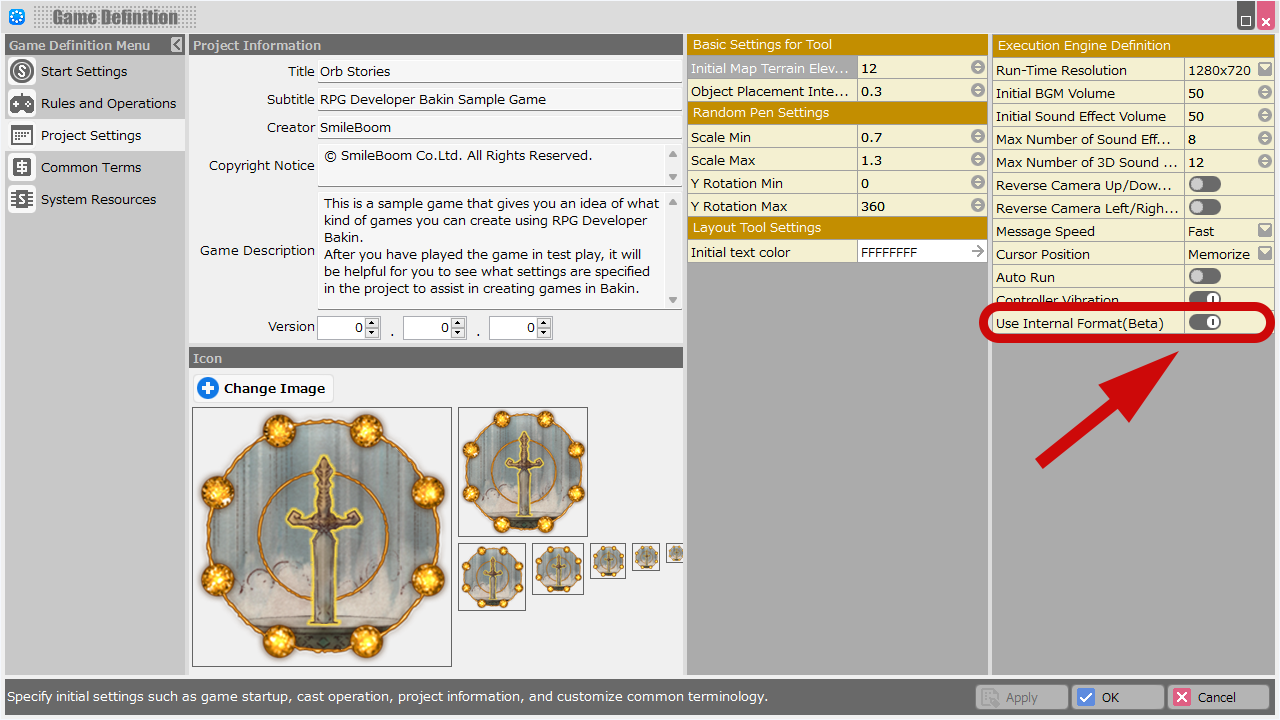
- Also, skybox models are loaded during the switch. You can reduce the loading time by enabling the internal format option in Game Definition > Project Settings.
- If a save is made while switching rendering settings, the game will be saved in the "after-switch" state.
Events†
- Added a "Check Key Input" panel under the Conditional Judgment category, allowing direct detection of key inputs.
- Added a condition panel to sheet execution conditions that allows comparison between string variables and specified strings.
- Added an option to the "Change Player/Event Movement Speed" panel to change speed without affecting walking animations.
If "Change Walk Motion" is not checked, the walking motion will not be changed.
- Added a feature to the "Display Free Layout for Event" panel that allows skipping the hide animation when closing the free layout for events.
Map Editor†
- Implemented a feature that allows changing the assigned stamp of an object selected on a map.
- You can change it from the "Stamp" entry added under the properties in the Placed List.
- Properties such as position, rotation, and scale will be retained, allowing only the graphic to be changed.
- If an event is selected, the graphic of the first sheet will be replaced.
- Added expand/collapse buttons for groups/folders in the Placed List palette and Common Event List.
- When placing objects or local lights, holding Shift while performing the action now prioritizes placement even if the cursor is over the manipulator.
Immediately after placing an object, manipulator operations take priority when the cursor is over the manipulator. Local light placement behavior has been unified with object placement operations.
These changes make it easier to continue placing objects consecutively.
- Improved the behavior of the eraser tool so that it immediately deletes objects when the eraser cursor passes over them.
- Added a feature to the far-right menu at the bottom of the Map Editor that visually highlights terrain with the non-traversable and/or liquid attribute.
Use this to identify terrain with the same texture but different properties.
Game Definition†
- Added an option under Rules & Rendering > Rendering Options to allow users to choose whether rendering settings changed by events should be retained.
Layout Tool†
- Added a new layout property to the Equipment Item Selection screen:
"Management Tags for Items to be Displayed".
You can now filter which equipment items are shown based on tags assigned under Database > Items.
Plugins†
- Movie playback-related processes have been consolidated into a new class: MoviePlayer.
For details, please refer to the Plugin Reference.
Localization Toolkit†
- When using resource localization, specified resources are now always included in public exports.
Bug Fixes†
Resources / Internal Format†
- Fixed an issue where enabling texture compression could degrade alpha channel quality.
In some cases, objects using alpha-cutout textures (e.g., discard-type shaders) would not render correctly when far from the camera.
This issue was more likely to occur if the alpha cutoff threshold in the discard shader was set significantly lower than 1.
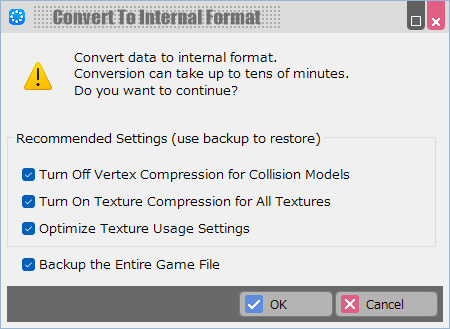
- When converting to the internal format, texture compression is automatically enabled. Please keep the following in mind if you are using internal format:
- (!)Note When using internal format, textures will be reconverted on project startup. As a result, please be aware that opening the project for the first time after this update may take additional time.
- (!)Note If you're using internal format and notice the issue mentioned above, we recommend exporting your project again.
We apologize for the inconvenience.
Events†
- Fixed an issue where events without collision settings placed next to elevated terrain were still recognized as walkable, even when "Disable Jumping from Elevation" was enabled in the Game Definition.
- Fixed a bug where, during battle, message/conversation panels did not correctly display speech bubbles when targeting "Player" or "nth in the Party".
- Fixed an inconsistency in wait time behavior when using the "Change Game Speed" panel between the Bakin tool and published builds.
- Fixed a bug where the "Change Game Speed" panel did not correctly affect walking speed.
- The "Display Layout Screen" panel is not supported during battle events.
However, if it was used via a common event with the "Wait to Complete" option enabled, the battle could become stuck. This issue has been fixed.
- Fixed an issue where empty conversations/messages interpreted as backlog entries would still be added to the backlog list.
Layout Tool†
- Fixed a bug where using the mouse to operate a spin panel configured with the "Change the Value of a Variable" action did not correctly apply the value to the variable.
- Fixed a bug in the Layout Parts List where rearranging multiple layout parts via drag and drop could incorrectly change their order.
Database†
- Fixed an exception that occurred in the "Items" list when switching the "Weapon/Armor" property while multiple entries were selected.
- Fixed a bug in the "Skills" list where switching the "Available on Maps / Available in Battles" property while multiple entries were selected caused the skill descriptions to be cleared.
- Fixed a bug under Casts > Battles where newly added items could not be registered in the drop item list when configuring the Reward for Being Defeated as an Enemy field.
Battles†
- Fixed an issue where an exception could occur if an enemy was spawned via an event during battle and immediately set as the attack target.
Test Play†
- Fixed an issue where an exception could occur after applying filters in the Variable Monitor tab of the Debug Window.
Gameplay Issues†
- Fixed an issue where the reference coordinates for environmental effects and the skybox were inconsistent depending on the camera type. These are now unified.
Ver. 2.0.2.1†
Bug Fixes†
DLC: Localization Toolkit†
- Fixed an issue in layout data localization where, in layouts with checkboxes in the Layout to be Assigned field (such as the main menu screen), the system layout was sometimes applied instead of the selected replacement layout.
- Fixed an issue in layout data localization where the pencil icon was displayed in the "Type" field even though it was not editable.
Ver. 2.0.2.0†
New and Improved Features†
Resources†
- Added a feature to set scale for particle effects.
Debug Window†
- Improved the Event Monitor to display the status of battle events during battles.
- Improved the behavior so that pressing the Enter key on the Variable Monitor tab no longer causes the game screen to respond.
Events†
- In the "Obtain Battle Information" panel, when retrieving values such as "Skill Target Number", where the target can be either an ally or an enemy, the system now obtains the index of the target manually selected by the player.
In other words, when using a skill configured as "Effect on Allies: Self / Effect on Enemies: Single Target", the index of the skill target selected by the player can now be retrieved.
Bug Fixes†
Database†
- Fixed an issue where copying and pasting a cast could cause event panels referencing the original cast to incorrectly reference the pasted cast instead.
Events†
- Fixed a bug where, during battle, if the second or later party member selected "Escape", the action type retrieved by the "Obtain Battle Information" panel would be incorrectly set to "Wait".
- Fixed a bug where using the "String Input" panel immediately after loading a map could cause an exception.
Resources†
- Fixed a bug where clicking the label of the last entry in the motion list and then pressing the delete button would cause an exception.
Layout Tool†
- Fixed a bug where using a variable as a parameter in a special format would cause an exception if the specified variable did not exist.
- Fixed a bug where the split position between the screen list and the tag list was not being saved.
- Fixed a bug where locked parts in the layout parts list could still have their sizes changed in the preview.
- Fixed an issue where existing tags were not displayed in the additional dialog when enabling "Edit Tags" mode within the layout tool.
Map Editor†
- Fixed a bug that caused an exception when performing Undo/Redo after changing the map size.
- Fixed a bug that caused an exception when editing the battle layout in the database that contains no enemy casts.
Sprite Tool†
- Fixed an issue where mask states outside the image bounds in the mask layer were not being cleared properly.
Tool UI†
- Fixed a bug where the position and size of certain dialogs, such as the asset picker, were not being saved.
- Fixed an issue where the dark mode background color was affecting the display color panel in the color picker.
Top Menu†
- Fixed an issue where thumbnails for moving graphics might not be displayed in the New Project > Main Cast Settings screen.
Others†
- Fixed a bug where dynamic patching for older battle scripts sometimes failed, causing build errors when exporting published works.
- Fixed an issue where, when a save destination folder was manually entered during project creation and an invalid path was specified (such as one with double path separators), the incorrect path would be saved in the history. This could cause published works to fail when exported.
Localization Toolkit(DLC)†
- Layout data can now be replaced per language.
- Fixed a bug where the "Change Item Name" panel was not included as translatable content.
- Fixed bugs where some layout elements were not listed or unrelated elements were mistakenly included for translation.
- Fixed a bug where exporting to Excel would fail if the same text was used in many locations.
Ver. 2.0.1.0†
New and Improved Features†
Events†
- Greatly improved the speed of map transitions in projects that use a large number of generated events.
- Increased the pointer limit for array variables to 9,999,999.
- When setting the “Camera Playback” panel in cast events, all cameras are now listed, just like in common events.
Layout Tool†
- When enabling the scrollbar feature for a menu container for the first time, the scrollable area size is now automatically adjusted.
Battles†
- To allow synchronization between subgraphics and motion timing, all ally members' motions are now reset at the start of battle.
Resources†
- When importing or deleting resources, a progress bar is now displayed if the dialog initialization takes a certain amount of time.
- The "Hereafter, Same Settings" checkbox in the import dialog has been removed, and a new "Set This Import Setting as Default" button has been added.
- When adding sound data shorter than 10 seconds, the “Type” setting is now automatically set to SE.
Bug Fixes†
Layout Tool†
- Fixed an issue where the displayed content and selected element could become inconsistent when showing an item list created using a free layout screen for events.
- Fixed a bug where an exception would occur when modifying the properties of a submenu container after importing the same .lyrbr file twice.
- Fixed an issue where the filtering by cast tags was not being applied correctly in the special format \partyimage.
- Fixed an issue where, if an appearance motion was set for a rendering container and the background image was then replaced, child containers/panels would disappear from the preview.
- Fixed a bug where textures imported via drag & drop would not appear until Bakin was restarted.
Battles†
- Fixed a bug where enemy cast characteristics were not properly initialized during battles in certain cases.
- Fixed an issue in battle tests where party cast characteristics were not being initialized.
Events†
- Fixed an issue where the "Camera Playback" panel would not function when using a battle plugin.
- The "Attach Model to Cast" panel now supports attaching to joints of the second party member and beyond, as well as to the entire party train.
- Fixed a bug where an exception would occur in the "Obtain Cast Status" panel if attempting to retrieve the status change of a member using a non-existent index.
- Fixed a bug where the fanfare was being saved in the save data as the current BGM.
Test Play†
- Fixed an issue in the Cast Parameter Check View where the "HP" cell was being unnecessarily updated repeatedly.
- Fixed a bug in the Cast Parameter Check View where some cells for values that do not reflect changes were still editable.
Resources†
- In the import dialog during resource import, fixed an issue where the mesh images would appear blank when selecting multiple 3D stamps.
Database†
- Fixed a bug where the "Add Attack Count" state ability was not functioning correctly during multi-equipment attacks.
- Adjusted so that even additional attacks granted by the "Add Attack Count" ability now perform hit success checks.
- Fixed a layout issue in the "Item Enhancement" panel when setting up item events.
Other†
- Fixed a bug where, since Ver. 2.0.0.0, analog input was being interpreted in reverse on certain game controllers.
- Fixed an issue where an exception could occur when attempting to use BAKIN under a different Windows account.
Trial Version†
- Fixed a bug where, due to Steam Overlay, a graphics error would be detected even though no error had occurred in the BAKIN application itself.
Ver. 2.0.0.3†
Bug Fixes†
Map Editor†
- Fixed a bug where an exception could occur in map editing only when launching the tool for the first time.
- Fixed an issue where the Battle Layout Editor icons were displayed misaligned.
- Fixed a bug where closing various editing dialogs could cause the Map Editor's editing mode to switch to the Pen Tool.
Events†
- Fixed a bug where specifying an index exceeding the initial party count in the “Attach Model to Cast” panel caused an exception to occur.
Layout Tool†
- Fixed a bug where an exception occurred when hovering the cursor over a shield in the store screen if the equipped slot set in the database contained a “Weapon/Shield” slot.
- Fixed a bug where an exception occurred when attempting to retrieve status changes for non-existent equipment slots in the layout format.
Resources†
- Fixed an issue where thumbnail files were being overwritten even when the project was opened in read-only mode.
Ver. 2.0.0.2†
New and Improved Features†
Top Menu†
- In the Create New menu, the default player image has been set to “Hero A”.
Bug Fixes†
Camera Tool†
- Fixed a bug where changes to rendering settings within the Camera tool sometimes did not apply to the map.
Map Editor†
- Fixed a bug where equipment selection settings were not being saved in battle tests since Ver2.0.0.0.
- Fixed a bug in Ver2.0.0.0 and later where, after placing an object, opening the Camera Tool and closing it with OK would prevent deletion of that object until the map was reloaded.
Resources†
- Fixed a bug where changes to "Model Optimization" and "Scale" in the Import Asset dialog (when adding resources) were not being applied unless "Same Settings Hereafter" was checked in the property panel on the right side of the dialog.
When "Same Settings Hereafter" is checked, the selected settings will be saved and used as the default for future imports.
- Fixed a bug where an exception occurred in the Import Asset/Add Asset/Delete Asset dialog when adding or removing resources, if the tree view was not selected.
- The Resources > Particles > Emitter Control feature, which was added in version 2.0.0.0, has been temporarily withdrawn due to insufficient preparation and operational verification. We appreciate your understanding.
Layout Tool†
- Fixed a bug where adding or removing equipment slots in the database could cause incorrect display of status differences when equipping items in the store screen.
- Fixed a bug where the item category display on the store screen did not support “Leg Armor”.
Dark Theme†
- Internal issues have been fixed, and related files have been modified.
Others†
- Fixed an issue where debris appeared at the bottom edge of the texture for the preset particle effect sb_ef_battle019_Fangs.
- Fixed an issue where the Standard Battle Script stored in Bakin was still using version 2.0.0.0.
- Fixed a bug where, when creating a new project with the asset volume set to “Normal,” the ‘State’ definitions “Disable Dual Wielding” and “Two-Handed” were not added to Database > State Definition.
- Partial revisions have been made to the Traditional Chinese translation data.
- Updated the ev-us.tsv file for the Tool Translation mod.
Localization Toolkit (DLC)†
- Fixed a bug where resource localization was not applied to sprite sets applied to layouts.
Ver. 2.0.0.1†
Bug Fixes†
Database†
- Fixed an issue where the "Item Usage Restriction" UI continued to display data from the cast selected when the database was first opened, even after switching to a different cast for editing.
- Fixed a bug in the "Initial Equipment" section for casts where selecting "None" for the equipped bone still wouldn't clear the field.
Also added the ability to reset the right-hand and left-hand joint bones to their default settings.
Events†
- Fixed a bug in the event editor's text mode where pressing the E hotkey (Edit Event Panel) caused the selection to jump to a different line when the event panel opened.
- Fixed an issue in versions 2.0 and later where the summary text displayed after closing the "Advanced String Variable Operation" panel was generated incorrectly.
Ver. 2.0.0†
New and Improved Features†
Item Usage Restrictions and Unlocking†
- Updated the UI and added new functionality to the "Usable Items" section for Casts/Classes.
- Changed the system to specify "Unusable Items" instead of usable ones.
When making selections, you can now specify tags assigned to items. This allows for settings like "All weapons with blades are unusable."
- Added a "Required Level" feature that unlocks the use of specific items once the cast reaches a designated level.
Add/Remove Equipment Slots†
- Implemented a feature to add and remove equipment parts for casts.
This feature has been added to:
Database > Casts > Equipment and Abilities tab > Initial Equipment field
- A maximum of two weapons can be equipped. (Combinations such as weapon & weapon, weapon & shield, or shield & shield are allowed)
- Equipment parts include: Weapon, Weapon/Shield, Shield, Headgear, Body Armor, Leg Armor, and Accessories.
Accessories can be added without limit.
- Equipment parts can also be removed.
(!) When an equipment part is removed, any settings related to that part (such as status abilities) will also be deleted.
For example, if the Headgear part is removed, the equipment part designation for helmet-type armor will be cleared.
Please carefully check to ensure no unintended consequences occur after deletion.
- In Database > Item Properties, if the "Damage" flag is enabled for equipped items, an attack will be processed for each such item.
- Multi-Attack Modifier is the adjustment value applied to the final damage when attacking with multiple weapons.
- Attachment Bones are only effective when the cast's graphics are in 3D.
Please ensure that the equipment part is specified in the ability settings of the item to be equipped.
- Added a new ability in the database that allows you to disable equipment using the "Equipment Disable" status effect by specifying a tag.
- Added a new control \equipposicon to the layout tool, which supports custom equipment slots for displaying equipment position icons in layouts.
- When creating a new project, preset status abilities for "Disable Dual Wielding" and "Two-Handed Weapon" are now automatically added to the Database under Status Definition.
Scroll Bar†
- A scroll bar feature has been added to menu containers.
- This cannot be used in conjunction with the "Page Mark" feature.
- "Enable Auto Expansion" is intended for cases where menu items increase over time, such as in an item list.
- If you place one submenu container with "Disable Auto Assignment Container Management Number" turned off, sub-menu containers will automatically increase as needed.
- When the cursor hovers over a submenu container with "Disable Auto Assignment Container Management Number" turned on, use directional keys that are not in the scroll direction.
- Child elements of the menu container will be the scrollable content.
- For child elements, please enable the following settings: "Clipping with Parent Container" and "Clip Based on All Parent Bounds".
- If you want to place elements within the visible area of the menu container that should not scroll, do not make them child elements of the menu container.
Example: To display a menu heading, place the text panel outside the menu container’s hierarchy.
- It is recommended to avoid overlapping submenu containers and the scroll bar.
- If cursor position interpolation is used, the cursor may temporarily disappear when moving back in the opposite direction of the scroll. This occurs until the entry the cursor points to returns to the visible scroll area, and is a known specification.
Special Format Parameter Variable Support†
- Added support for using variables (including nested ones) as parameters in special format strings.
Supports regular variables, cross-save variables, and array variables.
Use variable syntax in the parameter, like: \partystatus[\$[]].
Theme Color Switching†
- We have implemented a theme color switching feature in “Configuration”.
The tool must be restarted after changes are made.
Color settings will continue to be improved in future updates. For the time being, however, there are no plans to change the color of the scroll bars.
Database†
- Added support for tag-based specification in the "Skills to be Learned" section for Casts/Classes.
- Added copy & paste functionality to the "Level" and "Status" sections of Casts/Classes.
- When recovering from the "Instant Death" state, "Ability When Equipped" will now be re-applied properly.
Layout Tool†
- Implemented the ability to control variables from the spin panel, just like with the slider panel.
- When a thumb image is set for a slider panel, you can now drag the thumb to change the value.
- In the Ticker screen, automatic line breaks set on containers are now properly applied.
- When system layouts are overwritten, the display state check will now be preserved.
(!) While this behavior has been improved, we still recommend copying the system (default) layout before editing or using it.
- Implemented a feature to make it easier to insert parameters for special formats in dialogs such as the Special Format Insertion dialog.
For certain special formats that require parameters, a list of suggested values now appears on the right side of the dialog. Previously, users had to manually enter these values while referring to the list.
With this update, double-clicking an entry in the list will automatically insert the selected value into the last [] parameter slot of the tag.
Events†
- Added an option to the "String Input" panel to disallow confirmation when the input is an empty string.
- Added a setting to specify interpolation time in the "Change Cast/Event Motion" panel.
- The "Obtain Item Parameter" panel now allows you to retrieve both "Quantity of Item in Possession" and "Max Quantity of Item".
- Added the following features to the Event Editor:
- Added a context menu to the event sheet list.
- Added a "Delete" option to the context menu in condition panels.
- In the text mode event editing screen, the following features were added:
- Added hotkeys: Press "I" to insert a panel, and "Enter" or "E" to edit a panel.
- Added "Insert Panel" and "Edit Panel" options to the context menu.
- Graphics can now be changed by clicking the graphic name field in the event sheet.
- Improved scrollbar behavior so that all fields in the editor now display scrollbars correctly when needed.
Resources†
- Improved the dialog that appears when adding or removing resources.
Related resources are now displayed in a tree format, allowing you to select which resources to add or remove.
- Added a feature that allows you to copy and paste motions in the motion list.
Tag List†
(!) Note
If you roll back to a previous version after upgrading to this version, the content that was in the "Management Tags + Memo" field will be altered as described below.
Please note that this change cannot be undone.
- When rolling back, the text in the "Management Tags + Memo" field will be rewritten as shown below.
If it was written like "Tag memo Tag memo", it will be changed to "Tag Tag memo memo", with tags and memos separated.
- Additionally, if you added descriptions to tags in this version, those descriptions will be lost upon rollback.
- The "Management Tags + Memo" fields that were present in various menus have been split into separate "Tag List" and "Memo" fields.
- Added a new "Tag List" feature.
When adding a tag, you can now choose from existing tags already assigned to items in the same category.
- Tags can now have descriptions.
Game Definition†
- Renamed the "Localization Tool" (previously found in the Common Terms menu) to "Text Replacement Tool".
Added a filtering feature to the Text Replacement Tool.
Debug Window†
- Added a filtering feature to the Event Monitor, which displays a list of active events.
- The Variable Monitor has been separated into its own tab.
- Changed the layout to a tree format.
- Added a filtering feature.
- Values now apply instantly in the game when confirmed.
Save Data†
- Configuration settings are now saved globally across all save data.
Previously, config settings were saved separately for each save file, which required users to reconfigure things like BGM volume every time.
This has been changed so that settings now apply to all save data.
Map Editor†
- Under Functions > Configuration > Hotkeys, you can now set hotkeys for the “Paste Terrain Sides” function.
Assets†
- When creating a new project, we have made some improvements to the resources included in the “BasicSet” imported as “Asset Quantity: Normal.”
- We converted textures to PNG format to reduce the project size.
- Some models have improved details.
Bug Fixes†
Layout Tool†
Layout Preview†
- Fixed a bug where the red border indicating the selected layout element could be hidden when the grid was displayed.
- Fixed an issue where, after selecting multiple layout parts and moving them using the position adjustment buttons, the preview and the property values became misaligned.
- Fixed a bug where moving a submenu container using the position adjustment buttons could cause it to move to an incorrect position.
- Fixed a bug where using the size adjustment buttons could incorrectly change the size of a submenu container.
Note: Changes made with the size adjustment buttons were not reflected in the internal data.
The size of submenu containers is defined within their parent menu container.
- Fixed a bug where the method for determining the positions of the top and bottom edges was incorrect when using the alignment function to align items vertically.
- Fixed a bug where changing the position or size of a spin panel did not update the corresponding properties.
- Fixed an issue where certain actions, such as using adjustment buttons, were not recorded in the undo buffer.
- Fixed a bug where, after adding a rendering container in the Selection screen or General Message screen, changing the image and then canceling would cause the preview to display incorrectly.
- Fixed a bug where changing the size of a rendering panel with an origin point set to anything other than the top-left would cause the entire panel to shift.
- Fixed a bug where resizing multiple layout parts at once would sometimes fail, depending on the order in which the parts were selected.
- Fixed a bug where, when selecting three or more layout parts and deselecting the first-selected one, the properties of an unselected part could sometimes be displayed.
Layout Parts List†
- Fixed a bug where, when copying and pasting a submenu container within a menu container, it would be pasted at the top of the list instead of the intended position.
Layout Tool: Special Format†
- Fixed a bug where 3D stamps were not displayed when using special format codes like \partyimageicon.
Layout Tool: Slider Panel†
- Fixed a bug where hidden sliders could still be operated with the mouse.
- Fixed a bug where multiple nearby slider panels could have their values changed simultaneously when dragging with the mouse.
- Fixed a bug where, when a minimum value was set for a slider panel, the position of the slider thumb would not align correctly with the mouse pointer.
Layout Tool: Other†
- Renamed the "Include Parent in Clipping" property of rendering containers to "Clip Using All Parent Bounds" to more accurately reflect its actual behavior.
When this property is enabled, clipping is performed based on all ancestor containers of the rendering container.
- Fixed a bug where, when selecting “Initialize Config” in-game, sliders that are children of submenu containers assigned with the “Change the Value of a Variable (for Slider)” action were not being reset properly.
- Fixed a bug in the Store screen where, when selecting an item, the background board of the status display would appear one frame late.
- Fixed a bug where cursor movement between containers did not work correctly when there were multiple menu containers and multiple columns within the containers.
Events†
- Fixed a bug in the "Teleport Event" panel where individual cast events on the map could not be uniquely identified and selected.
- Fixed a bug where, in some cases, the panel immediately following "Display Main Menu Screen" would execute too early (immediately).
(!)Please note that this change may affect the behavior of the “Display Main Menu Screen” panel.
- Fixed layout issues where text was cut off in event panels for languages other than Japanese.
- Fixed a bug where, when a monster escapes, the index related to "Obtain Target Number" in the "Obtain Battle Information" panel would become misaligned.
- Fixed a bug in the variable list where the OK button would not respond if a variable was selected while slightly dragging the mouse.
Test Play†
- Fixed a bug where, in the raycast debug display, if the raycast position was off-screen, a line segment might be drawn at an invalid position within the screen.
Gameplay Issues†
- Fixed a bug where, during frame drops, cast members in the Party Train could freeze in mid-air.
- Fixed a bug where sound effect volume settings were not applied to movies.
- To prevent performance drops when showing the first conversation event in the game, environment maps and LUTs used for conversation are now preloaded.
- Fixed a bug where items with the "State Granting" ability would not be consumed upon use.
Items will now be properly consumed if the state is successfully applied.
- Fixed a bug where using an item with the “State Granting” ability on a map would apply the ability to the entire party.
- Fixed a memory leak where framebuffer memory would accumulate each time a sprite was displayed.
Asset Picker†
- Fixed a bug where an exception would occur when sorting by entry name in list view.
- Fixed a bug in list view where display glitches could occur if the management tag or memo field contained very long text.
- Fixed a bug where, when opening the Asset Picker from menus other than the "Resources" menu and attempting to re-import a previously imported local file, the corresponding resource would not be properly selected.
- Fixed a bug where the "Local Files" filter was not correctly set when selecting an effect, and updated it to include file extensions used for particle effects.
- Adjusted the resource import process to prevent unnecessary warning messages from appearing midway.
Resources†
- Fixed a bug where, when deleting a resource and its referenced assets, the selection state in the list could become invalid or corrupted.
- Fixed a bug where disabling the switch for using material outlines did not disable the corresponding parameter section.
Post Effects†
- Fixed a bug where environment maps would not be applied correctly if full-width (double-byte) characters were included in the file path of the Temp folder.
Camera Tool†
- Fixed a bug where an error could occur when trying to input a value for "Shadow Judgment Level" under Rendering Settings > SSAO.
Note: "Shadow Judgment Level" is a property that can only be set when the SSAO algorithm is set to "Linear."
Map Editor†
- Fixed a bug where, after opening the Event Editor and pressing OK to close it, the tool would sometimes revert back to the pen tool.
- Fixed a bug where pressing the ESC key while using a selection tool other than rectangular selection did not return the tool to rectangular selection.
- Fixed a bug where the latest settings were not applied to other maps using the same rendering settings.
Variable List†
- Fixed a bug that caused an exception to occur when collecting information from event panels that contained deleted elements in the Variable List dialog.
Ver. 1.15.1.2†
Bug Fixes†
Gameplay Issue†
- Since Ver. 1.15.1.1, an exception occurred when using an item with no skill assigned during battles.
Ver. 1.15.1.1†
Bug Fixes†
Published Work Export†
- Due to changes in Windows 11 security policies, there was an issue where games could not be launched if a ZIP file containing published work downloaded from the internet was extracted using Windows' built-in extraction tool.
We have implemented a workaround to address this issue.
- If the game is not distributed in ZIP format (e.g., if the game is distributed on Steam, etc.), this problem does not occur.
- (!)If you are distributing your work as a zip file, please see the following instructions.
- If you have exported your work in version 1.15.1.1 or earlier and published it in ZIP format, please export your project again with the “Published Work Export” function to resolve the issue.
- In addition, this problem can be avoided by taking the following actions for those who have downloaded the ZIP file of a project exported with a previous version.
If necessary, please inform users of the following measures.
- Right-click the downloaded ZIP file, open the properties, and check “Allow” in the security section at the bottom.
- Use a non-standard Windows extractor such as 7-Zip when extracting.
Rendering Issues†
- Fixed a bug where VRM models playing motion animations would occasionally shift to slightly incorrect positions for a single frame, roughly once every few to several dozen seconds.
Layout Tool†
- Fixed a bug in which changes to “Display Condition Switch” in the submenu container were not always applied correctly.
- Fixed a bug in the slider panel where the thumb image rendering position for the vertical slider was incorrect.
- Fixed a bug in the "Input String" screen layout where, when using keyboard input, pressing the Enter key would not confirm the input if the maximum character limit had been reached.
- Fixed a bug in the preview when using the special format partysubclassicon that did not refer to the topmost cast's subclass.
Events†
- Fixed a bug where, if multiple "Move to Location" event panels existed within a single event, modifying one panel could cause the destination symbols of the other panels to disappear.
Plugins†
- Fixed a bug in C# scripts where ChangeColor was not applied to mapScene.hero.
Gameplay Issues†
- Fixed a bug where the target re-selection process for consumable items treated as skills was incorrectly handled using the routine intended for regular items.
Ver. 1.15.1†
New and Improved Features†
Events†
- The “Enable/Disable Monster Appearing” panel has been improved to update the current appearing area even while encounters with enemies are prohibited.
- Improved the event editor to remember the position of the panel editor in “Text” mode while editing.
Bug Fixes†
Layout Tool†
- Fixed a bug in the “Layout to be Assigned” field where the selection display of the currently edited layout disappeared when editing a layout part.
Events†
- Fixed a bug where repeatedly pressing the confirm button during a conversation event would cause the portrait hide animation to replay from the beginning each time.
- Fixed a bug that caused an exception when executing the “Play BGM” panel across the transition from the end of a battle to the map screen.
- Fixed a bug that could cause footsteps to sound immediately after walking by an event.
- Fixed a bug where playing 3D sound while all sound output devices were disabled would cause a crash.
Battles†
- Fixed a bug where the enemy's equipment abilities were not being applied during battles.
- Fixed a bug where the party's equipment abilities were not being applied during battle tests.
Resources†
- Fixed a bug that could cause the Management Tags + Notes for Resources in the reserved folder to be rewritten.
Map Editor†
- Fixed a bug that caused the start position marker to be placed on a map when Cancel was pressed in the settings dialog after selecting an event template.
- Fixed a bug that caused the map grid to disappear when the Event Editor was closed.
Tool UI†
- The following bugs related to the Asset Picker's list mode have been fixed.
- Fixed a bug that caused an exception when sorting by entry name.
- Fixed the display method for long text strings.
Ver. 1.15.0.1†
Bug Fixes†
Gameplay Issues†
- Fixed a bug that WAV files were always played at maximum volume since Ver. 1.15.0.
- Due to the possibility of the tool freezing, the following correction made in Ver. 1.15.0 has been reverted.
- Fixed a bug that could cause an abnormally large rendering load depending on the area of the window when an image with a small size for the repeat portion of Fill_Repeat was used as the window image.
(!)The following functions have been added and changed in Ver. 1.15.0.
Map Editor†
- When using the pen tool, holding down Shift while dragging locks the axis for placement, allowing terrain and objects to be placed in a straight line.
This is useful when either terrain or object is selected.
(!)The following operation keys have been changed accordingly.
- When Placing a Terrain Stamp with the Pen Tool
| Ver1.15 or Later (New) | Ver. 1.14 or Earlier (Old) | |
| 6 (Full Key)+Click | Ctrl+Click | Attach the side of the specified terrain stamp to the side of the currently selected terrain |
| 6 (Full Key) + 7 (Full Key)+Click | Ctrl+Shift+ Click | Invert the texture of the side of the selected terrain. Shift+click again on the reversed area to re-invert it. |
Ver. 1.15.0†
New and Improved Features†
Enhancement of the Selection Panel†
Events†
- The following functions have been added to the “Select from Selection and Check Results” panel:
- Specify branching behavior when the "Cancel" button is pressed
- Set the initial cursor position
- Use variables in display conditions
- Set multiple conditions for display
- Set conditions for enabling/disabling selections
- Use of Text Commands for decorative text
3D Sound Simple Version†
- For 3D sound, a simple (lightweight version) mode was added.
This mode does not impart aural simulated sound effects but only reflects positional information in simple panning to the left and right speakers.
The properties of the sound resource can be configured in detail.
Resources†
- The following properties were added to Sounds:
- Processing Metho (Binaural/Planar)
- Attenuation Curve (Fix/Linear/logarithmic)
- Attenuation Start Distance
- Attenuation End Distance
Layout Tool†
- Variables can now be used as display condition switches for submenu containers and rendering containers.
- Multiple display condition switches for submenu containers and rendering containers can now be set.
Normal Variables, Array Variables, and Cross-Save Variables can be used as switches or variables.
In addition, multiple conditions can be applied.
- Item-related formats are now available in the Free Layout for Events displayed during battles.
- Added a special format for items with the maximum number of items in possession "\currentitemmaxnum".
- Container Auto Line Break is now enabled for tickers as well.
- The “Auto Line Break” setting is now applied to messages and conversations.
(!) When a project is newly loaded in Ver. 1.15, “Auto Line Break” in the Message and Conversation Layout is automatically turned on.
Variable List†
- The “Variables Used” dialog has been expanded to include the ability to search for the use of individual variables and to pick up unused variables.
Variables can be added, deleted, etc. in this dialog.
Resources†
- Added “Reset Materials in Use” to the context menu of the 3D Stamp List.
You can return the material to the same settings as the model you have specified for the graphics.
- Images for thumbnails added when importing VRM models are now included in the tree of the “Images” menu.
The model created by Vroid Studio includes an image called “thumbnail”. By registering this image as an image, it is easy to use it as an icon image.
Game Definition†
- Added “Party Train Spacing” to the “Move and Operate” menu.
The spacing between casts in the Party Train be adjusted.
Events†
- Added a new event start condition: "Repeat in Parallel / Sync with Physics".
This allows you to run processes synchronized with the physics engine, executing 60 times per second consistently without being affected by frame drops.
This option is now available for normal events, common events, and cast events.
[Additional Notes]
This condition is intended for cases where you want to move the camera, events, or player little by little each frame, or for timing-sensitive games like rhythm games.
If you’re implementing custom movement and are noticing issues caused by frame drops, you may want to consider using this option.
In other cases, we recommend using the regular event start conditions.
(!)When “Sync with Physics” is enabled, the process will still run 60 times per second even during frame drops. However, using this too much can reduce the system’s ability to handle heavy loads, which may lead to lower frame rates.
Also, since input handling (like button presses) is updated during the regular Update cycle, using this setting may sometimes result in inputs being processed twice.
Test Play†
- The “Level/EXP” of “Casts/Classes/Subclasses” can now be changed in the Cast Parameter Check View.
- Added the ability to display the performance meter from the menu in the test play launched from the center click.
Top Menu†
- Added “Auto Update Thumbnails” checkbox in Configuration.
Tool UI†
- Added a Display button and a Detail Mode button to the Asset Picker.
You can now view the file list in a format similar to the "List View" in File Explorer.
Additionally, a window can be opened to show detailed information about the selected entry.
Internal Engine Optimization†
- Thread-based optimization of the internal engine has been performed.
Adjustments have been made to better distribute tasks to each CPU core.
Editor Localization†
- LanguagePack for tool translation was updated to support Ver1.15.
Text additions and corrections are applied.
See Editor Localization for usage instructions.
Bug Fixes†
Database†
- Fixed a bug where, if the default status was customized in the "Edit Status" dialog, the status used during battle could sometimes display incorrect values after using the "Change Cast Status" panel in a battle event.
Events†
- Fixed a bug that caused an exception in some cases when adding graphics and other resources included in DLC in the Event Editor.
- Fixed a bug that caused portraits to disappear without waiting for fade-out at the end of a conversation scene using a 3D cast.
- Fixed a bug that sometimes prevented the cast from being displayed when the decision key was repeatedly pressed if a non-conversation event panel was inserted between conversations.
- Fixed a bug that prevented jumping correctly from the “Escape from Loop” panel to the label between the “End of Loop” panel.
- Fixed a bug in which the orientation specification when moving to a location was not applied to the Party Train, which would sometimes look down for a moment.
- Fixed a bug in the “String Replacement” panel where a local variable could not be selected as a variable to store a value.
- Fixed a bug that caused the panel summary to be “None” when “Image” was used for “Graphic for Layout” in the “Change Cast Graphic” panel.
- Fixed a bug that prevented status changes when selecting “This Event” for the “Change Cast Status” panel with a party member as the operation target in the “Make Battle Cast as Operation Target” panel.
- Fixed a bug that prevented some start conditions from being triggered correctly when specifying a cast in the “Battle Phase” condition panel of a battle event.
- Fixed a bug in which renaming a variable name in the event panel was not always applied to the panel being edited.
Common Event Editor†
- Fixed a bug in which when a variable name was renamed, the event currently being edited might not be correctly applied to the edit UI.
- Fixed a bug that could cause edited results to not be saved properly unless the “Apply” button was pressed accordingly.
Layout Tool†
- Fixed a bug where, in speech bubble messages spanning multiple pages, the text on the second and subsequent pages might not fit properly.
- Fixed a bug that could cause an abnormally large rendering load depending on the area of the window when an image with a small size for the repeat portion of Fill_Repeat was used as the window image.
- Fixed a bug that text decoration and scale were not applied to the text input screen.
(!) The font and scale of the text input screen will be applied with this modification, so if you have made any changes in the previous version, please adjust them accordingly.
- Fixed a bug in the conversation screen where the portrait position specification \dialoguecharacter in the conversation scene would work even if the node was disabled.
- Fixed a bug in which the size calculation for general messages did not apply information such as font size.
- Fixed a bug that prevented array variables displayed during layout from being updated correctly.
- Fixed a bug where layout parts sometimes wouldn’t appear immediately in the preview after being copied and pasted.
- Fixed a bug in which, when a rendering container was copied and pasted, the pasted part was displayed at the top of priority on the preview, regardless of the order of the parts list.
- Fixed a bug where copying and pasting hidden layout parts would incorrectly turn on the "visible" checkbox for the pasted parts in the tree view.
Resources†
- Fixed a bug in which the list of resources displayed when selecting “Images” in the Asset Picker was incorrect when selecting “Textures” in the “Resources” tab.
- When “Automatically Assign” is selected in the material sharing dialog, “Materials with no texture” are now automatically assigned.
- Fixed a bug where materials were not added when multiple models with shared materials were added at the same time.
- Fixed a bug that caused thumbnails to be re-created when resource names or management tags were changed.
- Fixed a bug that caused 2D/3D tags to be added to the management tags when images and textures from system resources in the reserved folder were assigned to resources.
- Fixed a bug in which when a stamp was generated by adding a resource in a menu other than the resource menu, the generated stamp was not added to the stamp list in the Map Editor.
- When adding a resource file from Local File or DLCs, a progress bar is now displayed when the files are converted to an internal format.
- Fixed the following issues that could occur when adding a model via the "Resources" menu in projects using the "Internal Format":
- A bug where the preview in the stamp import dialog might not be displayed
- A bug where material-related errors might occur
Map Editor†
- Adjusted the tooltip display position of the buttons at the bottom of the Map Editor.
- Fixed a bug in which updating thumbnails in the Resources menu, etc. sometimes did not work properly after executing the View > “Delete All Thumbnails”.
- Fixed a bug where selecting "None" for the background material in the Rendering Settings would create an unnecessary empty material.
Gameplay Issues†
- Fixed a bug that caused 3D sound to crash when playing back a camera with an incorrect value that forced the distance to zero.
- Fixed a bug in which an encounter area name could not be obtained correctly if the player did not walk immediately after loading.
Battles†
- Fixed an issue where, if an enemy performed a counterattack before taking its first action, the configured first-turn action would be skipped, and the enemy would instead execute an action intended for a later turn.
Game Definition†
- Fixed a bug in which the settings in Rules and Rendering > Max Level were not applied correctly.
Database†
- Fixed a bug that caused an exception when overwriting and pasting a folder from another project in the list of each menu.
Test Play†
- The "Event Monitor" in the debug window no longer updates while a map is loading.
This change was made as a precaution, since the possibility of an exception occurring could not be ruled out.
Sample Games†
- Fixed a bug in the Dungeon RPG Sample where the “White Silver Key” event was disabled.
- Fixed a bug that prevented the CTB gauge from updating correctly for the Battle Status Type B layout in the Battle Plugin Sample since Ver. 1.14.
1.14.2†
Game Definition†
- The default value of "CCD Radius Coefficient" was changed to "1".
Projects that were edited after ver. 1.14.1 are left with the previous default value of "2", so please adjust accordingly.
CCD (Continuous Collision Detection) was introduced to prevent the player from passing through mesh colliders when moving at high speed.
The "CCD Radius Coefficient" acts as a multiplier for the player's collision detection. Increasing this value can help reduce instances of passing through objects. However, it may also cause side effects, such as making the player bounce off edges more easily when jumping near ledges or steps.
In version 1.14.1, the default value was set slightly higher to reduce the chances of the player passing through objects or terrain at high speeds.
However, considering side effects such as behavior when jumping near ledges or steps, we have adjusted the default setting in this update.
(!) If you do not need this feature, you can set the value to "0" to disable CCD and revert to the same behavior as in versions prior to 1.14.
Bug Fixes†
Events†
- Fixed a bug in which the "Execute Common Event" panel settings added in Ver. 1.13.2 were not properly applied.
The behavior up to Ver. 1.14.1 was specifically as follows:
- "Wait to Complete" is also applied to "Wait until the Event is Executable".
- "Wait until the Event is Executable" is interpreted as "Start Execution from Next Frame"
- The check status of "Start Execution from Next Frame" is not affected by the execution of events.
(!) This may change the behavior of the "Execute Common Event" panel added in Ver. 1.13.2 or later.
Now these will work as described in each option.
The behavior after this version is the correct implementation. We apologize for any inconvenience this may cause.
- Fixed a bug that caused the "Display Message" panel and "Display Conversation" panel, where only Text Commands are described, to be skipped after Ver. 1.14.1.
- Fixed a bug where newly generated events were incorrectly treated as hits when using the "Change Player/Event Scale" panel, starting from version 1.14.1.
Map Editor†
- Fixed a bug that could cause the tool to crash when changing the "Background Material" in the Map Settings Palette > Rendering Settings.
Gameplay Issues†
- Fixed a bug that, after Ver. 1.14.1, when playing the first test after starting the project, the values of the near clips of the terrain used were sometimes incorrect.
- Fixed a bug that prevented some of the memory of cast-based events from being discarded when moved to a different map during play.
Resources†
- Fixed a bug that, since Ver. 1.14.1, the larger the amount of data in a project, the longer it took to change parameters in resource management.
Others†
- Fixed a bug that sometimes caused an exception when opening a project that has been continuously worked on from an older version since Ver. 1.14.1.
1.14.1†
New and Improved Features†
Game Play†
- Countermeasures have been taken and improved for cases where the player falls at high speed and goes through the mesh collider.
The player-side processing has been modified, which may slightly change the behavior during collisions. Therefore, the following feature has been newly implemented to allow it to be turned off or adjusted as needed.
- New “CCD Radius Coefficient” in the Game Definition > Move and Operate menu.
By changing the radius coefficient, the bounce of the collision can be adjusted.
Setting the radius coefficient to 0 will return to the previous process.
- Various improvements have been made to internal engine stability.
- When the number of local lights exceeds the limit per cluster in a map, improvements have been made to discard the lights so that they are as picture-perfect as possible.
Layout Tool†
- Automatic sorting has been added to the layout properties of the “Enhancement Item Selection” screen.
Tool UI†
- Improved thumbnail rendering process for stamps containing alpha channel.
Resources†
- The initialization process when opening the Resources menu has been corrected to slightly speed up the process.
- In Resources > Materials preview, the preview state is now remembered even if the editing target is switched.
Bug Fixes†
Events†
- Fixed a bug that caused the “Change Player/Event Scale” panel process to proceed while moving the map.
- Fixed a bug that was causing entries to be added to the backlog even though all text in the message was excluded from the log using the “\+” format.
- Fixed a bug that caused an exception when executing an event containing a “Call C# Program” panel that specified a C# plugin with a build error.
- Fixed a bug that caused incorrect behavior when another sheet was executed while the processing of an item event sheet was not completed successfully.
- Fixed a bug that prevented the “Rotate Event” panel from applying / saving the orientation if the event orientation was fixed.
- Fixed a bug that caused the collision target to change when the “Change Y Coordinate” panel was executed on an event with a stamp that had been assigned a collider without Control in the Physics Settings.
- Fixed a bug that sometimes caused an exception when an event created with a newer version of Bakin was opened with an older version of Bakin, for example, when an event panel that did not exist at the time of that version was on the event sheet.
- Fixed a bug where the selection would be cleared when "Add Event Panel" was performed while the cursor was positioned at "End Of Script" in the text mode of the Event Editor.
- Fixed a bug in the Event Editor where the “Event Execution Condition” setting UI was sometimes displayed twice when switching between panel/text mode.
Battles†
- Fixed a bug that caused the Battle Result screen, where level-up processing occurred, to become very slow.
- Fixed a bug that caused the next message to be displayed in a split second when displaying a series of battle messages.
- Fixed a bug that caused sprites to momentarily appear at 100% scale when playing back sprites in battle.
- Fixed a bug that prevented battles from progressing if an item with an item event set during a battle was obtained.
- Fixed a bug that prevented adding the same cast to the party during battle.
- Fixed a bug that could cause an exception when changing the battle skill list with auto-sorting enabled, for example, from a parallel event during a battle.
Layout Tool†
- Fixed a bug in which elements in the main menu that were hidden by “Visibility Switch” were displayed after battles.
- Fixed a bug in the layout parts list on the battle status screen in which turning off the check box for the node to which the special coordinate specification tag “DamagePosition” was assigned did not disable the process.
- Fixed a bug that caused enemy status sliders to not display properly when placed in a rendering container.
- Fixed a bug that could cause an exception when sorting the list of battle skills.
Resources†
- Fixed a bug that could cause a crash when replacing the material assigned to a stamp.
- Fixed a bug that could cause the thumbnails of “Terrain” resources to be retrieved incorrectly.
- Fixed a bug in the subgraphics of stamps that caused an exception when they were set to cycle.
In addition, an exception was raised when deleting a resource when deleting a stamp with a subgraphic set to cycle.
- Fixed a bug that prevented the File Import and Material Sharing dialogs from being displayed when importing a model from the Add button in the Resources > 3D Stamp List.
- Fixed a bug where after adding resources from some DLCs, thumbnail generation would stop and the application would not close properly.
Map Editor†
- Fixed a bug that caused an error dialog to appear and broke the texture of the generated model when “Export Model” was executed with terrain containing stairs selected.
Camera†
- Fixed a bug that could cause incorrect culling when the terrain of a map was set to an elevation near the upper limit (Y=25).
VRM Models†
- Fixed a bug in the automatic calculation of the waist position in the case of mixamorig in motion for VRM0X.
Top Menu†
- Fixed a bug that sometimes caused the Backup File Selection dialog to appear behind the Top Menu.
Others†
- Fixed possible GDI resource leaks.
1.14.0.2†
Bug Fixes†
Events†
- Fixed a bug where moving to another map with the “Custom” value applied to the player in the “Change Player Movement Speed” panel would cause the player's movement speed to become super fast.
- Fixed a bug that caused a build error to be displayed twice when opening the “Call C# Program” panel if the C# script had a description error.
Database†
- Fixed a bug in Items/Skills/State Definitions where the “Enable Switch” had an ability that could not be changed.
This also fixes a bug that caused an “exception” when operating the “Enable Switch” with the state recovery ability with the target set to “Valid Only for Those KOs”.
- Fixed a bug in the skill ability settings that when “None” was selected for the ability range of a skill in the “Effect on Allies” tab, the effect range of the skill in the “Effect on Enemies” tab would also be set to “None”.
Resources†
- When multiple models imported by the following methods cause overwriting of imported models and the “Model Re-Import Option” dialog box appears, the settings have been modified so that they can be updated at once with the same settings.
- Drag-and-drop import to in the Resources menu
- Import from Asset Picker > “Local Files” tab
- Modified the “Model Re-Import Option” dialog so that the “Fit Stamp Collision” option is always enabled, and it is now possible to change the checkbox even if the stamp in use includes stamps with the “Shape” property in “Simple Collision Settings” set to “Mesh”.
In addition, the collision fitting will not be applied to stamps whose “Shape” in “Simple Collision Settings” is “Mesh” as it has been in the past.
1.14.0.1†
Bug Fixes†
Events†
- Fixed a bug that panel mode/text mode switching information in the Event Editor was not saved after Ver. 1.14.0.
- Fixed a bug that caused particles displayed by the “Display Effect” panel to remain internally and be displayed at a different time after Ver. 1.14.0.
- Fixed a bug that the effect of “Change Game Speed” panel was not applied to some panels such as “Brighten/Darken Screen” since Ver1.14.0.
- Fixed a bug that caused a crash when typing a long sentence in the “Display Text as Image” panel and trying to display the placement preview.
- Fixed a bug that caused an exception if the player moved to another map while executing the “Generate Events” panel from Common Events with “Wait to Complete” off.
Sounds†
- Fixed a bug that caused noise when playing back some audio files such as 22kHz/mono since Ver. 1.14.0.
Layout Tool†
- Fixed a bug in which the special format \reserveimage was not working.
1.14.0.0†
New and Improved Features†
Use of Multiple Fonts in a Game†
"Fonts" has been added as a new resource type, which can be optionally switched for each layout element or message.
Resources†
- A new “Fonts” menu has been established.
The fonts set here can be selected and applied in the game at various locations in the tool.
- You can import ttf/otf files.
- Default font and ruby sizes and various offsets can be set.
- Supports import/export of fonts in exrbr format.
- A type of bold feature is being implemented for font resources that enlarges the outline as a property.
The “Bold” feature in the Text Commands in the event panels and in the text panels of the layout tool was a simple bolding feature that rendered a double font with a shifting font.
This function enlarges the outline and renders it as a separate character, which consumes additional memory but produces a high-quality bold effect.
Game Definition†
- New “Default Font Settings” in System Resources.
You can specify a default font to be used for messages in the game and text in the layout.
Events†
- A text command \f[], which allows users to specify fonts, is now available in various event panels that handle text.
- Display Conversation
- Display Message
- Display Ticker Text
- Display Text as Image
(!)At present, for the Selection Panel, please specify the font in the Text Panel of the Layout Tool > Selection screen.
(!)It is not currently possible to use a different font for each selection.
(!)For the text input panel, please specify the font in the text panel of the Layout Tool > Text Input screen.
Layout Tool†
- A new “Fonts” option has been added to the properties of the text panel.
If you want to change the default font of the conversation depending on the scene, you can do so by preparing multiple layouts of the conversation screen and switching between them with an event.
Binding of Multiple Plugins†
Events†
Multiple C# scripts can be bound to an event.
- The C# program assignment field in the lower left corner of the Event Editor has a field that increases each time one is assigned.
- When specifying the C# method to call using the “Call C# Program” panel, you can now select from a tree-style dialog box.
- The "Call C# Program" panel summary now displays the specified return value and arguments.
The summary is the string that appears when the event panel is closed.
Editor Localization Mod Support†
Editor Localization†
A .tsv file (English version) with the main texts of the Bakin editor is now available.
You can localize the editor itself by localizing the tsv file and some files and placing them in a specific folder.
See Editor Localization for more information.
Other Additions and Improvements†
Events†
- When opening the Event Editor, the sheet that was open before the last time the editor was closed is now automatically opened.
- The following functions have been added to the “Change Game Speed” panel:
- New “Omit Physics Update” section.
Enabling this can help avoid a situation where the speed of event skipping stops increasing.
- Improved so that no fanfare is played when “Mute Sound Effects” is turned on.
- "Mute Sound Effects" is now independent of other options and always selectable.
(!)However, if “Undo if Selection Waiting Occurs” is turned on, the game speed will be restored, and the mute will be removed.
- The following functions have been implemented in the “Change Player/Event Movement Speed” panels.
- A custom adjustment function has been implemented to fine-tune the speed of movement by percentage.
- The function to specify the motion to be used when walking has been implemented.
- Initial value of “Counting Variable” can be specified in the “Start Loop” panel.
Database†
- When adding a new entry to a non-cast menu list, the entry is added immediately, without interrupting the selection of an image for the icon.
- In the "Item/Skills/Statuses" ability settings section, the selection method for "Skills/Statuses/Attributes" has been improved to use a simplified asset picker.
Test Play†
- The Event Monitor tab of the Debug Window now displays the sheets in progress and the processing load for all events that can currently be operated.
- Improved the load on the Debug Window, making it more responsive.
Resources†
- The following behavior has been improved when adding a model from “Local Files”.
- Materials and textures are now placed in the “model name folder”.
- Material and texture names have been adjusted to prevent duplication.
- Imported textures are now tagged with a 3D tag.
- Thumbnail files contained in vrm files created by Vroid Studio are now registered in the “Images” menu.
- In Sounds, when importing data, it now checks to see if the data can be read properly.
- When multiple models are selected and “Update Information” is performed, the settings in the “Model Re-Import Option” dialog can be updated together with the same settings.
- When using “Open the Resources Folder in Explorer” from the context menu, Explorer will now open with the corresponding file selected.
- Improved to focus on added/pasted subgraphics of 3D stamps when they are added/pasted.
VRM†
- When using VRM motions, if there is a BindPose in the FBX file, it is now used.
- Bone names starting with VRM mixamorig: are now supported.
- A .vrm.mixamo.fbx file has been added to the automatically generated export file when importing VRM files. This makes importing into Mixamo easier.
In addition, .vrm.fbx has been eliminated from the automatically generated files.
Game Definition†
- The sound effect when saving can now be specified in System Resources.
Tool UI†
- Vertical scroll bars have been implemented in “Management Tags + Notes” throughout the tool.
Bug Fixes†
Events†
- Fixed a bug that could cause the event progress to be incorrectly saved during save and load if multiple sheets were in progress at the same time within an event.
(!)A new “Save in Compatibility Mode (Deprecated)” has been added to Game Definition > Rules and Rendering to maintain compatibility with previous saves.
If you wish to maintain the previous save process, turn this switch on.
- Fixed a bug that prevented all but the Y angle of events from being saved in the save data.
- Fixed a bug where graphics for decal events were not being saved correctly in the save data.
- When using the “Make Player/Event Walk to Specified Coordinates” panels, the processing of the last frame for processing the completion of the move has been corrected.
In some cases, this problem caused objects with the player/event on them to be left behind.
- Fixed a bug where ending a battle using the “Terminate Battle Forcibly” panel could cause the next battle to not proceed to the battle command selection scene.
- Fixed a bug in which changing the state of the “Force Granting Below a Certain Value” ability during battle, such as in the “Make/Cure Battle Cast State Change” panel, did not change the consumption value correctly.
- Fixed a bug that caused an exception when trying to select DLC with “decals” in the “Change Event Graphic” panel.
- Fixed a bug in which Stamp A on the map could disappear when the “Stamp A added from DLC” was placed on an open map and the graphic was selected from “Graphics included in DLC” in the “Change Event Graphic” panel in the Event Editor.
Resources†
- Fixed a bug in which the Image List was not immediately updated when an image was imported by drag & drop into the “Slice Animation” list.
- Fixed a bug that caused the currently edited stamp to be displayed as a candidate for selection in the Asset Picker when specifying a graphic for a subgraphic.
- Fixed a bug in which material settings were not cleared when the “3D Stamp” graphic was changed from "Model" to "Other than Model".
- Fixed a bug that caused the preview model to revert to the default (spherical) when changing material textures, etc.
- Fixed a bug in which the "Image" slice X/Y disabling process did not work when the image was specified as a "sprite" image in the "Image" property's "2D Settings" when the "Slice" was set to "PixelSlice" and the number of slices was set to less than 1.
- Fixed a bug that caused VRM files to be displayed as candidates for selection in the Asset Picker when selecting "Motion Set," "Motion," or "Physics Settings" from a local file in a resource.
- Fixed a bug that caused an exception when updating a model with no material set.
- Thumbnail generation process has been adjusted.
- Fixed a bug that caused one unnecessary green thumbnail to be added to the thumbnail folder when editing stamps.
Also, when a project up to Ver. 1.13 is opened, the above unnecessary thumbnails are deleted in a batch.
- Fixed a bug that caused decals to be displayed incorrectly for models with toonvrm0x shader specified in the material.
- Fixed assignment of white textures to shaders where default textures were not defined for normal maps and were undefined.
(!)If a texture is set on the normal map, there is no change.
(!)Please note that this modification may slightly change the appearance of the water surface from the previous version.
Gameplay Issues†
- Fixed a bug that prevented the experience bar animation on the Battle Result screen from applying the increase/decrease in experience obtained from the “State” abilities.
- Fixed a bug that prevented events placed on the event battle map from being applied when the same cast as the battle background of the current map was placed on the event battle background map.
- Fixed a bug where skills made usable by equipping items were being learned again upon leveling up if they were also set as learnable skills for the cast.
- Fixed a bug where if a monster was “instantly killed” by the “State Granting (When Removed)” ability in “States”, the instant death was processed after all party cast members had completed their command selection.
- Fixed a bug where the consumption values of a party cast affected by a "state" that changes values like "Instant Death" through the "State Granting (When Removed)" ability were not applied in the battle status panel until after all party members had finished selecting their commands.
Layout Tool†
- On the map screen, the red frame that was forcibly displayed for the map has been removed.
Database†
- Fixed a bug that prevented the enable/disable switch in the “Casts” characteristics field from working.
Map Editor†
- Fixed a bug in which deleting selected terrain, etc. from Resources in the Stamp Palette did not work correctly when returning to the Map Editor.
Game Definition†
- Fixed a bug in which the “Page Position Current” setting of the System Resource was not applied to the layout.
Others†
- Fixed a bug that could cause frame rate fluctuations in certain environments after Ver. 1.13.2.
- Implemented a fix for GDI resource leaks occurring in each editor window.
- Fixed a bug that could cause file creation permission checks to fail when creating project folders.
- Fixed a bug that caused differences to be detected when closing a project, even after loading a newer version of the project and pressing the save button.
1.13.2.3†
Bug Fixes†
Layout Tool†
- Fixed a bug that caused an exception when closing the layout tool after Ver. 1.13.2 or later while a layout using certain special formats, such as Equipment Item Selection, was open.
Sample Game†
- Fixed a bug that caused an exception when opening the “Mini Map: Simple” event in the Common Events palette of the Dungeon RPG Sample since Ver. 1.13.2.
1.13.2.2†
Bug Fixes†
Resources†
- Fixed a bug that could cause the window to freeze when narrowing down the list of entries in each resource menu and then releasing it.
- Fixed a bug in which copying a folder containing sprites in the resource menu caused the duplicated sprite entities to be shared with existing resources.
Events†
- Fixed the following bugs that occurred while accelerating the game speed in the “Change Game Speed” panel since Ver. 1.13.2.
- Fixed a bug in the “Make Player/Event Walk to Specified Coordinates” panels where movement was interrupted as soon as the “Abort if Unable to Move” checkbox was checked.
- Fixed a bug that caused the number of steps moved to change when using the “Make Player/Event Walk” panels.
1.13.2.1†
Bug Fixes†
Events†
- Fixed a bug that caused an exception when a Counting Variable was set in the "Start Loop" panel in non-Japanese versions.
- Fixed a bug that caused an exception when an event name was left blank and the enter key was pressed on the event sheet.
1.13.2†
New and Improved Features†
Engine Optimizations†
- Optimized internal engine (faster operation).
This will improve the performance speed of games created with Bakin.
(!)If you have already released your work, please try the Published Work Export again to apply this update to your game.
- Modifications have been made to improve the stability of the internal engine.
Test Play†
- The names of parameters in the Performance Meter have been modified to be more easily understood.
The explanation of each process visible on the Performance Meter and measures to reduce the load of each process will be published in the online manual > Performance Meter.
Please also see Creation Tips for ideas on how to reduce processing load.
Events†
- The expression in the sheet list when editing an event has been modified so that "Normal Sheets" and "Parallel Sheets" are displayed separately.
At the same time, the processing order of sheets was changed from "the lower the priority" to "the higher the priority".
(!) The order of the sheet listings for existing events will be automatically converted with the update.
(!) As before, parallel sheets are processed after normal sheets.
- The following options have been added to the "Execute Common Event" panel.
- Wait until the event is ready to execute.
- Wait for completion.
- Start execution from the next frame.
It checks the status of the common events being called and made it easier to control the timing when the common events are executed.
- The condition for the appearance of the clock icon on the event panel has been made more stringent.
If the "Wait to Complete" type option is not checked, the panel no longer displays the clock icon.
- Clock icon (wait icon) is now visible in text view mode as well.
(!)An event panel with a clock icon indicates that a time lapse will occur during the execution of that panel.
Conversely, panels without a clock icon are executed all at once in a single frame.
Even in parallel events, these panels do not execute the next panel until completion.
- Added a function to the "Check Surrounding Collision Detection" panel to obtain the coordinates of the intersection of the ray cast and the target.
- Added "Generated Events" as a check target in the "Check Surrounding Collision Detection" panel.
- For the "Check Collision State" panel, a decision specifying the type of cast event has been added.
- The "Advanced Variable Box Operation" panel has been added to obtain the "Distance and Angle between Player and Event".
- The internal processing of text input when "Use Physical Keyboard" is used in the "String Input" panel has been improved.
Database†
- Added “State (Characteristic) to be Learned” for cast members and classes.
This is a so-called "passive skill".
The "state" created in "State Definition" can be assigned.
This makes it easier to create distinctive data, such as cast members who are "always easily targeted" or classes that "always receive a large amount of reward for battle".
- The following conditions apply to the conditions that can be set for the characteristics.
- All removal conditions must be unset.
- The "Force Granting Below a Certain Value" ability is not set.
- Even if the above does not apply, the state can be set as a characteristic if the #characteristics tag is used.
Resources†
- Previously, 2D stamps with "Lighting" turned "off" required the texture "SRGB" option to be turned off, but this has been corrected to require SRGB to be turned on, just as when Lighting is "on".
This means that all stamp images to be placed on the map should be SRGB-on.
(!) Please note that the texture settings for the above will be automatically changed to the same rendering as in the previous version when an existing project is loaded.
- Added "Use as Item Hook" option to subgraphic properties.
Subgraphics with this option can be used for joints of weapons and armor in battles.
Previously, models without itemhook, such as VRM models, could not hold the models set as weapons or armor in their hands in the Database when they entered a battle.
With the addition of this option, it is now possible to put an equipped weapon or armor item in the hands of the cast when entering a battle.
- Settings are made in the following ways:
- Set subgraphics on the cast stamp.
- In the subgraphic properties, set either "Right Hand/Left Hand" in this option.
- In addition, adjust the relative position/angle in the subgraphic properties. (It is difficult to adjust without graphics, so it is better to set graphics such as a sword and then adjust the position etc.)
- The subgraphic models should generally not be specified.
- If you want the right hand and the left hand to have their own subgraphics, set up separate subgraphics for the right hand and the left hand.
- In blend shapes, the position of the key's reset button has been moved above the list of keys.
Also added a shortcut key Ctrl+R to reset the keys. The reset button, which was above the preview, has been moved to the position that is easier to press, since it is frequently reset when key information is changed.
- Added pause button to Resources/Particles.
- The behavior of the jump button to the original resource in the properties of Resources > each menu has been improved when selected by clicking with the mouse.
VRM Models†
- Improved compatibility with VRM model motion.
- When a VRM model is imported, xxx.vrm.humanoid.fbx is generated.
This FBX has a simple bone structure that improves compatibility with humanoid bones.
This makes it less prone to errors when importing into Mixamo.
Currently 3 FBX models are generated when importing a VRM model, we intend to output only this xxx.vrm.humanoid.fbx in the future.
Game Definition†
- A frame rate limit function has been implemented in the Project Settings.
When a game is executed, the game will run at a frame rate near the specified value.
This feature can be used to avoid consuming full GPU power even when vertical synchronization is turned off.
Variable Usage Location†
- Improved behavior when double-clicking on a row in the “Variables Used details” list to open the Event Editor.
- The event sheet that uses the variable has been made accessible.
- The event name can now be changed on the event sheet.
Camera Tool†
- Improved reloading of rendering settings when editing the rendering settings of the map currently being edited.
Plugins†
- Allows access to other MapCharacter class members via casts.
- Fixed isCommonEvent to return the correct value at the timing of the start method of the C# plugin.
- The @@link function can now load DLLs in the script folder.
Top Menu†
- Changed to a default setting for player character graphic when creating a new project.
Assets†
- Added humanoid models with bone structure to the “3D Tutorial” project in the Game Gallery for easy addition and modification of motions in Mixamo and Blender.
- Reviewed the pre-installed Effect Pack vol.1 particle Prewarm Settings.
Considering the load given by Prewarm Settings, the set number of seconds has been modified to shorten if the set number is too long.
We are also reviewing Particle Settings in pre-installed projects such as Orb Stories.
(!)If you are importing pre-installed particles into your own project, you may be able to reduce the load during map transitions by reviewing your Prewarm Settings.
Try to shorten it to the extent that it does not affect appearance.
You can refer to the particle settings in the Effect Pack in the following way:
- Create a new project and import all particles from Effect Pack Vol. 1
- Check the Prewarm Settings for the particles used in your project.
Others†
- "? Help” has been placed in each tool.
Clicking on the ? symbol to jump to the online manual related to the relevant section.
Bug Fixes†
Test Play†
- Fixed a bug that prevented closing the test play dialog when keyboard text input was enabled during test play.
Events†
- Fixed a bug in which the value stored in the variable at the top of the variable list would affect the range of contact determination when performing contact determination with terrain using the "Check Collision State" panel.
- Fixed a bug in which targets were not detected even if "Including Non-Collision Targets" was turned on in the "Check Collision State" panel in the following cases.
- The event itself has the “Collide with Events” setting turned on.
- Target for which contact is to be determined “Collide with Events” setting is off.
- Fixed a bug in which an incorrect cast selection option was displayed when adding the "Battle Phase" sheet condition for battle events.
- Fixed a bug in the “Make Monster Appear” panel that caused the monster's action to be executed even if the monster was no longer in the battle before its action was taken.
- Fixed a bug where the specified actions did not work when using the "Make Battle Cast as Operation Target" panel to select "Party Member" as the operation target and then using the "Change Cast Status" panel to select "This Event" as the status change target.
- Fixed a bug in the variable list where the open/close state of the tree was not saved when multiple variable entries were added to a multiplexed variable folder.
Battles†
- Fixed to add EXP only to cast members who are still in the battle at the end of the battle.
"Cast members removed from a party by an event" will no longer receive EXP.
- Fixed a bug that caused an exception when removing a cast member from the party who used a skill using a common event called from the skill.
- Fixed a bug that was causing events on the battle map that were set to be hidden in the Placed List palette to be displayed during battles.
Gameplay Issues†
- Fixed a bug that caused the player or events that were buried in a wall while moving to be pushed upward, even when moving sideways would be much closer to the wall.
Layout Tool†
- Fixed a bug that prevented skill filters by tags in Free Layout for Events from being applied correctly in some cases.
- Fixed a bug in the Layout to be Assigned field where the currently edited layout was not switched when deleting a layout.
Camera Tool†
- Fixed a bug that could cause the shadow map to flicker when extremely small values were set for the near clip of a keyframe.
In conjunction with the above, the minimum value of the near clip was reduced from 0 to 0.01.
- Fixed a bug in which selecting the battle center coordinates was not applied.
- Fixed a bug in the battle camera preview where changes to the battle layout position on the battle map were not being applied.
- When a camera is pasted in the camera list, the added camera is now selected.
Resources†
- Fixed a bug that prevented the 3D stamp of DLC displayed in the preview in the Asset Picker from displaying properly in the Map Editor when the stamp was placed on the Map Editor.
- Fixed a bug that caused the task to remain after exiting the application if the 3D stamp of DLC displayed in the preview in the Asset Picker was placed on the Map Editor.
- Fixed a bug that caused stamp thumbnails to be generated incorrectly in some cases.
- Fixed a bug that could cause the thumbnail to be empty if the size of the model assigned to the stamp was close to zero.
- Fixed a bug that caused the material sharing dialog to appear in some cases when importing in 3D stamps, even though there was no material to share with existing models.
- In Terrains, fixed a bug that prevented changes to the normal map and mask map textures of existing terrain stamps from being applied to the appearance of the terrain on the map.
- Fixed the behavior when clicking the "Jump to Referenced Resource" button in the resource properties. This update addresses issues such as incorrect destinations after the button is clicked.
- Fixed a bug in blend shapes where interpolation sometimes failed because the current value of a key could not be obtained.
- Fixed a bug in which the preview was not updated after replacing shaders or adjusting parameters when editing materials.
- Fixed thumbnail generation process after stamp generation.
VRM Models†
- Fixed a bug that caused incorrect Spring Bone status when Bakin was left unattended for an extended period while displaying VRM models.
- The root node of the VRM model is currently defined as “_root_”.
Considering this, we have fixed it so that attaching subgraphics to the same “_root” as FBX will work correctly.
Map Editor†
- When editing a map, if a terrain resource dedicated to stairs was on the map, the staircase texture would corrupt when the terrain under that resource was changed.
- When editing a map, the Fill tool no longer fills the terrain dedicated to stairs when used to fill the terrain.
- Fixed a bug that sometimes caused the pen icon to appear twice in the Map List.
Internal Format†
- Fixed a bug in projects using internal formatting where importing particles from DLC would take a very long time.
Battle Plugin Sample†
- Fixed a bug when using the "Specify Battle Cast Action" panel with the "This Turn" specified for the Battle Plugin sample.
- The turn would take an unexpectedly long time to come.
- The command selection cannot be made.
Assets†
- Fixed SampleMan_VRM motions that are automatically assigned when importing VRM models.
Modifications are automatically applied to already imported VRM models as well.
1.13.1.2†
Bug Fixes†
Events†
- Fixed a bug that affected the value stored in the variable at the top of the variable list when determining contact with terrain.
- Fixed a bug that caused an exception when using the “Camera Playback" panel during a battle when no one's turn had yet come.
1.13.1.1†
New and Improved Features†
Steam Workshop†
- The Steam Cloud Administration screen now displays the number of uploadable files remaining.
(*) This update increases the maximum number of files that can be uploaded to the Steam Workshop (Steam Cloud) from 25 to 100.
Please also note that due to changes in Steam's specifications, the total file size limit for uploads has been reduced from 10 GiB (10,737,418,240 bytes) to 10 GB (10,000,000,000 bytes).
Files will not be forcibly deleted even if the file size already uploaded exceeds the modified limit.
Resources†
- Property widths are now saved for each menu individually.
Bug Fixes†
Events†
- In the "Specify Battle Cast Action" panel, an exception could occur when specifying "Random" as the target.
Battle Plugin Sample†
- The following issues that occurred when using the battle plugins in the Battle Plugin Sample project have been fixed.
- Fixed a bug that caused action skips for all cast members to be inserted when the "Escape" command failed.
- Fixed a bug that prevented "Management Tags for the Selected Skill or Item of the Cast Currently in Action" from being obtained.
Gameplay Issues†
- Fixed a bug that could cause an exception when "Pre-load" is turned on in the Map Settings palette and event generation is performed in parallel with map pre-loading.
- Fixed a bug that caused an exception when a cast level up occurred after deleting certain initial statuses in the Database and then loading “saved data with statuses saved as they were before the statuses were deleted” during gameplay.
Database†
- Fixed a bug in which "Including Non-Collision Targets" was not correctly judged for cast events when all the following three settings were turned on when "Including Non-Collision Targets" was specified in the execution conditions or "Check Collision State" panel on the event sheet.
- Database > Casts > "No Collision with Other Generated Events"
- Event Collision Settings > "Collide with Player"
- Event Collision Settings> "Collide with Other Events"
- Fixed a bug in which the attributes of weapons could not be obtained correctly when “Weapon Attribute” was specified in the “Skill Attribute” skill ability.
Layout Tool†
- The following bug has been fixed regarding the "Submenu Container to Select When Pressing (Directional Key)" property of the submenu container.
- Fixed a bug that caused a cursor movement sound when moving the cursor in the in-game menu when the destination was specified as "None".
- Fixed a bug that caused the cursor to be displayed on an invalid element when the specified destination was an invalid node, and the page was subsequently moved.
- Fixed a bug that caused multiple models to appear in the thumbnail in some formats such as \currentitemimage when using 3D models for item icons.
- Fixed a bug in the special format equipattributeicon where the attributes of weapons were not being obtained correctly.
Test Play†
- Fixed a bug that could cause a crash at the end of test play.
Resources†
- Improved compatibility to read VRM files that crash when imported.
- Fixed a bug that caused the motion set for VRM in System Resources to be lost when a VRM file was dragged into the Map Editor and then canceled after import.
1.13.1.0†
New and Improved Features†
Events†
- A "Manipulate Array Variable" panel has been implemented in the Variable Box category.
This panel can be used to rewrite some or all the elements of an array variable or to retrieve the number of elements.
- A "Batch Clear Variables" panel has been implemented in the Variable Box category. You can specify a folder in the variable list and clear all variables in that folder at once.
- An "Obtain Bone Coordinates" panel has been implemented in the Variable Box category.
- Offset specification has been added to the following event panels:
"Check Surrounding Collision Detection", "Generate Events" and "Display Effect".
- Added the option to delete placement adjustments (battle layouts) in the "Execute Battle and Check Results" panel.
Database†
- Added "Do Nothing" to the system tag for battle commands.
Usage example:
When specifying a tag for the "Disable Command" state ability, "Do Nothing" can be selected as the system tag.
Disabling "Do Nothing" will cause the "Do Nothing" column to be ignored by the enemy battle AI.
This allows, for example, to create "an enemy that begins to attack rapidly at a certain point in time".
- Separated "State" from the item ability "Attack Attribute" and added the "State Granting" ability.
The "Attack Attribute" ability had two mixed settings: "Attribute accompanying the attack" and "State generated to the opponent when the attack hits".
By separating them this time, we have made it possible to set the characteristics of the weapons more flexibly.
Battles†
- During battle, the enemy's appearance now displays their equipment.
Weapon models attached to item hooks will also be displayed during battles.
Layout Tool†
- When attempting to display status changes of "unequipable items" in the "Store" layout, the container to which they belong is now hidden.
Rendering Settings†
- The rendering engine has been modified to improve stability.
- Improved the process of applying fog to the water surface shader.
- The SSAO algorithm has been improved and the following settings have been added to improve rendering performance.
- SSAO algorithm added.
-View: Conventional algorithm.
-View (Corrected): The algorithm is the same as before, but the darkness parameter is now in a more adjustable range.
-Linear: The algorithm is less sensitive to the distance from the viewpoint.
- The following parameters have been added:
- Maximum Distance: Beyond the distance, the SSAO effect will not be applied.
This was implemented to improve the noise-like results that had sometimes appeared in areas far from the camera.
- Blur: Added a choice of blurring techniques.
- Previous: This is the previous blur. There is no sense of noise because of the large blur, but there is a problem with the blur being somewhat wide.
- Bilateral: It has less blur, but avoids extending blur to unnecessary areas.
- Half Bilateral: Bilateral is performed at half resolution. The blur is extended, but may be slightly blurred in an unnecessary area.
- Shadow Judgment Level: You can adjust how well the linear algorithm is judged as a hidden state when it is used. (0~5)
Map Editor†
- Added the function to sort entries in the Placed List palette.
Sorting can be done from the context menu (select an entry and right-click).
Test Play†
- The Cast Parameter Check View now also displays the effect values of the "Charge" and "Defense" commands.
Specification Changes†
Resources†
- When importing a file from the Image menu, the initial value of the "Wrap" (U/V/W) property has been changed to "Clamp".
Bug Fixes†
Events†
- Fixed a bug in the "Check Variable Box" panel setting where decimals could not be entered.
- Fixed a bug where "Enhanceable" items were not detected when "Include Equipped Items" was enabled in the "Check Items Possessed" panel.
- Fixed a bug where HP/MP changed by an event after the result was complete would not be applied when returning to the map screen.
- Fixed a bug where the content displayed in the "Display Message" and "Display Conversation" panels would overflow beyond the message window if the width was exactly one character wider than the message window.
- Fixed a bug where, in an event where a rotation angle other than the Y-axis was set, the coordinates gradually shifted when transitioning between sheets.
- Fixed a bug where collision detection would pass through between an ally cast with "Collide with Other Events" enabled in the cast event and a map event with "Collide with Player" disabled.
- Fixed a bug where switching to a different map several times in a row would temporarily distort the screen depending on the window size.
- Fixed a bug in the "Recover/Reduce Battle Cast Consumption Status" panel where the formula type would not work if a variable was specified as the nth.
- Fixed an issue where, when using the "Make Player/Event Walk to Specified Coordinates" panel in an event with "Falling by Gravity" off, the player/events would snap to the ground height.
- Fixed a bug that caused Collision Detection with events to be lost when walking events from multiple parallel sheets simultaneously using the "Make Player/Event Walk" panel with "Pass Through Events" turned on.
- Fixed a bug where even if you allowed the player to walk through non-traversable terrain using the "Change Player/Event Traversable Terrain" panel, the player would sometimes stop walking on non-traversable terrain when using the "Make Player/Event Walk" panel.
Map Editor†
- Fixed a bug in the Placed List palette where sorting entries added to the tree by copy and paste did not save the rearranged results.
- Fixed a bug where the destination location was not displayed in the Placed List palette for events where both the moving source and destination were set on the same map.
- Fixed a bug where after creating an event with a move, deleting the event that was the moving source would leave the destination information in the Placed List palette tree.
The destination information was deleted internally but could not be deleted from the tree until the map was reloaded.
Game Definition†
- Fixed a bug that caused gamepad input to become unresponsive in the Key/Button Assignments screen on the gamepad that opens from Move & Operate > Key/Button Assignments.
Resources†
- Unused files and folders are deleted from the project folder when particles are deleted from the Resources menu.
- Fixed a bug where model changes etc. were not immediately applied to the preview if the efk file was modified and the Update Information button in Resources > Particles was pressed.
- Fixed a bug that caused animations to be displayed incorrectly in the preview of the Slice Animation menu when the "Slice" property of the texture was set to "PixelSlice".
- Fixed a bug in the Asset Picker preview where resources from any DLC in the project being edited were not displayed correctly.
- Fixed a bug where the value set in Asset Picker Options > Scale was not applied to the added model when adding a model file using 3D Stamps/Motions/Blendshapes/Physics Settings.
- When creating a physics setting from a model that was changed in scale on import, the initial size value is now set to "scale on import".
- Moved the particle's "Playtime" property to "For Battle Effects" and changed the tooltip.
- Fixed a bug that prevented the cast from blinking when selecting a target during battle if the "Lighting" property was turned off for the 2D stamp used for the cast.
Database†
- Fixed a bug where using the "Tag" for the "State" ability "State Granting (When Removed)" would cause the removal condition to not work properly.
- Fixed a bug where the state with the "Force Granting Below a Certain Value" ability set to "HP 0%" could not be recovered when an item was used on the map.
- Fixed a bug in the processing of the lower limit set for the "Auto Damage" state ability.
- If there is a "State" with the removal condition set as "When Battle Ends" and state ability set as "State Granting (When Removed)", then a cast member is under this state condition, the “state” set in “State Granting (When Removed)” is not granted to them when a battle is over.
- Previous Specification:
Paralysis is removed at the end of the battle.
If "Paralysis" is set to "ability to grant 'Sleep' when removed", then if the battle ends with "Paralysis" still applied, the "Sleep" state is granted and a transition to the map screen is made.
- Improved Specification:
This change will prevent sleep from being granted at the end of a battle.
Internal Format†
- Fixed a bug that prevented the generation of internal format files in some cases.
- When importing from DLC using the Asset Picker
- When importing by drag & drop into the Map Editor
- When copying and pasting on the Resources & Database
- When importing from an entry that specifies a graphic in the Database
- When importing layout data
- Improved internal model format for more efficient memory usage.
(!)Please note that if you are using the internal format, it will take some time to reconvert the game file when you open it in this version.
Layout Tool†
- Fixed a bug that caused layout elements to be misaligned when using the alignment feature for submenu containers.
- Fixed a bug that prevented some operations, such as selecting text panel contents, from being recorded as undo targets.
- Fixed a bug where, when copying and pasting elements in a container in the layout parts tree, the display order of the parts did not match the tree order until the layout was reopened.
- Fixed a bug in the "Store - Sale" screen where an empty element was left at the end of the list.
- Fixed a bug where event graphic changes were not applied when using the \partyimage format in battle layouts.
- Fixed a bug in the submenu container property " Submenu Container to Select When Pressing (a directional key)," where, when a specific cursor destination is explicitly set, if the destination is empty and corresponds to the target position on the page (such as the last row or column of a list), the page break is now handled correctly.
Battles†
- Fixed a bug in which during a normal attack in battle, if the attack motion had not yet completed playing at the timing set in the “Damage Display Timing” property of Resources > Particles, the damage value would not be displayed until the motion was complete.
- Fixed a bug in which the default display state of subgraphics set in the Resources menu was not applied during battles.
Sprite Tool†
- Fixed a bug that caused an exception when deleting a layer name while renaming and then adding a layer.
Post Effects†
- Improved fog processing for the water surface shader.
Tool UI†
- Fixed a bug in the Movement Range Setting dialog where the map for specifying the movement range was not displayed if the size of the map was too small.
- Fixed a bug in the entry tree that sometimes did not filter correctly when filtering by word or phrase.
Plugins†
- Fixed a bug that prevented getting the attribute/state set for a skill using SkillEffect.AttributeGuid.
Assets†
- Changed the removal condition and icon for the "Less HP" state when creating a new project.
The "State" icon is now displayed without being removed at the end of battle.
DLC†
- Fixed an error that displayed an error message that the battle script was outdated when opening [DLC] SMILE Characters DX Vol. 1 from the Gallery.
Other minor UI and text changes were made.
1.13.0.3†
Bug Fixes†
Events†
- Fixed a bug where the collision size did not change when moving between event sheets with "Custom Collide Range" enabled.
Resources†
- Fixed a bug where the height generated by RigidBody was incorrect in cases where the height was narrower than the width in capsule collision (automatically corrected to a sphere shape).
- Fixed a bug that caused an error when importing a VRM model that had a SpringBone definition but no ColliderGroups definition.
- Fixed a bug that prevented the preview of the resource “Movie” from being displayed only in the Traditional Chinese version.
Camera Tool†
- Fixed a bug that prevented editing the camera when deleting a referenced map with "Use Other Camera" in the Camera tool.
As of Ver. 1.13.0.2, the bug where the basic settings of the camera properties were not displayed in some cases has also been fixed.
Layout Tool†
- The description of the special format currentskillconsumptionsp[x][y] was incorrect and has been corrected.
Map Editor†
- Fixed a bug that caused the model to appear to repeatedly zoom in and out on the Map Editor when a VRM 1.0-based model was placed on a map and the scale was changed.
Gameplay Issues†
- Fixed a bug that could cause some cast members during Party Train to momentarily bury themselves in the terrain while walking.
Others†
- Fixed a bug that prevented changes to font settings from being applied to the published export unless a test play was performed after the configuration settings were changed.
1.13.0.2†
Bug Fixes†
Events†
- Fixed a bug in the "Obtain Battle Information" panel that caused an exception when specifying cast/monster status as the obtain target.
Resources†
- The Y coordinate of the capsule collision, which is automatically generated when importing VRM, is now slightly raised.
(!) When VRM-based 3D stamps imported in versions up to Ver. 1.13.0.1 are used as event graphics, if the "Make Event Walk" stops the movement immediately, try adjusting the Y coordinate of the collision in the same way.
- In the Resources section, the "Update File" button has been modified to allow VRM files to be specified in the dialog box when the import source is re-specified.
Ver.1.13.0.1†
New and Improved Features†
Resources†
- Automatically set collision on VRM import to "capsule" shape.
Bug Fixes†
Resources†
- Fixed a bug that caused multiple VRM format models imported from the same folder to be shared if there were textures with the same name.
Events†
- Fixed a bug that sometimes caused translucent areas to be rendered incorrectly when using a model with Toon (VRM) shaders for a conversation scene.
(!)The following bug fixes have been cancelled in rev. 66871 due to problems identified.
- Fixed a bug that caused the loss of collision detection with an event when walking the player from multiple parallel sheets at the same time and with “Pass Through Events” turned on.
Common Event Editor†
- Fixed a bug that caused slow processing when trying to change the event name in the “Event Name” field in the Event Editor.
The problem of grayed out event names will be fixed in the future.
Game Definition†
- Fixed a bug in which the setting option “Count Y Movements as Steps” in “Rules & Rendering” was hidden.
Known Bugs†
- If you change the scale of a stamp based on a VRM-format model placed on the Map Editor, the stamp will not display correctly.
There is no problem with game play.
Ver.1.13.0†
New and Improved Features†
Battle-related Features†
Additional Abilities when Equipped†
- [Database]
- The following options have been added to "Item" abilities > "Weapon/Armor".
- "Ability When Equipped: Skills" ability that allows the cast to use certain skills while equipped.
- "Ability When Equipped: States" ability to grant specific states to the cast while equipped.
Usage of "Tags" to Set the Effect Target Range†
- [Database]
- Added the ability to specify "tags" in the "Items", "Skills", and "State Definition" menus to target a "state/attribute".
Example: In the State Definition, add the tag "#KO" for "states" that cause inability to act, such as "Sleep", "Paralysis", and so on.
Then, by creating a skill with the "State Recovery (Tag)" ability set to "#KO", you can create a skill that can recover from multiple states at once.
Skill Reflection†
- [Database]
- "Reflection Rate", which allows skills to reflect, has been implemented in the "State Definition" ability > "Battles".
- If more than one cast successfully reflects, each will execute the reflected skill against the attacker.
- The destination of the reflection can be randomly selected from the attacker cast or from the attacker's group.
- Reflective/non-reflective skills can be specified by tags.
Example: If you do not want to reflect only skills with only Effect on Allies set and with #tagA, you can state as follows (#allycast is a system tag for “Effect on Allies only” skills):
-#allycast -#tagA
- In Casts > Battle tab > Treat as Enemy in Encounters, if the enemy AI is set to “Intelligent” or “Cunning” and the following conditions are met, the skill use will be abandoned, or the skill target will be changed.
- Skill target is all of them and someone is in [Reflection] state.
- Skill target is a single person, but everyone is in [Reflection] state.
- When the skill target is a single person, if someone is in [Reflection] state, he/she is not a candidate for the target.
- [Game Definition]
- Added a field in "System Resources" to set the effect of a successful reflection.
If the reflection is successful, the specified effect is displayed in front of the receiving side of the attack.
The sample game "Orb Stories", which is pre-installed in the "Basic Set" project, is set up with the reflection effect.
If you want to use it, go to Resources > Particles, click the Add button, go to the "Ready to Use" tab, select "Basic Set" and import sb_ef_battle076_Reflection into your project.
- “Display Reflected Effects” has been added to “Rules and Rendering" > Battle Related.
Turning this switch off shortens the time of the battle performance by omitting the effect that is displayed against the attacker after the skill reflection.
Critical Hit†
- [Database]
- The following options have been added to the "Items" ability - "Weapon/Armor" and the "State Definition" ability - "Battle".
- Added "Critical Damage Rate (%)" which adds the critical damage rate of normal attacks.
- Added "Critical Evasion Rate (%)", which adds the probability of avoiding a critical attack from an opponent when becoming the target of an attack.
- "Critical Effect" has been added to the "Weapon/Armor" ability under "Items".
You can set the effect that is displayed when a critical hit is made.
- A “Bare Handed Critical Effect” has been added to the “Casts” > “Effects” tab to allow the user to set the effect when a critical hit occurs with a bare hand attack.
- [Game Definition]
- “Critical Damage Rate” has been added to Rules and Rendering > Status Related.
- [Events]
- When using the "At the Beginning of Action" trigger for battle events, the "Obtain Battle Information" panel can now be used to obtain hit determination information (misses, hits, criticals).
Probability of Escaping†
- [Game Definition]
- Added an option to edit the ""Escape" Command Success Rate" under "Rules and Rendering" > Battle Related.
Formula Related†
- [Database and Others]
- Added "Formula List Dialog" to manage multiple formulas and set "tags" for each formula.
In the tool, where formulas are available, you can use "tags" to specify which formulas to use. (You can also enter formulas directly as before.)
- Improved Formula Editor UI.
- Parameters and functions that can be used in formulas have been added to the Formula Editor.
- “Clamp” added to “Opcodes” is a function to keep a value within a specified minimum to maximum value.
Example: The parameter “a” represents the value to be kept within min,max, clamp(5, 1, 2) and clamp(0, 2, 4) are both 2.
When clamp(a,5,10), a is output if 5<a<10, otherwise 5 or 10.
- The “Active Casts” added to “Others” refers to the number of cast members who are not under the influence of more than 1 HP or the “Unable to Act (In Battles)” state ability. (e.g., a cast that is not in a "paralyzed" state)
Battle Events†
- [Events]
- The following information is now available from the "Obtain Battle Information" panel.
- "Management Tag" for the selected battle command
- The "Management Tag" set for the "Action Type" that the enemy cast currently in action is trying to execute
- The result of the hit determination at the beginning of the action.
Information on misses, hits, and criticals can be obtained.
Note that if the results are manipulated by events after the action has started, the results will be different from those obtained.
- The target type of the immediately preceding skill.
For example, you can see if the selected skill targets a single enemy or the entire enemy.
- Skill (item) tags used
- Number of surviving cast members randomly from allied/enemy groups
- Resistance value of the cast to attributes and states
- The following features have been added to the "Specify Battle Cast Action" panel.
- Added the "Change Target Only" feature to the "Action" field.
- Add "Action Timing" field to allow for immediate action (interrupting the next action) and the option to override this turn's action.
- "At the End of Result" has been implemented as an execution condition for battle events.
The triggering condition will be triggered after the results screen closes and before the fade out begins if the battle is won.
- "When Result Ends" has been implemented in the "Battle Phase" condition panel for battle events.
Note that "When Result Ends" is also executed when "When Battle Ends" is executed.
Refer to Weapon Setting†
- [Database]
- Added "Refer to Weapon" to the motion and effect settings when using "Skills".
The motion and effects of the weapon used when activating a skill will be displayed.
- In the attribute selection of the skill's ability "Skill Attribute", "Weapon Attribute" can now be selected.
VRM Format Support†
Import of VRM Format Models†
- [Resources]
- VRM format models can now be used as 3D models.
Upon import, the most appropriate materials are automatically assigned, and basic motion is assigned from Bakin's pre-prepared motion files.
In addition, a file converted to FBX format is generated in the same folder when VRM is imported.
By using the model converted to FBX for services such as Mixamo, it is possible to add motions to the model other than those pre-installed in Bakin.
(!)However, in some cases, depending on the model shape, importing into Mixamo may not be possible. It is assumed that some models, especially those wearing long coats, skirts, or other costumes with bones in them, may not be able to be imported by Mixamo. For this reason, it is better to use the model pre-installed in Bakin and add motions with it.
Please see the 3D Characters > .vrm Format Models section.
(!)In some cases, VRM format models use large texture sizes, which may affect the operation of the tool or game. (It takes time to load, etc., and the operation becomes slow.)
Please consider using the "Internal Format Settings" feature found in Game Definition > Project Settings > Game Engine Settings section.
- In Resources > Models, added "Movement Limit of Swinging Objects" UI to properties only when a VRM-formatted model is selected.
When running or changing direction during a game, you can limit the behavior of the swinging objects set in the VRM to prevent them from getting out of control.
Other Features and Improvements†
Game Definition†
- The "Rules and Operations" screen has been split into the "Rules and Rendering" screen and the "Move & Operate" screen.
- The UI of the "Common Terms" screen has been changed.
- In the "Common Terms" section, the arrow symbol used to indicate status changes set in the Layout Tool can now be changed to any string.
[Tool UI]†
- Improved the tooltip of the variable selection box at various places in the tool to check variable names.
Bug Fixes†
Battles†
- Fixed a bug that caused the effect to be applied to the cast with the lowest cast number when selecting "Cast to be Changed" in the "Change Cast Status" panel during a battle and the same cast was in the party.
- Fixed a bug where the consumption status values of cast members other than the same cast member and the cast member with the lowest cast number in the party would differ from the values displayed in the "Cast Parameter Check View" when the consumption status values were restored using the "Fully Recover Party" panel during a battle.
- Fixed a bug that caused an exception when using the “Change Event/Player Y Coordinate” panel during battle.
Database†
- Fixed so that when damage is generated by automatic damage, the damage color is used if the damage is 0.
- Fixed a bug where damage/recovery colors were not used for normal attacks during battles.
- Fixed "Battle Action AI" under "Cast" so that the width of the "Management Tag" can be changed with a separator line on the left side of the "Continuous" column.
- Fixed a bug that caused an exception in some cases when the Attribute Definition menu was opened and immediately closed after a while.
- Fixed a bug in the editing UI for abilities that increase or decrease resistance and the "State Granting (When Removed)" ability in the State Definition that caused an exception when entering the information.
- Fixed a bug in which the number of items with "Enhanceable" turned on was locked at "1", but in some cases the number of items could increase.
- Fixed a bug in the "Damage to Consumption Status" ability of the skill, where changing the "Target" was not applied.
- Fixed a bug where some ability editing UI had unnecessary input cells.
- In Database, modified a scroll bar to appear when an entry in the Data Grid View is outside the display area.
Layout Tool†
- Fixed a bug in the Free Layout for Event screen that prevented the correct use of formatting for picture books, item lists, etc.
- Fixed a bug that caused an exception if a key input was made while a menu container was displayed that did not contain any submenu containers.
- Fixed a bug that reset the "Number of Message Lines" and "Line Spacing Offset" layout properties to their default values when copying a layout.
Events†
- Fixed a bug that caused an exception when specifying a non-existent index when specifying a target number in the "Specify Battle Cast Action" panel.
- Fixed a bug in the "Display Store and Check Results" panel where drag-and-drop sorting of products did not work properly.
- Fixed a bug in the Common and Battle events that could cause the Event Editor to be marked as "changed" simply by opening the Event Editor.
Internal Format†
- Fixed a bug that could cause some of the huge mesh collisions to be omitted when using internal formatting.
- Fixed a bug that caused the Resources screen to freeze after model addition failed due to an error in the model file when using the internal format.
Map Editor†
- Fixed operation during narrowing of the placed list.
Camera Tool†
- Fixed a bug in the Camera List where buttons for unavailable functions such as Add and Copy remained enabled when a battle camera folder or other folder was selected.
- In the combo box of the camera property "Use Other Camera", the display name of "Normal Camera" was incorrect in some cases.
- Fixed a bug that caused the map currently displayed in the camera tool to overlap when changing the preview map in the camera tool.
Sprite Tool†
- Fixed a bug where the first frame of a sprite assigned to a player/event graphic was always rendered at 100% scale.
Resources†
- Fixed a bug that could cause an exception to occur when importing some FBX files.
- Fixed a bug that could cause the preview to be very slow when adding particles.
Sample Games†
- Fixed a bug in the "Dungeon RPG Sample" where the stairs going up from B2 to B3 were sometimes difficult to climb.
- Fixed a bug in the "Dungeon RPG Sample" that caused inexplicable rotation when the Up key and Left/Right keys were pressed simultaneously.
(!)The "Grid Move" in the Common Event Template has been modified accordingly.
- In Orb Stories, the battle AI of the Sword Keeper was modified, the hit effect of the Spirit Sword was changed (a critical hit effect was added), and the initial amount of money possessed was changed.
Ver.1.12.1.2†
Bug Fixes†
Internal Format Conversion†
- Fixed a bug that caused internal format files to be created when opening textures in Resources, even if the internal format conversion function was not used.
- Fixed a bug in which model changes were not reflected in the preview of resource editing when model data was reimported in the “Resources” menu when using the internal format conversion function.
Events†
- Fixed a bug that sometimes caused an exception when trying to display a sprite on the screen using the “Display Image” panel after Ver. 1.12.1.
Map Editor†
- Fixed a bug that caused the names of entries in the Placed List and Common Events palette to sometimes be white text when narrowing entries with the search function was performed and then canceled.
Others†
- Fixed a bug that caused Japanese text to be displayed for some elements in the tool in English mode since Ver. 1.12.1.
Ver.1.12.1.1†
Bug Fixes†
Events†
- Fixed a bug that blendshapes were not reflected in events after Ver. 1.12.1.0.
Plugins†
- Fixed a bug in which some overloads of Yukar.Engine.Graphics.DrawImage were removed in C# scripts since Ver. 1.12.1.0.
Ver. 1.12.1†
New and Improved Features†
Conversion Feature to Internal Format of Resources†
- The “Use Internal Format (beta)” feature has been implemented in Game Definition > Project Settings.
The default setting for this feature is “off”.
(!) This feature is in beta. It is recommended to save the project as an alias before turning it on.
When turned on, the model and textures are converted to a Bakin-optimized format (internal format) and saved in the project as a separate file from the original.
The converted files will be placed in the library folder directly under the project folder.
- This feature has the following advantages and disadvantages:
[Advantages]
- Speeds up the loading process during games.
- The memory used by the game is reduced.
- When exporting as a published work, game size is reduced by exporting only files that have been converted to the internal format.
[Disadvantages]
- Depending on your environment and the number of resources to be converted, the conversion may take a considerable amount of time.
- The size of the project folder will increase as it will now contain files converted to internal format.
- In addition, when this feature is turned on, the following actions are performed:
- Adding resources to the project with this feature turned on will automatically convert them to the internal format.
- When this feature is turned on, a backup of the project is automatically created.
- In addition, the properties of the resources to be converted can be changed at once when this feature is turned on.
If you wish to restore the properties that were changed in this dialog to their original settings, please use a backup file of your project or set them manually.
- [Turn Off “Vertex Compression” on the Model for Collision]
[Advantages]
When “Vertex Compression” is turned on and an internal format model is used for the mesh collider, the accuracy of the vertex coordinates will be reduced and there may be subtle differences in the collision detection.
By turning this one off, you can avoid its effects.
[Disadvantages]
If the same model is also used for display, the reduction in memory consumption due to vertex compression is not achieved.
- [Turn On “Texture Compression” for All Textures]
[Advantages]
Compressing textures can reduce memory consumption.
However, the following types of textures, which have a significant impact on image quality degradation, are excluded.
Textures for which the interpolation method is Nearest (e.g., for slice animation)
Textures for LUT
[Disadvantages]
The image quality will be slightly degraded.
- [Optimize Texture Usage Settings]
Normal maps have dedicated texture compression, so if there are any textures assigned to normal maps whose usage is not properly set to “Normal,” change the setting.
- [Backup the Entire Game File]
Create a backup folder for the entire game file (project folder) with the folder name [ProjectFolderName_bak1].
- Once this feature is turned on, turning it off will remove the Library folder from the project folder and use the resources before internal format conversion.
Note, however, that “Resources” menu properties changed in the internal format conversion dialog will not be automatically restored.
Game Definition†
- In the system graphic, icons indicating the equipment types can now be specified.
Events†
- The text command \c has been added to panels that can display text, such as the “Display Conversation” panel, with the ability to restore the text color.
Database†
- Sorting can now be done by clicking on the “Enable”, “Ability Type”, and “Ability” columns in the ability editing UI.
Map Editor†
- Improved the behavior of the Map List palette.
- After pasting a map, the editor will open the pasted map.
- A blue circle is now displayed on the thumbnail of the map that is currently being edited.
Test Play†
- The performance meter opened from the option menu has been improved to a simpler form.
Others†
- Improved the combo box to open immediately when clicking on an unselected cell in a data grid view (e.g., in the database or other tabular format).
- A “Save Information for Inquiry” feature has been added to the crash reporter when an exception occurs.
By sending us the information you have saved using this feature via the inquiry form on our official website, we will be able to better respond to your problem.
Bug Fixes†
Layout Tool†
- Fixed a bug in which sound effects set for sprite motions assigned to the visual effects of hidden parts would be played.
- Fixed a bug that prevented the use of currentitem-related formats in the layout of the “Stores - Sell” screen.
- Fixed a bug where an exception would occur when opening a picker to select a common event or layout in a state where submenu containers with "Common Event to be Executed" and "Layout to be Opened" properties set and submenu containers with nothing set were mixed placed and selected.
- Fixed a bug in which if the decision button was pressed during the visual effect of a layout part, the visual effect was still treated as not completed.
- Fixed a bug that allowed users to edit the motion of a sprite set of system resources when selecting motion for an effect.
Sprite Tool†
- Fixed a bug in which a motion was not immediately added to the list when pasting a motion with the motion selected on the sprite tree.
Events†
- Fixed a bug where moving to another map while a message or conversation was displayed did not perform event processing after the move.
- Fixed a bug in the String Input panel where an exception occurred when specifying the number of characters that can be entered with the keyboard as a variable in cases where a number less than or equal to zero was set.
Map Editor†
- Fixed a bug that could cause an exception when multiple common events were selected and deleted.
Database†
- The display color of the damage value was fixed to the recovery color when the value of damage/recovery was “0” but has been corrected to display the value in the color for damage when the value caused by damage is “0”.
- Fixed a bug in which the damage/recovery color set for the consumption status was not used when a normal attack was made during battle.
- The wording of the "Success Rate" property under "Skills" and the tooltip description have been revised to be more consistent with the ability.
Resources†
- Fixed a bug that caused the motion blend time to be 0.1 second only in the Resource Window preview, and standardized the blend time to 0.2 seconds.
- Collisions that were inadvertently added to 3D stamps for skyboxes have been removed.
- Fixed 4 textures for the pre-installed terrain stamp EP1_wall_01.
Battles†
- Fixed a bug that caused a waiting time of 30 frames even if the “message upon state recovery” was empty when the state was recovered.
- Fixed a bug in a battle event where the "Force Granting Below a Certain Value" ability was not checked immediately when using the "Change Cast Status" panel and the "Recover/Reduce Battle Cast's HP/MP" panel.
Test Play†
- Fixed a bug that could cause the tool to crash due to insufficient buffer when debugging display of collisions when a mesh with many vertices is used as a collision.
Others†
- Fixed a bug in which an exception would occur, and the editor could not be started depending on the status of settings.dat, which records the editor's window placement, etc.
- Fixed a bug that caused the font.ttf of the first project to remain reflected when returning to the top menu and opening another project after opening a project containing font.ttf.
- A minimum size has been set for the dialog palette.
- Fixed a bug that could cause display corruption when resizing the top menu with a project selected.
- Fixed a bug in the battle status screen of “Orb Stories” where the “special format” of the MP display for party member #4 was incorrectly specified.
Ver. 1.12.0.5†
Bug Fixes†
Map Editor†
- In the entry tree of the Common Events palette and the Placed List palette, narrowing is now canceled if an event, object, or other entry is added or deleted while narrowing is in progress.
- When opening another window, such as the Database, from the Map Editor, the narrowing of the Placement List palette, Common Events palette, and Stamp palette entry trees is now removed.
- In the tree of the Common Events palette and the Placed List palette, it is no longer possible to drag and drop the position in the tree while narrowing the list.
Configuration†
- It is no longer possible to disable all three types of backup trigger settings when automatic backup is enabled.
- A warning is now displayed when automatic backup is “turned off”.
Others†
- If a problem occurs with this tool and a crash report is displayed, a backup file is automatically generated.
Layout Tool†
- Fixed a bug that caused an exception when pressing the play button in the preview of the ticker screen layout since Ver1.12.
Ver. 1.12.0.4†
Bug Fixes†
Map Editor†
- Fixed a bug in which an exception would occur if the area selection dialog was opened with multiple enemy distribution areas set in the Map Settings Palette > Enemy Distribution tab since Ver. 1.12.0.
Also fixed a bug that caused an exception when setting multiple enemy distribution ranges.
Layout Tool†
- Fixed a bug that prevented \itemdictionaryname[x] from working after Ver. 1.12.0.
Ver. 1.12.0.3†
New and Improved Features†
Events†
The limit of up to 2,048 entries has been removed from the variable/event switch list.
Bug Fixes†
Layout Tool†
- Fixed a bug in which the Special Coordinate Specification Tag \Variable[XX][YY] coordinates were sometimes not reflected.
- Fixed a bug that caused an exception when placing a rendering container with a Special Coordinate Specification Tag, such as “Center”, on selection and inn layouts.
Events†
- Fixed a bug that caused the "Recover/Reduce HP or MP" panel and the "Make/Cure State Change" panel to have an exclusive relationship with the conversation and message display.
- Fixed a bug in the "Change Cast Graphic" panel, which is used for the first time after the game starts, where the "unchecked elements" of the cast, for which graphic changes were specified, could not be changed if the setting elements with checkboxes were unchecked.
Map Editor†
- Fixed a bug that caused an exception when executing “Copy Battle-Related Scripts to Game File (Default Battle)” in the Map Editor upper menu after Ver. 1.12.
Others†
- Fixed a bug in which when a game with a different aspect ratio between the monitor and the game screen was executed in full screen (with black area on the screen), the value of the cursor coordinate position was obtained with the black area added to the value of the cursor.
This is in response to a problem that occurs when running a 16:9 game in full screen on a monitor wider than 16:9, or when the Run-Time Resolution is set to “Portrait Ratio” in the Game Definition > Project Settings.
Ver. 1.12.0.2†
Bug Fixes†
Gameplay Issues†
- Fixed that the decision button does not respond when the rendering container of the conversation screen is hidden by the Visibility Switch.
- Fixed a bug that prevented the battle from progressing if a physical attack occurred in a series of actions while a State Change message was being displayed.
- Fixed a bug that caused damage in map battles to hit in multiple stages while processing was slow.
Database†
- Fixed a bug in the State Ability “Disable Command” that caused all actions to be disabled if a “state” using the system management tag was applied to an enemy.
- Icons displayed in the Database Tool have been corrected.
Map Editor†
- Fixed a bug that caused the tool in the Map Editor to change to pen mode when the Event Editor was closed with OK.
Events†
- Some English translations of the Text Command Insert Dialog (Input Support) for text have been corrected.
Others†
- Added a sentence to the Published Work Export readme.txt recommending driver updates.
Ver. 1.12.0.1†
Bug Fixes†
Events†
- Fixed a bug that sometimes caused an exception when executing the “Display Image” panel after Ver. 1.12.
- Fixed a bug that caused an exception during playback using the “Play Movie” panel for some movie files since Ver. 1.12.
- Fixed a bug that caused events using the “Item Enhancement” layout to behave differently than in the past since Ver. 1.12.
Layout Tool†
- Fixed a bug that a sound effect assigned to the display animation of a layout container sounded twice after Ver. 1.12.
Ver. 1.12.0†
New and Improved Features†
Backlogs†
- Layout Tool
- A new “Backlog” screen has been added to the Layout Tool.
- Added “Show Backlogs” to the submenu container actions.
The in-game backlog can be displayed by placing a submenu container in the menu with a “Show Backlogs” action and specifying that the layout of the backlog screen should be opened.
- Events
- Added “Add Strings to Backlogs” panel to the “Conversations” category.
Texts set in this panel are not displayed during the game and are only recorded in the backlogs.
For example, it is intended to be used to include a separator such as “End of Chapter 1” or to insert selection results or text input results into the backlog using a string variable.
- The following control characters have been added to the “Display Conversation” and “Display Message” panels.
- Record/End in Backlog Only: \-
- Show/End Only in Main Text: \+
- Game Definition
- New “Max Number of Backlogs Retained” in Rules & Operations > Game System Definition.
Change Game Speed / Skip Events†
- Events
- A “Change Game Speed” panel has been added to the “Controls” category.
This panel allows you to change the time elapsing speed of the game engine while on maps.
The game speed is restored when user input is required to choose a selection, when a battle occurs, or when an event switch is used to turn off event skipping.
(!) Excessively high game speeds may cause frame skipping and other rendering problems.
The speed limit will vary depending on factors such as the specs of your PC and the map layout. If you want to speed up the process without hiding the screen, such as a fade-out effect, please play and check before making the appropriate settings.
- Display priority can now be specified in the “Display Image” panel.
As with the “Play Movie” panel, we have added a low, medium, and high setting.
Previously, images could not be displayed in front of the fade in/out process, but with the addition of this feature, they can now be displayed at the very front of the screen.
- Common Event Templates
- Added “Skip Events” as a template for common events.
Pressing the menu button will cause the game screen to fade out, followed by a fast game progression.
This event template uses the “Change Game Speed” panel and the “Display Image” panel.
If you wish to change the key for activation or the effect of skipping, etc., please convert this template to a custom event and modify it accordingly.
(!) In this event, the screen will remain dark unless the “End Event Skipping” switch is turned on in the event, unless there is an area in the event that requires user input, such as “choosing a selection”.
(!)At this time, this event automatically disables event skipping only when choosing a selection or entering a string.
If you want to explicitly disable event skipping in event battles or at other points, turn on the End Event Skipping switch.
(!)If you wish to continue displaying conversations and other content within the same event after event skipping is disabled, be sure to insert 0 Wait (“0” for the time specified using the “Wait Specified Time” panel) after the End Event Skipping switch.
This is a necessary action to wait for the Common Event side to process a skip stop.
Message Skipping†
- Game Definition
- New “Use Message Skip” in Rules and Operations > Operation.
When this flag is turned on, messages and conversations in the middle of display can be displayed at once up to the state of waiting for input by pressing the Decide/Cancel key.
- Events
- The control character “\s” has been added to the “Display Conversation” and “Display Message” panels to disable message skipping.
Movie Playback During Battles†
- Events
- Movies can now be played in battle events using the “Play Movie” panel.
Events†
- In the “Increase/Decrease Item” panel, the Nth item in the inventory bag can be specified.
- A function to specify the attack attribute and “a setting for not disappearing even if HP reaches zero” have been added to the “Recover/Reduce Battle Cast's HP/MP” panel.
- The “Text Command Input Assistance Dialog,” which opens from the “Input Support” button on panels where message text is entered, such as the “Display Conversation” panel, has been improved so that control characters are now categorized using tabs.
Layout Tool†
- The “Variable to Assign a Selection Result” and “Variables to Assign a Selection” functions have been extended to be available for all layouts in the Layout Properties.
- "Start the Index from 1" has been added to the Layout Properties of the “Menu”, “Free Layout for Event”, and “Enhancement Item Selection” screens.
Previously, the index of the selection was set to 0 origin in the Free Layout for Event and menus, and to 1 origin in the layout of the Enhancement Item Selection screen, but now it can be selected arbitrarily.
Database†
- Added an entry field for Management Tags in “Battle Action AI” under Casts > Battles.
This allows us to use the “State” ability “Disable Command” to disable the enemy's actions.
(!) Even if you do not enter any tags in the Management Tags field, the system automatically assigns tags to the actions that can be specified using the “Action Type”.
- Changed the category of item/skill/state abilities and ability names, etc.
Game Definition†
- A new option “Count Y Movements as Steps” has been added to the Rules and Operations> Battle Related section.
This allows choosing whether to consider the height movement in counting the number of steps used to determine encounters with enemies.
Resources†
- The “3D Stamps” have been improved so that subgraphics are displayed in a list format.
This also allows the properties of selected entries to be edited together.
We will support the reordering of subgraphics by dragging in the future.
- For “3D Stamps,” the initial display state setting for subgraphics can now be configured.
Map Editor†
- Improved the maximum map number limit, allowing map numbers to be freely assigned if they do not conflict with other maps.
Plugins†
- Added BattleStart method to MapScene class to generate battles from C#.
You can specify the monsters that appear by passing the GUID of Yukar.Common.Rom.Cast as a list.
Tool UI†
- The overall color brightness of the Bakin tool has been adjusted toward less brightness.
The coloring of the tool will be adjusted on an ongoing basis.
Reminder Regarding the Update†
- Note on APIs available in C# scripts
- Removed invalid Rectangle argument that previously existed for compatibility purposes for “DrawImage, DrawString” in “Yukar.Engine.Graphics”.
(!)If you have been using these, please replace the “new Rectangle(~)” with false.
Bug Fixes†
Battles†
- Fixed a bug that prevented eventized decals from being displayed on a battle map.
- Fixed a bug that prevented action types from being obtained for the “after the end of action” battle event.
- Fixed a bug that sometimes caused damage processing to be skipped during map battles when a processing delay occurred.
- Fixed a bug that caused a pause in the timing of the first list of commands during battle.
- Fixed the problem so that if an action selected by both allies/enemies is disabled before it is performed, the action will be canceled.
Events†
- Fixed a bug in which if the “End of Battle” event was canceled by “Monster Appearing”, the “End of Battle” event would not occur even if the enemy was next eliminated.
- Fixed a bug that prevented the “Change Layout to be Used” panel from applying immediately during battles.
- Fixed a bug that caused the “changed type of layout” to be rendered in the foremost order when using the “Change Layout to be Used” panel.
- Fixed a bug that caused incorrect centering when there was a “line with only icons placed” in the ticker.
- Fixed a bug that caused the “Check Collision State” panel to only respond to the topmost collision of an object when running in “Including Non-Collision Targets” mode and checking an object that has multiple collisions.
- The upper limit of the “Change Battle Speed” panel setting has been changed to “2000%”.
- Fixed a bug that prevented the graphics of event symbols on the Map Editor from updating when there is a P-sheet (parallel sheet) at the top of the event sheet.
Database†
- Fixed a bug that caused the “Change in Resistance” effect by “State” to persist even after the “State” was removed.
Layout Tool†
- Fixed a bug that caused all name fields to be displayed when using “Visibility Switch” to display the layout of the conversation and message screens.
- Fixed a bug that prevented \savename from being displayed in the Special Formats Insert dialog.
Sprite Tool†
- Fixed a bug in which images no longer used in the sprite being edited were sometimes not deleted from the internal data.
- Fixed a bug that allowed motions to be added to the System Sprite set (sprite set with red text).
- Unnecessary “sweet_smile_1” was removed from chr001 in the System Sprite.
(!)It will remain in the existing projects in a deletable state. Please delete it if you do not need it.
Resources†
- When rendering a movie in an enlarged format, the linear interpolation method is now used instead of the nearest neighbor method.
- Fixed a bug in which if a subgraphic had a swaying object, it would remain stationary in place when the swaying stopped.
- Fixed a bug where the setting of the scale to the subgraphic particles by the bone was only affecting the preview.
- Fixed a bug where a 3D stamp that used a different material than the assigned model would be assigned the original model's material when pasted into another project.
- Fixed a bug that prevented collisions from being updated when adding (overwriting) stamps already in a project from the DLC, unless the project was reopened.
- Fixed a bug in which, when changing some parameters of a stamp subgraphic placed on a map in the Resources menu, the values were not restored correctly after canceling the Resources menu.
- Fixed a bug where decals added to Resources were not being removed after canceling the Resources menu.
- Fixed a bug that could cause an exception when executing the context menu “Rename File by Resource Name” in the tree of each entry.
- Fixed a bug in which when selecting blendshapes with the Asset Picker, the clip selection location was “colored to indicate that it cannot be selected”.
Gameplay Issues†
- Fixed a bug that caused animations of sprites displayed in conversations to play at double speed after Ver. 1.11.
- Fixed a bug that caused the “HP” value to decrease when the “Maximum HP” value was changed by the “State” ability, etc., when it was restored to its original value.
- Fixed the player cast motion to return to wait motion when opening a menu while moving.
- Fixed a slight color fading issue during WebM (movie) playback.
- Fixed a bug where the screen would not stay still when encountering enemies.
- Fixed a bug in which repeatedly hitting the close button in the test play window would close the test play ignoring the wait for preload completion, and the tool would become unstable after closing.
Plugins†
- Fixed a bug that prevented updating with overwrite copy if there is a read-only file in the battlescript folder.
Others†
- Fixed a bug that could cause maps with the environment map set to “None” in the Rendering Settings to be rendered with an unintended hue for games exported to the public.
- Fixed a bug in the function to zip a project by right-clicking on the project name in the upper right corner of the Map Editor, where the folder information in the project was lost when “Delete Import Path” was selected.
Ver. 1.11.0.5†
Bug Fixes†
Issues During Test Play†
- Fixed a bug that caused an exception at the start of test play if a deleted cast was included in the saved data since Ver. 1.11.
- Fixed a bug in the test play window in which repeatedly hitting the close button could close the window without waiting for the data pre-loading to complete, resulting in unstable operation of the tool afterwards.
Ver. 1.11.0.4†
Bug Fixes†
Layout Tool†
- Fixed a bug that caused the “Line Spacing Offset” in layout to be ignored from the second page onward when a message runs over multiple lines.
Resources†
- Fixed a bug that caused thumbnails to not display correctly when adding DLC assets containing particles.
Others†
- Fixed a bug that caused some files to not be exported properly in rare cases when exporting to the published file.
Ver. 1.11.0.3†
Bug Fixes†
Events†
- Fixed a bug in which the “Brighten/Darken Screen” panel would not remove the operation prohibition when executed immediately after game over.
- Fixed a bug that prevented lip-synch of sprites in conversation from working after Ver. 1.11.
Event Templates†
- Fixed a bug that caused incorrect assignment of local variables when some event templates were made into custom events and then copied and pasted.
Variables Used†
- Fixed a bug that caused the start conditions of “When Generates” and “When Disappears” in the parallel sheet to change when the Event Edit dialog was opened with a double-click.
Database†
- Fixed a bug that caused some splitters in the “Casts” and “Classes” edit screens to be pinned.
Gameplay Issues†
- Fixed a bug that could cause an exception at startup if there was saved data containing deleted statuses.
Map Editor†
- Fixed a bug that caused an exception when displaying a portion of the map as a selection in the editor if the map size was exceeded.
Others†
- Some skills used by monsters in Orb Stories have been adjusted.
Ver. 1.11.0.2†
Bug Fixes†
Events†
- Fixed a bug that caused an exception during a conversation event when a motion with a given name could not be found in the sprite set assigned as the animation for the entering and exiting of the cast's portrait during the conversation event.
(!)This problem occurred when the “Motion Name” in the sprite set assigned to Game Definition > System Resources > Conversation Cast Display Effect was changed.
Since the “Motion Name” determines which animation is displayed, it is recommended not to change the motion name from the default sprite set “DialogueAnimation” to another name.
- Fixed a bug that sometimes caused unintended lighting effects to be applied to conversation cast displays using 3D models since Ver. 1.11.
- Fixed a bug that prevented the “Change Cast's Equipment” panel from working even if “None (unequipped)” was specified in the “Item to be Equipped” field after Ver. 1.11.
Camera Tool†
- Fixed a bug that prevented the splitter in the Camera Tool tree from being moved.
Test Play†
- Fixed a bug in the debugging display of collisions during test play that caused an exception if the number of wireframes exceeded a certain number.
Resources†
- Fixed a bug that caused an exception when adding a blend shape with a folder selected in the Asset Picker.
Others†
- Fixed a bug in which the dialog size did not match the length of the text in various parts of the tool, causing the text to be cut off.
Ver. 1.11.0.1†
Bug Fixes†
Events†
- Fixed a bug that prevented specifying speech bubbles targeting other events in the “Display Conversation” panel / “Display Message” panel after Ver. 1.11.
Ver. 1.11†
New and Improved Features†
Auto Save†
- An auto save function has been implemented.
Also, it is now possible to save and load from an event to an assigned save data slot.
- By turning on Game Definition > Rules and Operations > Auto Save, the game will automatically save to a special auto save slot when moving between maps.
- The top slot on the save data selection screen will be changed to an auto save slot, which can be loaded but not saved at will. The auto save slot is automatically overwritten when moving between maps.
- In the Layout Tool > Save File Selection screen, the save data display name of the panel at the top of the Layout Parts tree will automatically change to "Auto Save" if the panel is assigned the special format \savename.
- If you wish to display an indication such as "Saving" when executing an auto save, use the Free Layout for Event to do so.
- The event panels "Forced Save" and "Forced Load" have been added to the command selector "Controls" category of the Event Editor.
- The "Forced Save" panel is a function that forcibly overwrites the save data of an assigned slot.
- The "Forced Load" panel forces the loading of saved data in the assigned slot. If there is no saved data in the assigned slot, it will be ignored.
- You can also assign a slot for auto save as a save/load slot.
- Even if auto save is turned off in "Game Definition", save and load can be performed on the auto save slot target. This allows the "auto save slot" to be used as a "special save slot that does not appear in the save data list".
-- An event panel “Enable/Disable Auto Save” has been added to the command selector “Switches” category in the Event Editor.
We expect you to use it to create "games that only have auto save" in the following ways.
1. Delete the "Save" option from the menu.
2. At the beginning of the game, "Forced Load" is always performed for the auto save slot. By doing these two things, the game can be restarted from auto save if data is available, or a new game can be played if not.
Conversation Cast Enter and Exit Animation†
The "Conversation" event can now be customized by using the Sprite Tool for the cast members entering and exiting the event.
- Added "Conversation Cast Display Effect" to "Screen Transition Effects" in Game Definition > System Resources.
Assign the sprite set you wish to use for the Enter and Exit animation to this field.
The sprite set for Enter and Exit is created with the Sprite Tool.
Referring to the default sprite set "DialogueAnimation," create a motion that assigns the left and right cast movements.
Example: Motion "LeftCharacterIn_Active" is the motion when the left cast member (Cast 1) enters the screen in a speaking state at the beginning of a conversation.
- In the previous version, when a billboard was assigned as a conversation cast graphic, it did not animate when entering and exiting the scene; however, this has been corrected so that it now enters and exits the scene with animation, just like regular portraits.
Display the Portrait in Front of the Conversation Window†
The relationship between the rendering orders of windows and portraits, which was previously fixed in the conversation screen, can now be changed.
- A new "Reflect the Rendering Order of the Cast Displayed" has been added to the Layout Tool > Conversation Screen Layout Properties.
When this option is turned on, the rendering order will change according to the order of the layout parts list, just as in the layout of other screens. (Parts at the bottom of the list are rendered in the foreground.)
Change the position on the layout parts list of the "panel that assigns the special format \dialoguecharacterleft or \dialoguecharacterright″ accordingly.
User-defined Icons†
Allows registered icons to be displayed in conversations and message text.
- "User-defined Icons" can now be registered in Game Definition > System Resources.
- Added \i[X,Y] for displaying User-defined Icons to Text Commands in the "Display Conversation" and "Display Message" event panels.
When you register an image with "Count Slice" in Resources > Images > Slice in System Resources, you can assign which frames in the image will be displayed as icons.
Icons are automatically resized to the size of the immediately preceding font size.
Database†
- In the "State Abilities" section of the State Definition > State Change Effects tab, the "State Change (When Granted)", "State Recovery (When Granted)", "State Change (When Removed)", "Raise in Resistance (Attribute)" and "Raise in Resistance (State)" categories have been added.
We also added the "Disable Command" ability to the "Abnormal Action" category.
- State Change (When Granted)
Assigns an additional state to the opponent.
- If "Not Granted" is assigned, the specified "state" is granted to the target cast when it is not in that state.
For example, if the effect of the "Poison" state is assigned as [State Change (When Granted) - Not Granted - "Sleep"], when a cast member who is not in the "Poison" state is put into the "Poison" state by an event, "Sleep" will be granted along with the "Poison" state.
- If "Granted" is assigned, then the specified "state" will be added to the cast when the target cast is in the "state".
For example, if the "poison" ability is assigned as [State Change (When Granted) - Granted - "Deadly Poison"], then when a cast in the "poison" state is poisoned by an event, "Deadly Poison" will also be added to the cast.
(!) If the cast is not "poisoned" in the above example, this ability is disabled.
(!) This ability will not work unless the Multiplexing setting under "State" is specified as something other than "Disable Multiplexing".
(!) It is recommended to specify the ability to remove the "poison" state along with this ability.
- State Change (When Removed)
When this "state" is removed, the assigned "state" is granted to the opponent.
However, if the "state" is disabled by the "State Disabling" ability, this ability will not work.
- If "Always" is specified, the specified "state" is assigned when this "state" is removed except for "State Disabling".
- If "At Removal Condition" is assigned, the specified "state" is assigned when this "state" is removed by "Removal Condition".
- If "At State Recovery" is assigned, the "state" is assigned when the "state" is recovered by a skill or state, which means when the "state" is removed except by a "Removal Condition".
- Abnormal Action Category > Disable Command
Assigning a "tag" to a battle command disables the ability to select that command from the battle command menu.
Assign a default tag such as "Attack" or "Skill" or a tag specified in the "Battle Command Menu" under Database > Casts > Battles.
(!)This ability “disables command selection”. Therefore, a monster's “action by battle action AI” cannot be disabled. Note that it is not possible currently to seal a monster's skills during battles, for example.
- A new option has been added to the “Change in Appearance When Applied” section of the “Influence of State Change” tab that allows the user to assign a color and translucent/opaque state when the “state” is reached in battles or on maps.
- Damage values specified in State Definition > State Abilities “Auto Damage Ability” can now be displayed on maps as well.
When damage is caused by this ability on maps, the damage value can be displayed for each damage that occurs.
(!)To use this feature, turn on “Display Damage during Map Battles” under Game Definition > Rules and Operations > Map Battles.
- Added enable/disable switches for items/skills/state abilities.
Please use this feature when you want to temporarily disable them for debugging or other purposes.
- The "target" of an item, skill, or ability of State Definition can now be changed using a combo box.
- The State Definition "Auto Damage" ability now has a new feature that opens an Advanced Edit dialog that allows the user to edit the specified values for all this ability.
- Assigned a lower limit when reducing the consumption value to the State Definition "Auto Damage" ability.
- In the "State Abilities" section, specify "Auto Damage," and in the far-right field you will see an option called "Edit." Click there to open the dialog.
- For example, if "1" is set in the "Lower Limit", the status will never fall below "1" even if it continues to be affected by abilities such as "Poison".
- Changed the order and option name of "Removal Condition" in the State Definition.
- The UI of the Casts > Basic tab "Resistance to State" and the Equipment and Skills tab "Skills to be Learned" has been improved to "additional type".
- Changed the "Auto Damage (On Maps: HP)" ability so that the game is over when the HP of all party members reaches 0.
Resources†
- In the "Materials" section, a new feature has been implemented that allows you to copy and paste settings to another material.
Copy and paste buttons are placed above the property section.
This feature copies all material properties including texture information to be assigned to the shader.
- In the “3D/2D Stamps” section, the feature to copy and paste specified settings onto another stamp has been implemented.
Copy and Paste buttons are placed above the property field.
(!)Note that this feature does not copy subgraphic information.
- In each resource menu tree, the context menu (right-click menu) of the element has a check mark to ensure that the resource is included in the published export.
When exporting as a published work, resources with this check mark will always be included in the project, regardless of whether they are referenced by events, etc.
(!)Use this feature if you want to include resources you have assigned from the C# plugin in your published work.
- A warning message is now displayed when importing WebM files in formats that cannot be played back in Movies.
The WebM file formats that can be successfully played back by this software are as follows:
- Video tracks encoded in YUV420 using VP8/VP9
- Audio tracks encoded using Opus
Events†
- A "Check the Learned Skill" panel has been implemented to check whether they have learned the assigned skill.
- The "Obtain Battle Information" panel now allows the name of the item or skill selected by the cast currently in action to be obtained.
- The following functions have been implemented in the "Change Cast's Equipment" panel.
- The function to change the equipment ignoring the fixed equipment.
- The function to discard removed items without putting them back in the inventory bag.
- In the "Display Effect" panel and the "Display Emoticon" panel, the second through the sixth of the party train were added as targets to be displayed.
Event Editor†
- The "Favorites" function has been added to the Command Selector.
Turning on the star symbol for each command will register it in the "Favorites" category.
- The rendering speed of the Event Editor has been improved when creating complex event content.
Improved processing in both panel mode and text mode.
Tool UI†
- When assigning a common event or a layout in the Event Panel or Layout Tool, it is now possible to open a dialog and select the element you wish to specify from a tree.
- Folder expansion state on the "Select Variable Box" dialog is now remembered.
Map Editor†
- Improved processing of opening and closing groups in the Placed List to speed up the process.
- Added "Event Search" to the Map Editor top menu > Edit menu.
The "Event Search" menu, which was previously opened by pressing Ctrl+F, can now also be opened from this menu.
Layout Tool†
- A check box has been added to the Layout to be Assigned field on the "Exit Game Confirmation" screen to allow the user to select the screen on which to close the published work.
The layout of the Layout Tool > Exit Game screen can now be assigned to the screen when closing the game with the "X" icon in the upper right corner of the game window. In the "Layout to be Assigned" field on the Exit Game screen, the layout with the check box turned on will be displayed.
You can also empty the contents of the layout to avoid the exit confirmation.
- "Management Tags for Casts to be Displayed" has been added to the layout properties of the Item Target Selection / Skill Activator Selection / Skill Target Selection / Equipment Changer Selection / Cast Picture Book screens.
- In the Sprite Panel, an “Add and Edit” button has been added to the Asset Picker when selecting a sprite set, allowing the user to open the Sprite Tool and modify the selected sprite data.
Sprite Tool†
- When a motion is selected in the sprite list, information on the first frame of the motion is now displayed in the preview and timeline fields.
Camera Tool†
- Improved the behavior of the camera list, including improving the position of a new camera when it is added to the tree and saving changes in the camera's position on the tree.
Test Play†
- Improved to save the position and size of the debugging dialog such as Cast Parameter Check View and Debug Window.
Plugins†
- For build/run errors in C# plugins, the number of lines is now also displayed in the error occurrence dialog as information.
Others†
- In the Published Work Export function, it is now possible to select whether to display loading before the game starts and whether to display the game window menu or not.
- Updated the sample game “Orb Stories” to support Ver. 1.11 features such as auto save.
In addition, some 3D resources have been improved.
- Help button with ? mark has been added to the caption bar of the Sprite Tool and Camera Tool.
The button opens the manual page in your browser. We plan to implement this feature in other parts of the tool gradually.
Bug Fixes†
Events†
- Fixed a bug that prevented the "Change Cast's Equipment" panel from equipping items that could be enhanced.
- Fixed a bug that sometimes caused the invincibility mode to remain invisible when moving between maps while the player was invincible due to the "Make Player Invincible" panel.
- Fixed a bug in the "Change Cast Status" panel where the total value was overwritten when status was changed by assigning an overwrite.
- Fixed a bug that caused an exception when using the "Label Jump" panel if the first line of the event was "Start Loop".
- Fixed a bug in which jumping into a loop process using the "Label Jump" panel would jump to the "Label Jump" line when the "End Loop" command was approached.
- Fixed a bug that caused discrepancies between the target number and the nth monster when transforming a monster using the "Make Monster Appear" panel.
Battle Plugin Sample†
- Fixed a bug in the Battle Plugin sample that prevented action in the turn immediately after an Unable to Act abnormal condition was removed.
- Fixed a bug in the Battle Plugin sample where a skill could be triggered on the wrong target when using the "Specify Battle Cast Action" panel.
Battles†
- Fixed a bug that prevented evented decals from being displayed on battle maps.
Map Editor†
- Fixed a bug in the battle test that caused an exception when adding a member after selecting a saved list.
- Fixed a bug in the Placed List in which copying and pasting an entry that was a child of a hidden group would cause the pasted entry to disappear regardless of its check box status.
- Fixed a bug in the Common Events palette under "Battle Events" where events were not pasted in the correct position in the tree when pasted in sequence.
- Fixed a bug that made opening a map in the editor and/or editing events very slow when there were many “destination spots” for events on the map.
Layout Tool†
- Fixed a bug that caused only that element to be visible when the "Visibility Switch" layout property was turned on, even if the entire layout was hidden.
(Example: "Visibility Switch" is specified for the "Money in Possession" element of the menu).
- Fixed a bug in which the decision button could be pressed when the menu element hidden by "Visibility Switch" was the initial selection position or the memorized cursor position.
- Fixed a bug in which when a common event was executed from the menu, if the first line of the common event to be executed was “an event that displays a short message,” the message would proceed ahead as soon as the common event was executed and could not be read.
- Fixed a bug in the layout parts list in which layout parts added as children of a container that had been hidden were no longer displayed when moved out of the container.
- Fixed a bug that caused incorrect line breaks in some descriptions in the Insert Layout Part dialog.
Resources†
- Fixed a bug in which "Cancel" in the Resource Dialog after changing material properties did not return the property values to their pre-modified state.
- Fixed a bug that caused an exception when deleting the bottom clip of a blend shape.
- Fixed a bug in which deleting “stamps using system project stamps for subgraphics” would also delete the system project resources.
Database†
- Fixed a bug that when opening a project created in a version older than Ver. 1.10, if the "Influence on Battles" and "Influence on Map Movement" effects in the State Definition were specified with a "negative value," they were not added to the list type.
- Fixed a bug where the HP did not change when the player was on [terrain assigned a "state" that assigns 0% HP using the State Definition > "Force Granting Below a Certain Value" ability].
And we modified the system so that when the HP of all the party members reaches 0 in this case, the game is over.
- Fixed a bug that caused the game to be over when the State Definition > State ability "Force Granting Below a Certain Value" assigns 0% consumption values other than HP to a cast by an event or the player was on terrain assigned a "state".
- Fixed a bug that caused a minus sign attached to the damage value displayed during the game when a negative value was specified as the damage value for the “Auto Damage Ability” under State Definition > State Abilities.
Variables Used†
- Fixed a bug that caused deleted common events to remain as battle events in the “Variables Used” dialog.
Gameplay Issues†
- Fixed a bug that caused the displayed free layout to disappear momentarily when an event was performed to darken and then lighten the screen when moving between maps.
Plugins†
- Fixed a bug that sometimes caused references to DLLs in Bakin to be removed when editing C# scripts.
Others†
- Fixed a bug where the mouse cursor that was hidden did not return to its original state when changing values by dragging in the tables (DataGridView) in the tool.
- Fixed a bug that caused the left mouse button to behave incorrectly when double-clicking the title bar to make the window full-screen during gameplay.
Ver. 1.10.1.5†
Bug Fixes†
Gameplay Issues†
- Fixed a bug that could cause a crash when loading saved data with deleted items.
Ver. 1.10.1.4†
Bug Fixes†
Layout Tool†
- Fixed a bug that prevented inserting special formats using the Layout Tool's Special Format dialog in Chinese-language environments.
Ver. 1.10.1.3†
Bug Fixes†
Layout Tool†
- Fixed a bug in the tree view of the "Layout to be Assigned" field that caused the folder name to be empty when the Layout Tool was closed while the folder name was being edited.
- Fixed a bug that caused an exception when trying to narrow down the search in the "Layout to be Assigned" field by Management Tag.
- In the layout of the "Skill Target Selection" screen, the target selection process for skills targeting "Only Oneself" or "Except Oneself" was not functioning properly.
- Fixed a bug in which the target selection process did not function properly when the target of the next skill used was "Except Oneself" when using a "skill that closes the layout of the "Skill Target Selection" screen after activating the skill".
Others†
- Fixed a bug that prevented launching of published games in paths containing Japanese characters in non-Japanese environments after Ver. 1.10.
Ver. 1.10.1.2†
Bug Fixes†
Events†
- Fixed a bug that could cause an exception when using the "Make Event Walk" panel on a common event.
- Fixed a bug in which the "Speech Bubble" display of a message/conversation immediately after the "Camera Playback" panel could be corrupted.
- Fixed a bug in which when an item with the ability to enhance status by "Rate" was equipped and the "Level" was changed using the "Change Cast Status" panel, the value of the status enhanced by the item would in some cases become an incorrect value.
Layout Tool†
- Fixed a bug in which, while displaying a layout with the "Save Display State" and "Disable Player Operation" settings specified, saving and loading in a game could unintentionally allow operations that were supposed to be prohibited.
- Fixed a bug that the check box in the "Layout to be Assigned" field was not reflected correctly after Ver. 1.10.0.
- Fixed a bug in which converted layouts were not registered in Layout Tool when the game resolution was changed after Ver. 1.10.0.
- Fixed a bug in which the target selection process for the next skill was not functioning properly when using a skill that closes the "Skill Target Selection" screen after activating the skill.
Database†
- Fixed a bug that caused an exception when pasting when copying fields in the Database that was reopened after opening and canceling the Database.
- When a skill is used on the map, the target of the rate recovery and the status consumed by the skill are the same, (e.g., recover 10% MP & consume 10 MP), Fixed a bug in which the "maximum value of the Skill Activator" was used as the basis for rate recovery, instead of the "maximum value of the Skill Target".
Others†
- Fixed a bug in which saved data for cast members who had learned "skills deleted from the Database" were not being loaded properly.
- Fixed a bug in which the facial graphics of some cast members included in "BasicSet" and "Battle Script Sample Project" since Ver. 1.10.0 were replaced with incorrect ones.
(!)In making this correction, we have fixed a problem in which the file name of the image data for cast sprites in the project "BasicSet" and "2D Cast Set" preinstalled in Bakin was incorrect.
This caused the file names of the "for sprite" images of "Fighter A and Fighter B" and "White Magician and Black Magician" to be swapped.
For example: Fighter A will be chr005 to chr006. Fighter B will be chr006 to chr005, and vice versa.
Please be careful when importing the above cast resources into a project created before the current version.
Example; When importing an image of fighter B into a project that has already imported fighter A, the image will be overwritten unless it is imported with a different ID.
Ver. 1.10.1.1†
Bug Fixes†
Events†
- Fixed a bug in which contact judging were not made when the event was graphic "None" and "Custom Collide Range" was not turned on, due to the changes made in Ver. 1.10.1.
Ver. 1.10.1†
New and Improved Features†
Resources†
- When the "Optimize" option is selected during model import, it has been improved so that tangent spaces are also added.
Layout Tool†
- When multiple layouts are selected in the "Layout to be Assigned" field, the layout properties can be edited at once.
The changes are applied to the properties of all currently selected layouts.
Sprite Tool†
- Layer information is now also copied when copying timeline keyframes.
Test Play†
- Added a simple performance meter to check CPU/GPU load.
It will appear when you select "On" in Options > Performance Meter.
The names of the performance meters, which were previously referred to as Types 1 through 3, have been changed to match their functions.
For "Details" graphs, explanations about graph coloring have been added.
- The "Log" tab of the Debug Window now logs the triggers for the execution of common events.
When an event is executed from Map Settings, Skill Events, Item Events, Actions in Layout, or Special Actions on Game Over, either Execute From Map/Skill/Item/Layout/GameOver Action will appear in the "Sources" field.
Plugins†
- For [BakinFunction] in C# script, \n can also be used for line breaks in the Description.
Others†
- Some Chinese translations have been improved.
Bug Fixes†
Events†
- Fixed a bug in the "Select from Selection and Check Results" panel where the event would not progress if all options were disabled by the "Visibility Switch".
- Fixed a bug that caused a forced termination of the walk if the player's graphics were changed while the "Make Player Walk" panel was running.
- Fixed a bug that caused an empty item slot to be reserved at the end of the item list when using the "Discard Item" panel.
- Fixed a bug that sometimes caused folders with the same name to multiply when adding a folder to the variable list and then adding more variables within that folder.
Layout Tool†
- Fixed a bug in the layout of the "Battle Status" screen where parts with the Special Coordinate Specification Tag "DamagePosition" would not work unless they were placed in the top container of the layout parts list.
- Fixed the behavior of tags for Obtained Items/Learned Skills for layout property filtering, including handling of tags with a minus sign.
Gameplay Issues†
- Fixed a bug that increased the load on the collision detection since Ver. 1.10.0.
- Fixed a bug in which the behavior of determining the height of steps to be descended had changed when a stamp with "no graphics" was assigned to a player since Ver. 1.10.0.
Database†
- Fixed a bug in which specifying "Collide with Terrains" as a disappearing condition in the Casts > "Others" tab was sometimes not reflected when a cast event was moved using the "Make Event Walk" panel.
- Fixed a bug where the state ability "State Disabling" was not functioning properly.
- Fixed a bug in which the initial value of the state ability "Auto Attack (In Battle)" was incorrect.
- Fixed a bug in the edit UI of the "Skill" ability "State Recovery (Valid Only for Those KO)" where the enable switch could not be edited even if it had the effect of restoring the KO state.
- Fixed a bug that some changes in "Status" abilities were not reflected when a project was opened with a version older than Ver. 1.10.
Resources†
- Fixed a bug in the "Model" menu where a model for a skybox would not appear in the preview until the mouse wheel was operated.
- Fixed a bug that caused the transparency of water surface shaders to be higher than before after Ver. 1.10.0.
Sprite Tool†
- Fixed a bug in which the enable/disable control of the paste button did not work correctly in some cases when switching the currently selected sprite.
- Fixed a bug in which layer information was pasted only on the first layer when pasting keyframes into a new motion.
Others†
- Fixed a bug that prevented the correct re-import of escaped double quotation marks when inputting and outputting Excel files in the Game Definition > Common Terms > Localization Tool.
- Fixed a bug in which alpha channel values were not always interpreted correctly in PNG data with 16 index colors.
- Fixed a slight problem with the preset cast standing portrait.
Ver. 1.10.0.1†
Bug Fixes†
The following bugs derived from Ver. 1.10 have been fixed.
- Fixed a bug that prevented starting in Intel CPU built-in graphics environment.
- Fixed a bug that could cause collision generation for events using 3D stamps to fail and result in an exception.
Ver. 1.10†
New and Improved Features†
Decals†
"Decal" related functions that allow 2D images to be projected onto 3D backgrounds and decorated have been implemented.
For more information on how to use decals, please see Decal Stamps.
- New "Decal Stamps" section in Resources is now available.
(!)In v1.10, stamps added to the "Decal Stamps" are placed in the Objects tab of the Map Editor > Stamps Palette.
- Added "decal shader" as a shader available in Resources > Materials.
- "Decal Target" has been added to the Resources > Materials properties. Turning this switch on will cause decals to be projected.
(!)Note that using large images as decals or using many decals will increase the processing load.
- (!)About Preset Decal Stamps
If you have created a project with previous version of Bakin (prior to version 1.10), or if you have created a project with "Simple" assets, please import and use the preset decal stamps by following the instructions below.
- Press the Add Decal Stamp List button under Resources > Decal Stamps to open the Asset Picker.
- Select BasicSet in the Additional Menu (leftmost menu) under the "Ready to Use" tab.
- Select the decals you wish to import from the Asset column and press the "Add and Exit" button. Multiple selections are also possible.
Database†
- The edit UI for State Definition > "State Abilities" has been changed to "additional type".
With this change, the Effects tab has been eliminated and combined into a single tab.
- The "Auto Damage" ability of "State" can now be assigned separately in battle and on the map, and it is now possible to choose a consumption value other than HP as the target of damage.
- The "state" ability "automatic damage" can now be specified with a negative value. This allows for an "automatic recovery" ability to be added to the "state".
- The "State" ability "Disable Encounters" was changed to "Change in Encounter Rate" to increase or decrease the encounter probability.
- "Sequential Numbering of Names When Generated", a function that automatically assigns unique names (sequential numbers at the end) to cast events, has been added to the Casts > Others tab.
The maximum number to be assigned is the value specified in "Maximum Number of Events Generated" under Game Definition > Rules and Operations > Shooting Events. Please note that the number will loop if it is exceeded.
- Changed the "Map/Available in Battles" flag so that both flags are turned on when a new skill is created.
- When pasting databases between projects when Bakin multiple launches, the status in use can also be pasted.
Layout Tool†
- "Slider Orientation" was newly added to the properties of the slider panel, and the option to select the orientation of slider expansion/contraction from "Up/Down" or " Left/Right" was added.
- The UI of the following dialog, which opens from the Layout / Container / Panel Properties, has been modified.
- Text Panel: Special Formats Insert Dialog
- Slider Panel: Parameters Reflected in the Slider Insert Dialog
- Rendering Container: Special Coordinate Specification Tag Insert Dialog
- Layout of Item Selection Screen, etc.: Management Tags for Items to be Displayed Selection Dialog
- The following features have been added to enhance the "Management Tags to be Displayed" layout property, which narrows down the entries to be displayed in the layout.
- Added "Management Tags for Skills to be Displayed" to the layout properties of the following screen:
Free Layout for Event
- Change the layout property of the following screen to "Management Tags for Skills to be Displayed"
Skill Activator Selection / Skill Selection / Skill Picture Book / Battle Skill Selection
- Added Item Related Tags
Obtained Items (For Picture Book)
- Added Skill Related Tags
Learned Skills (For Picture Book)
- A folder management mechanism has been added to the "Layout to be Assigned" field.
Events†
- A "Change Transition" panel has been implemented to change the screen switching effects (transitions) during the process of moving from map to battle and from one map to another during the flow of the game.
You can change the sprite used for the Screen Switching Effect, which can be assigned in Game Definition > System Resources. This will allow the transition to be changed only for "boss battles" or "moving to an important map" by events.
- A scroll bar has been added to the description text field in the "Call C# Program" panel.
- Regarding the "Check Collision State" panel, we have added the ability to get whether there is a collision or not by specifically assigning a cast name.
- The "Select from Selection and Check Results" panel now can specify a display condition switch for each selection.
- For the "Assign to String Variable" and "String Replacement" panels, the ability to change the name of "This Event" has been added.
- A new option has been added to the "Obtain Battle Information" panel so that values can be obtained in the range of 1~ instead of 0~.
(!)For example, "Target Number of Last Used Skill (1~)" is an option that was added this time.
The existing option to obtain a value from (0~ ) has been left as "Deprecated", so there is no need to change the existing event processing.
- In the Event Command Selector, the "Display Effect" panel has been moved from the "Conversation" category to the "Screen Effects" category.
Map Editor†
- Rotate lights and decals can now be rotated using the rotate button on the Tools palette.
- The direction of rotation using the Rotate button on the Tools Palette has been reversed. (Left-click to rotate counterclockwise, right-click to rotate clockwise.)
Resources†
- A "Vertex Compression" option has been implemented in Resources > Models.
By turning this off, the "slight degradation of vertex coordinates when displaying models with Bakin" that was sure to occur in the past will no longer occur.
Test Play†
- Added the ability to add/delete items in possession in the Edit menu of the Cast Parameter Check View.
Others†
- The "Batch Rename Dialog" available from the context menu in the Map Editor > Placement List Palette and other trees in the tool now remembers the settings specified in the dialog.
The "Numbering Digits" and "Make All Names the Same" checkboxes will be remembered.
Localization†
- Some Chinese translations have been improved.
Bug Fixes†
Map Editor†
- Fixed a bug that caused an exception when changing a map name in the Map List.
Battle†
- Fixed a bug in which the effect of using an item during battle was displayed even when the item had no effect, and the number of items was not reduced.
Event†
- Fixed a bug in the "Item Enhancement" panel that prevented enhancing the recovery effect of added consumable statuses.
- Fixed a bug in the "Recover/Reduce Battle Cast's HP/MP" panel that incorrectly referenced party stats when "Effect Source" was selected from the Cast.
- Fixed a bug that caused some conditions to not work correctly when using label jumps, such as when jumping into a conditional branch.
- In the "Check Collision State" panel and the "Collision Detection" event sheet condition, the capsule collider was making the decision when "Including Non-Collision Targets" was checked.
- Fixed a bug in which the "Change Cast Status" panel was not changing the status of the cast but the total status, including equipment, etc.
- Fixed a bug that caused the Asset Picker to open when right-dragging in the preview of the sheet graphic in the Event Editor.
- Fixed a bug in the Edit UI of the Event Panel where the control that allows direct values and variables to be assigned, sometimes the variable selection was visible even in direct value mode.
Database†
- Fixed a bug in the "Auto Damage Frequency" of the "State" ability, which was causing damage every turn regardless of the specified value.
- Fixed a bug that caused the translucent state of the last cast member of the Party Train to be reflected to the player when the "State" ability "Display in Translucent" was used with the Party Train off.
(!)After this version, the player cast will reflect a translucent state only if everyone is translucent.
- Fixed a bug in the Database > Items tree where copying and pasting an item with an item event specified did not save the item event for the pasted item.
Gameplay Issues†
- Since Ver. 1.9.0, we have fixed a bug that sometimes caused the Battle Result screen to run extremely slow when the cast had their class set for a project of a certain size.
Map Editor†
- Fixed a bug that caused unintended rotation results when using the manipulator to rotate a placed object if the object had a Z-rotation applied.
- Fixed a bug that local light type changes (local light/spotlight) were not recorded in the history for undo.
Test Play†
- Fixed a bug in the Cast Parameter Check View where in-game cast skill replacements were not immediately reflected in the list of Learn/Forget Skill forms in the Edit Menu.
Others†
- Fixed a bug that the slider background image on the Orb Stories config screen was not displayed after Ver. 1.9.0.
- Fixed a bug in which the proper management tags were not specified for some of the resources in the Images/Textures reserved folder.
- Fixed a bug that the volume of Bakin itself and the execution engine changed by "Volume Mixer" in Windows was not saved.
Alerts for Update†
If you are using the following functions after updating to Ver. 1.10, please check the contents and correct them.
- If you are using self-made shaders in the previous version, please make the following modifications.
- To access scene information (members of struct System in uniform.cgh), use the SCNVAL macro.
- When assigning the PBR world position using the fragment shader, the FragmentInStruct position information should be passed to the CalcWorldPosition function as a parameter.
- If you are using "UV Step Animation" of the material, please make the following modifications as necessary.
- Fixed a bug that caused the frames to be omitted when the "Number of Total Frames" in "UV Step Animation" under Resources > Materials was less than U Slice x V Slice, where the frames were no longer adopted from the right end of the second row from the bottom (the bottom row is always adopted). This behavior was fixed.
- If you have created UV step animations based on this behavior, please rearrange the images on the assumption that they will be omitted from the bottom row.
![[PukiWiki]](./skin/BAKIN_logo_92.png "[PukiWiki]")