What are Casts?†
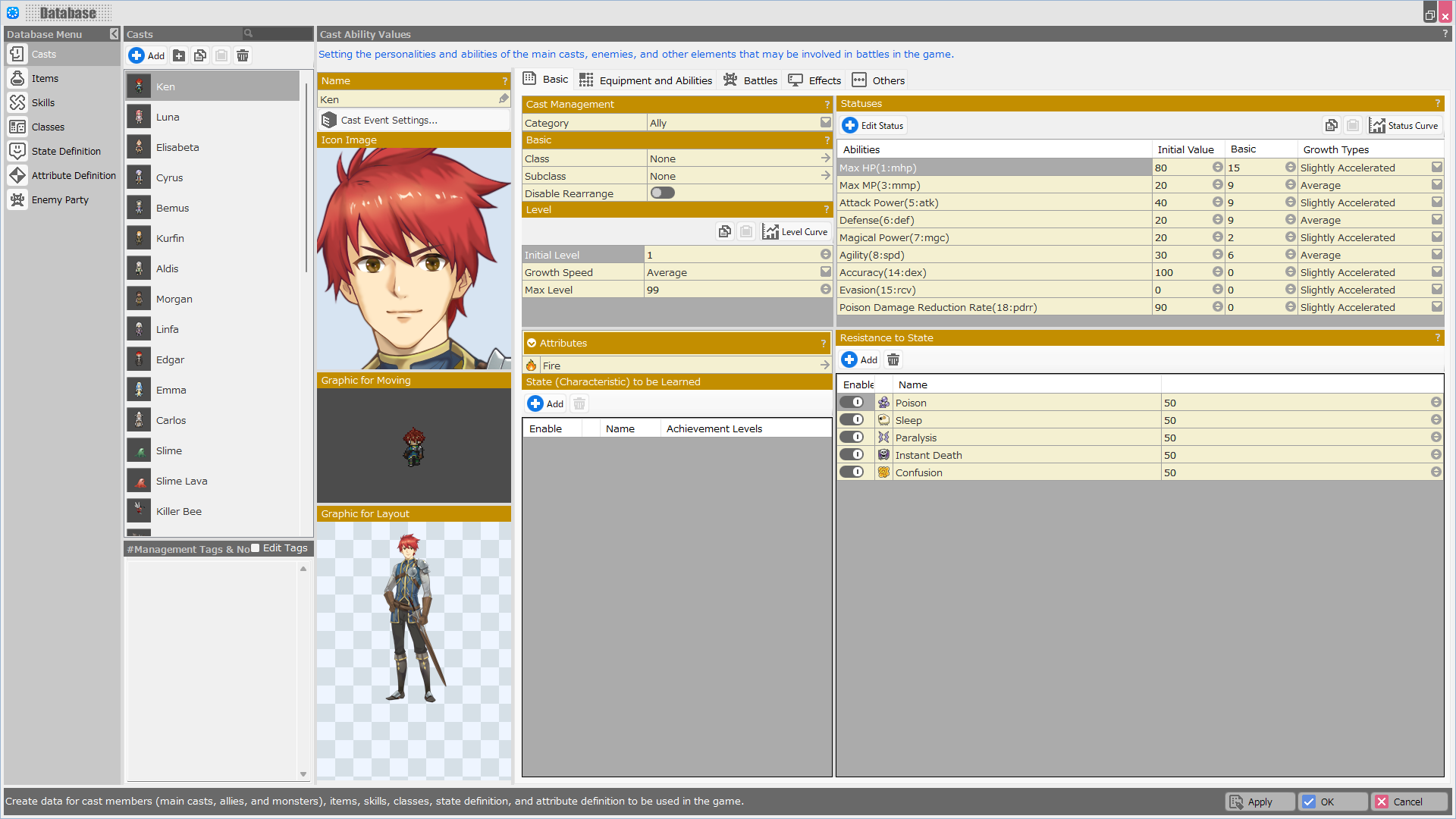
The main character in the game and the characters who are either allies, enemy monsters, or both are generally referred to as "casts".
This section is mainly used to specify the basic stats of the cast, such as HP, MP, attack power, and magic, as well as the personalities and abilities of the available skills, items, and other elements that may be involved in battles in the game.
Function Description†
- Add Folder
Create a folder.
- Copy
Copy the data of the selected casts.
- Paste
Paste the copied cast data into the last column.
- Delete
Delete data for the selected cast.
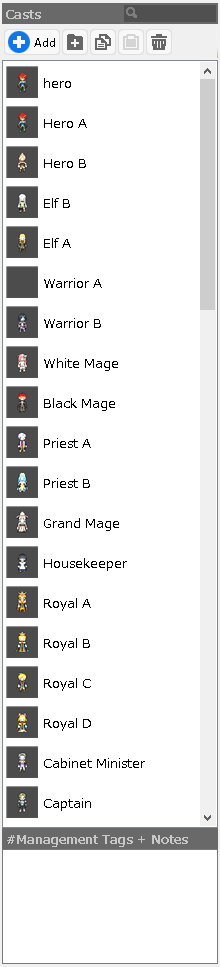
- Management Tags + Notes
You can add management tags and jot down memorandums.
Tags are registered by adding # to the beginning of the line. Tags and notes entered in this field will not appear in the game.
The specified tags can be used to narrow down the entries displayed in the "Picture Book" screen, etc., by specifying them in the Layout Tool function.
Cast Ability Values†
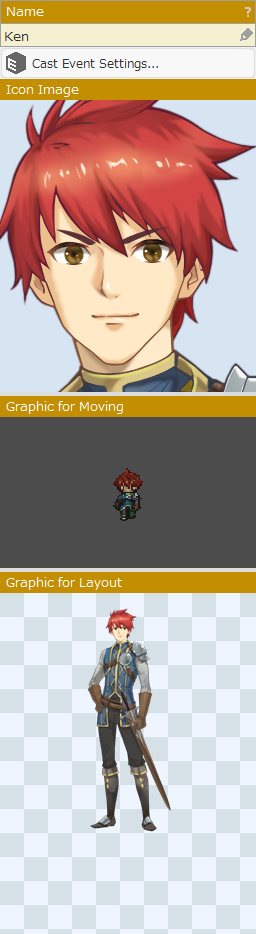
- Name
Specify the name of the cast.
- Cast Event Settings
Use a command script to specify unique events for the cast.
- Icon Image
Specify an image for the icon.
- Graphic for Moving
Specify the graphic to be used during the game and while moving around.
- Graphic for Layout
Specify the graphic to be displayed on the status screen during the game.
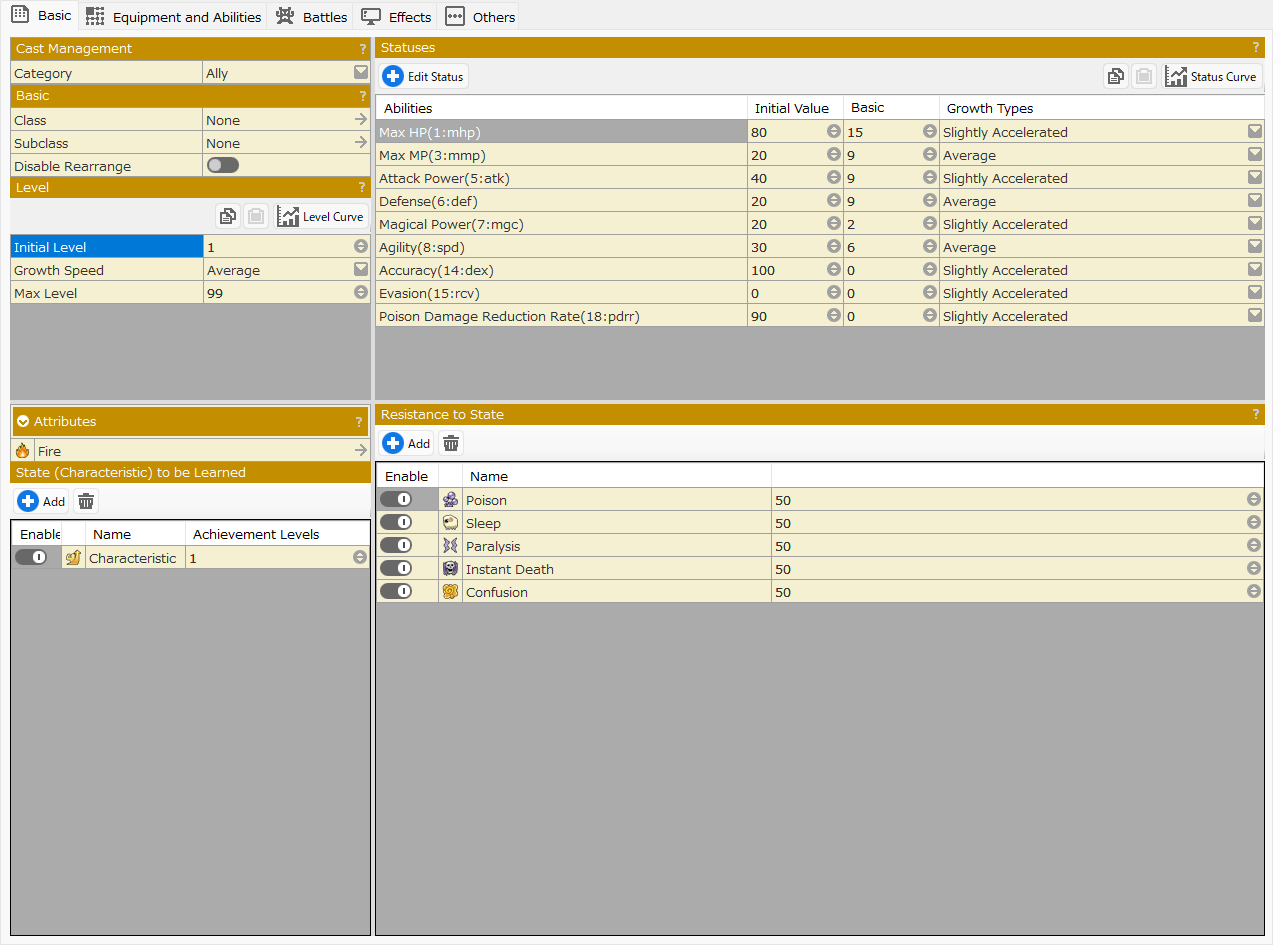
Cast Ability Values : Basic†
Cast Management†
Specify the type of cast.
- Category
Specify the ally or enemy setting.
- Ally
This cast is used by the main cast and other accompanying members of the party.
- Enemy
This cast can be specified as an enemy monster.
- Both
This cast can be used by both ally and enemy.
- None
Used to create NPCs.
Basic†
Specify the initial status of the cast.
- Class
Specify the cast's class. You can specify a cast member's class from the classes registered in the Database > Classes.
The status addition value specified for the assigned class is added to the cast's status.
The amount to which the status addition value is reflected in the cast's status can be specified under "Parameter Reflection Rate (Class)" in Game Settings > Rules and Rendering.
- Subclass
Specify the subclass of the cast member. You can assign one of the classes registered in Database > Classes.
The status addition value specified for the assigned class is added to the cast's status.
The amount to which the status addition value is reflected in the cast's status can be specified under "Parameter Reflection Rate (Subclass)" in Game Settings > Rules and Rendering.
- Disable Rearrange
If turned on, this cast member will not be selected for replacement in the Replace Members screen.
For example, if you want to fix the main cast member at the top of the party member, please use this function.
Level†
- Initial Level
Specify the level when the game starts.
- Growth Speed
You can select preset data for the rate of increase in experience required to level up.
Please see the section Formula for Level Increase by Experience for the required experience calculation formula and preset default data.
In the Level Curve dialog, if you change the preset data, this field will show "Custom".
- Max Level
You can set the maximum level of this cast that can be reached during the game.
The range can be less than or equal to the value specified in Game Definition > Rules and Rendering > "Max Level".
The maximum level of the cast can be changed by using an event.
You can specify how each status changes when adding/deleting statuses and when leveling up.
The upper/lower limits for the added statuses are 0 to 999999.
However, statuses using the following keywords have a limited range of increase or decrease in status values due to the effects of items and other elements.
| Keyword | Default Name | Description |
| mhp | Max HP | It cannot be less than 1. |
| dex | Accuracy | Values beyond the range of 0% to 100% are ignored. |
| rcv | Evasion Rate | Values beyond the range of 0% to 100% are ignored. |
| pdrr | Poison Damage Reduction Rate | Values beyond the range of 0% to 100% are ignored. |
- Status Settings
- Initial Value
Specify the initial value of each ability.
- Basic Increase Value
This is the basic value added to the status when the level is increased.
This value is added to the Growth Type.
- Growth Types
Choose from several types of preset data for status growth rates.
When leveling up, this specification is added to the Basic value to determine the status value.
If you change the preset data in the Status Curve dialog, this field will show "Custom".
Please see the section Formula for Each Status Increase for the formula for calculating the status increase in the Growth Type.
Attributes†
You can specify which attributes this cast has.
You can choose from among the attributes specified in Attribute Definition.
State (Characteristic) to be Learned†
Specify the “state” that this cast learns as a characteristic.
- The “state” that can be set as a characteristic has the following conditions.
- All removal conditions must be unset.
- The "Force Granting Below a Certain Value" ability is not set.
- Even if the above does not apply, the state can be set as a characteristic if the #characteristics tag is used.
- Enable Switch
Turning it off will disable the entry.
Please use this function for debugging and other purposes.
- Name
The name of the characteristic.
- Achievement Levels
Specify the level at which the characteristic can be learned.
Resistance to State†
You can specify the resistance to state changes (the value of increase or decrease in the probability of going into a state).
Press the “Add” button, select “State”, and specify the increase or decrease value of the resistance.
"State" can be added in State Definition.
Level Curve Dialog†
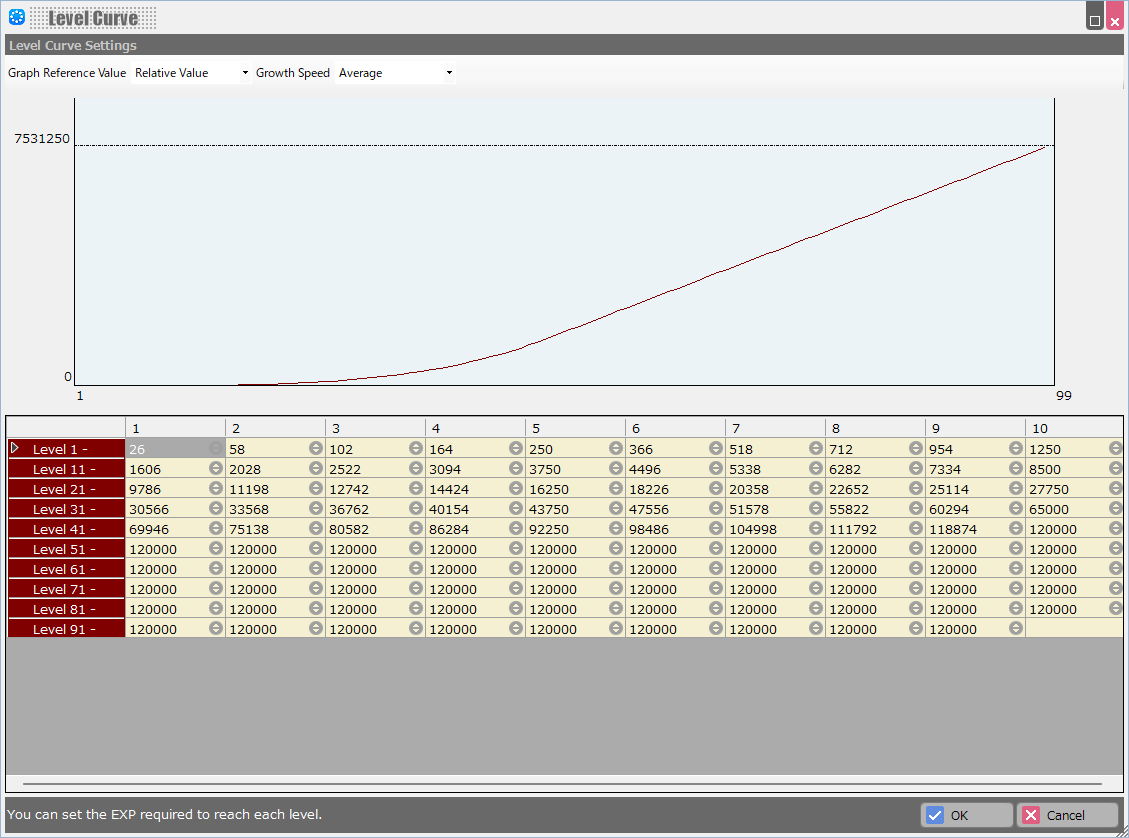
This dialog allows you to specify in detail the amount of experience required for a cast member to reach the next level.
- Graph Reference Value
Reference values for the graph and table can be switched between "Relative Value" and "Absolute Value".
- Growth Speed
You can select preset data for the rate of increase in experience required to level up.
It is linked to the settings on the Casts > Basic tab, and any changes specified here will be reflected in the Basic tab.
- Experience Amount Settings
You can customize the level curve by entering values in the table portion of the dialog.
The range of values entered into the table is 1 to 9999999.
- When the Graph Reference Value is "Relative Value"
- Negative values are not allowed.
- Multiple cells can be selected and the same value entered at the same time.
- When the Graph Reference Value is "Absolute Value"
- You cannot specify that the amount of experience will be less than the previous level.
Status Editor†
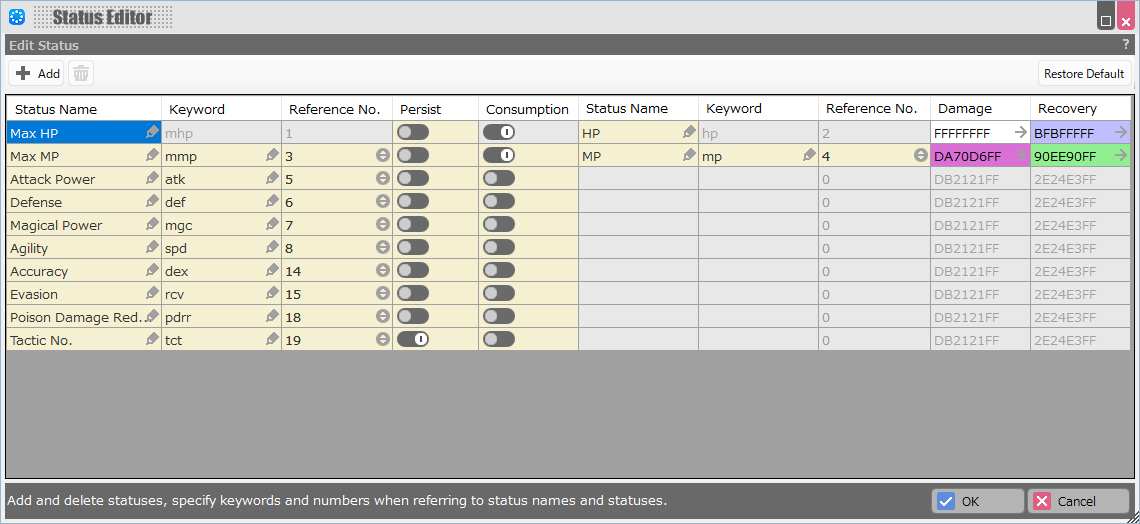
This dialog allows you to add/delete statuses.
Keep in mind that changes made in this dialog will affect other database entries ( items/skills/classes/state definitions), layout data, events, etc. throughout the game.
- Delete Button
Delete the selected status.
- However, only "Maximum HP" cannot be deleted.
- If Accuracy (keyword: dex) is deleted, it is treated as 1 fixed value "100".
All other statuses are treated as "0".
- Restore Default Button
Change the statuses to the default state of this tool.
Note that your customizations will be lost.
- Default Status Settings
| Status Name | Keyword | Reference No. |
| Maximum HP | mhp | 1 |
| Maximum MP | mmp | 3 |
| Attack Power | atk | 5 |
| Defense Power | def | 6 |
| Magical Power | mgc | 7 |
| Agility | spd | 8 |
| Accuracy | dex | 14 |
| Evasion Rate | rcv | 15 |
| Poison Damage Reduction Rate | pdrr | 18 |
- Status Name
You can change the status name.
- Keyword
These are keywords that Bakin programs use internally to refer to status, such as events and damage formulas.
For example, a status with the keyword mmp is treated as "maximum MP" regardless of the status name.
Words that overlap with other statuses cannot be specified.
[Important]
The event panels that perform some operation on "MP" operate on the status of the keyword "mmp".
- Reference No.
Reference number to use as a parameter for special formats in Layout Tool.
This value is also used for the status number that can be obtained from event panels.
Numbers that overlap with other statuses cannot be specified.
- Persist
If this setting is turned on, any changes made to this status using battle events will carry over even after the battle ends.
- Consumption
When turned on, this status becomes a consumption status with a "maximum value" and a "consumption value".
Think of it as the relationship between "maximum HP" and "HP," for example.
The settings to the left of this field are for the "maximum value" status, and the settings to the right are for the "consumption value" status.
- Status Name (Consumption Value)
The status name of the "consumption value."
- Keyword (Consumption Value)
The keyword is "consumption value."
- Reference No. (Consumption Value)
Reference number of the "consumption value".
- Damage Numeric Color
Specify the color of the "damage numbers" that are displayed when the "consumption value" is reduced, i.e., when damage is taken.
- Recovery Numeric Color
Specify the color of the "damage numbers" that are displayed when the "consumption value" is increased, i.e., recovered.
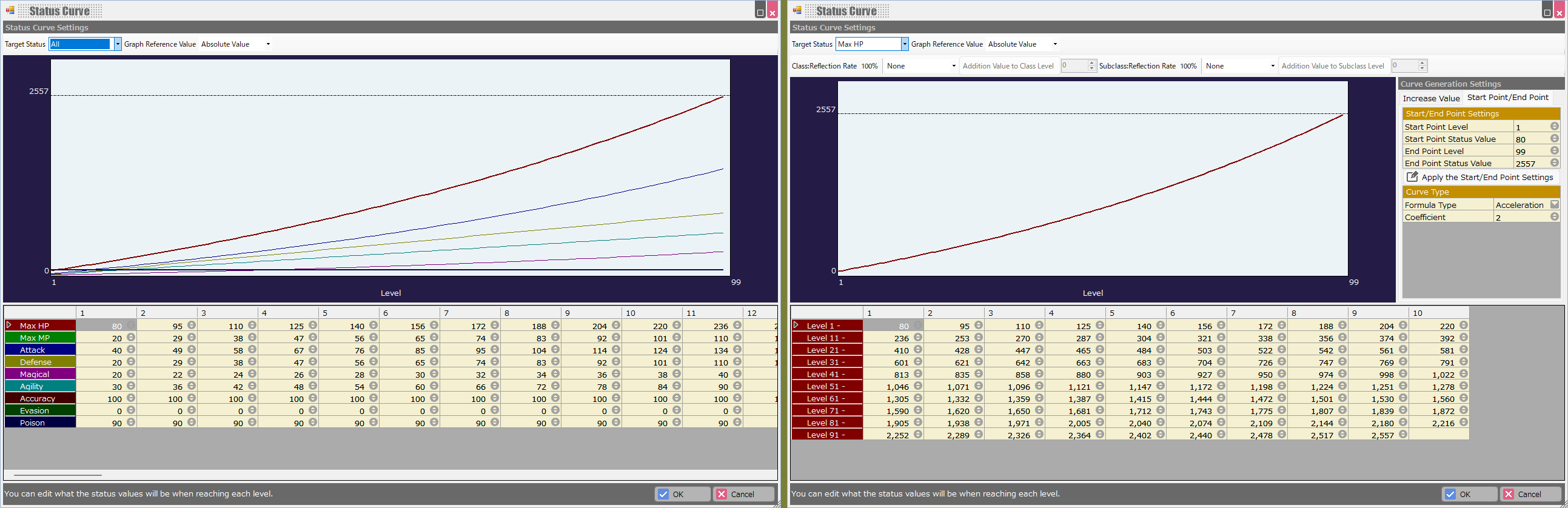
Status Curve Dialog†
This dialog allows you to specify in detail what values each status will have when leveling up.
The view changes depending on the "Target Status" setting.
- Target Status "All" (Left image)
This view shows status values and the graph for all statuses at the same time and allows the user to change each status value.
- Target Status
The status displayed in the graph and table can be switched between "All" or "Single Status".
- Graph Reference Value
Reference values for the graph and table can be switched between "Relative Value" and "Absolute Value".
The range of values entered into the table is 0 to 999999 for "Absolute Value" and -999999 to 999999 for "Relative Value".
- Target Status "Single Status" (Right image)
This view shows status values and the graphs for individual statuses and allows the status values to be changed.
- Class/Subclass
This function allows you to display a graph with a dotted line that adds the influence of class/subclass to the status.
- Reflection Rate
This is the percentage of the value of the class/subclass setting that is added to the status, which can be specified under "Parameter Reflection Rate" in the Game Definition > Rules and Rendering.
- Class/Subclass Settings
Specify the class/subclass you wish to have reflected in the graph.
You can choose from any class you have created in the Database > Classes.
- Addition Value Button to Class/Subclass Levels
By activating this button (blue underline will be shown), a dotted line graph will be displayed, adding the influence of class/subclass to the status.
The field next to this button to specify a value is a feature to facilitate estimating status values even in cases where the cast level and class/subclass level values do not match.
A graph will be displayed showing the cast level plus the class level status addition value specified in this field.
Example: If the value is specified as 1, the graph will show the status value for "cast level 1" plus the status addition value for "class level 1+1=2".
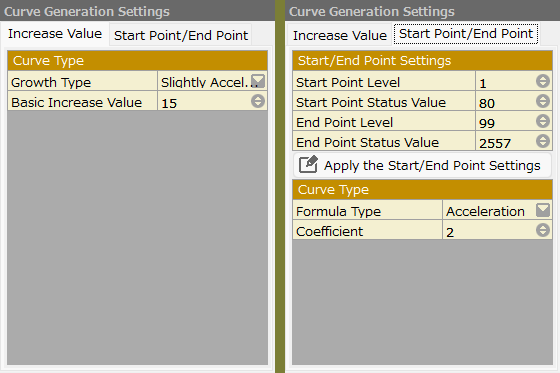
- Curve Generation Settings
This function supports the generation of status curves.
- [Increase Value] Tab
The default growth formula is used to generate a curve from level 1 to the maximum level, adding the Basic Increase Value and the effect of the Growth Type to the formula.
See Formula for Each Status Increase for the growth formula.
- Basic Increase Value
It is a basic value that is added to the status at each level up.
This setting is linked to the same entry on the Basic tab.
Any changes specified here will be reflected in the same entry on the Basic tab.
- Growth Types
The coefficient used in the growth formula.
This setting is linked to the same entry on the Basic tab.
Any changes specified here will be reflected in the same entry on the Basic tab.
- [Start Point/End Point] Tab
Specify the start and end levels, the status value at that level, and generate a curve connecting them.
This method can generate a "curve between Lv 20 and Lv 50" or a "curve with a status value of 500 at Lv 50".
- Start Point/End Point Level
Specify the start point/end point level of the curve you wish to generate.
The end point level must always be specified higher than the start point level.
- Start Point/End Point Status Value
Specify the status value at the start/end point level.
The status value of the end point may be smaller than that of the start point.
- Apply the Start/End Point Settings button
This button reflects the start/end point settings and allows the "curve type" to change the curve between the two points.
- Formula Type
Select a formula to generate a curve connecting the start/end points.
- Coefficient
The coefficient to multiply the selected formula.
The larger the value, the more extreme the curve.
Cast Ability Values: Equipment and Abilities†
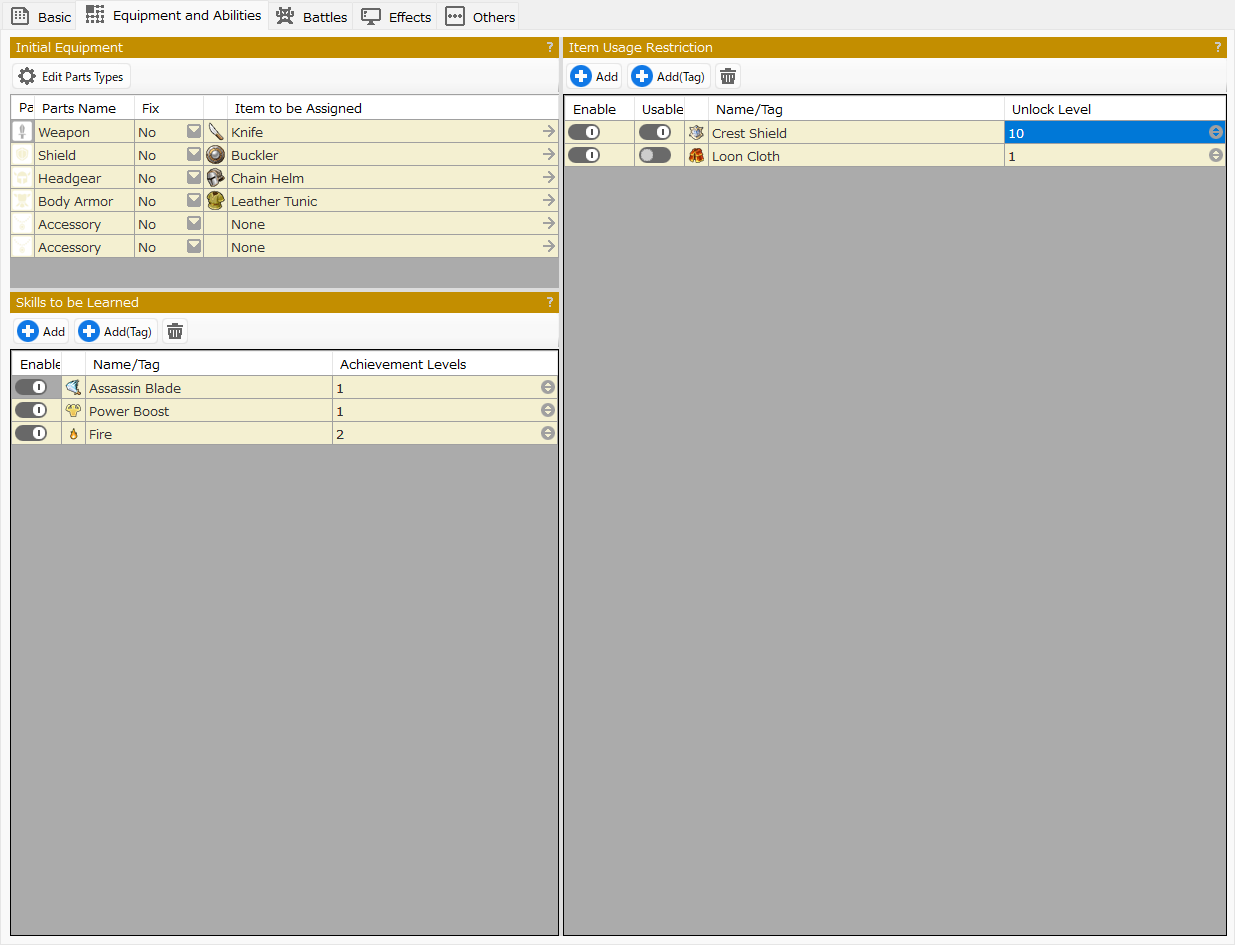
Initial Equipment†
Specify the equipment for this cast when they appear in the game.
You can equip items set as weapons or armor in Database > Items.
Items marked (Common to All Casts) are settings shared by all cast members.
- Parts Icon (Common to All Cast)
This is an icon representing part locations. Changes can be made in the Edit Parts Types dialog.
- Parts Name
This is the part name. Changes can be made in the Edit Parts Types Dialog.
- Fix
Configure whether the specified equipment can be removed or not.
- No
Equipment in this part can be freely attached and removed.
- Yes
Equipment is locked to what is specified here and cannot be removed during gameplay.
- Disable "None"
The "Remove" option will not appear in the equipment selection screen for this part.
This means the part must always have some equipment assigned.
- Item to be Assigned
Select the equipment to be assigned to this part from the asset picker.
- ''Edit Parts Types'
Opens a dialog for configuring settings related to the wear location.
- Add
Additional equipment parts can be assigned.
The number of assignable parts is as follows:
| Weapon or Shield | Headgear | Body Armor | Leg Armor | Accessory |
| 2 | 1 | 1 | 1 | Unlimited |
- Delete
The equipment parts can be deleted.
(!)When you delete an equipped part, any "Equipped Part Settings" specified in the item's state abilities will also be removed.
For example, if you delete the "Headgear" part, any item abilities that designate headgear as the equipped part will become invalid.
Please make sure to double-check that removing a part does not cause unintended effects elsewhere.
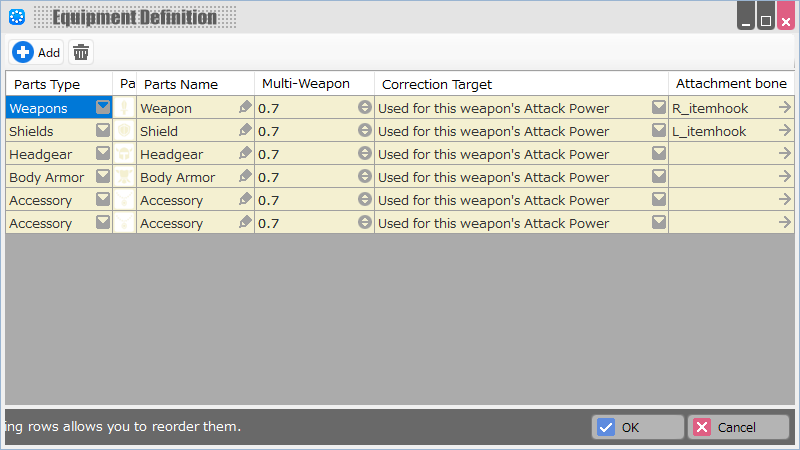
- Equipped Parts (Common for All Casts)
Specify the equipment part where the item will be equipped.
- Part Icon (Common for All Casts)
You can assign an icon to visually represent the equipped part.
- Parts Name
Set the name of the part.
- Multi-Weapon Modifier
If multiple pieces of equipment in the Database > Items have "Damage" enabled, the system will perform one attack roll per such item.
For example, if two damage-enabled weapons are equipped, two attacks will be executed.
The Multi-Weapon Modifier adjusts the damage for each attack made with these weapons.
If only one attack occurs, the modifier will not be applied.
- Damage Calculation Flow
The following is the process for calculating damage during one attack:
1. The character's base Attack Power is added to the total Attack Power of all equipment with Damage turned off.
Then, the Attack Power of the currently attacking equipment with Damage enabled is added to this total.
This becomes the total Attack Power for the current attack.
2. The weapon's Damage Formula is used to calculate the damage using the total Attack Power.
3. The final damage is then multiplied by the Multi-Weapon Modifier set for the currently attacking part.
Example:
A cast has the following equipment: "Weapon 1", "Weapon 2", and "Armor 1".
Both "Weapon 1" and "Weapon 2" have Damage enabled.
When the cast attacks, two attack calculations are performed:
- First Attack
(Cast's Attack Power + Armor 1's Attack Power) + Weapon 1's Attack Power = Total Attack Power A
(Total Attack Power A applied to Weapon 1's Damage Formula) * Weapon 1's Multi-Weapon Modifier = Final damage of the first attack
- Second Attack
(Cast's Attack Power + Armor 1's Attack Power) + Weapon 2's Attack Power = Total Attack Power A
(Total Attack Power A applied to Weapon 2's Damage Formula) * Weapon 2's Multi-Weapon Modifier = Final damage of the second attack
- Attachment Bone
Specify the bone to which the equipment for this part will be attached.
This setting is only valid when the cast uses a 3D model.
- Correction Target
Select the target to apply the Multi-Weapon Modifier to from the following options:
- This Weapon's Attack Power
- Total Attack Power
- Total Damage
- Use in Formula
Selecting “Use in Formula” assigns the modifier value to the “Multi-Weapon Modifier:mwm” formula.
Selecting any other target multiplies the modifier value by each respective value.
Skills to be Learned†
Set the skills this cast can learn.
Click the Add button to select a skill and specify the level at which it will be learned.
You can also use tags defined for each skill in Database > Skills to specify them.
- Enable Switch
Turning it off will disable the entry.
Use for debugging or other purposes.
- Name/Tag
The name or tag of the skill to be learned.
- Achievement Levels
The level at which the cast will learn the specified skill.
- Relationship with skill acquisition levels set in the Class
There is also a skill acquisition setting section in Database > Classes.
If the cast has a class and/or subclass assigned, conditions will be evaluated individually for the cast, the class, and the subclass.
The skill will be learned if any of these meet the condition.
- Level Referenced
The cast uses its own level, while the class and subclass use the class level and subclass level respectively.
Example 1: In the following case, the skill is learned when the cast reaches level 2.
Example 2: In the following case, the skill is learned when the class level reaches 3.
Item Usage Restriction†
Configure restrictions for items that cannot be used.
You can also set items to become usable when the cast reaches a certain level.
Tags defined in Database > Items can also be used to specify groups of items.
Example: To create a cast that cannot use any sword-type weapons, configure the following:
- In Database > Items, assign the tag #Sword to all sword-type items.
- In the Item Usage Restriction section, use the Add (Tag) button to specify the #Sword tag.
- If you want to allow only specific swords within the #Sword tag group, use the Add button to select individual items and turn Usable ON for those.
- Enable Switch
Turning it off will disable the entry.
Use for debugging or other purposes.
- Usable
If OFF, the selected item cannot be used.
To use Unlock Level, this option must be turned ON.
- Name/Tag
The name or tag of the item you wish to restrict.
- Unlock Level
Set the cast level required to unlock usage of this item.
This option only works if Usable is turned ON.
- Relationship with Item Usage Restrictions Set in the Class
The Usable and Unlock Level settings configured in Database > Classes work as follows:
- Priority of Settings
The priority of item usage restriction settings is as follows:
Class>Subclass>Cast
If an item is restricted in the Class, it cannot be used even if it is allowed in the Subclass or Cast settings.
- Level Referenced
The cast uses the cast's level, while the Class and Subclass refer to the class level and subclass level, respectively.
Example 1: In the following case, the specified item becomes available for use when the class level reaches 4.
| Cast | Unusable |
| Class | 4 |
| Subclass | 3 |
| Cast | 2 |
| Class | Unusable |
| Subclass | 3 |
Cast Ability Values: Battles†
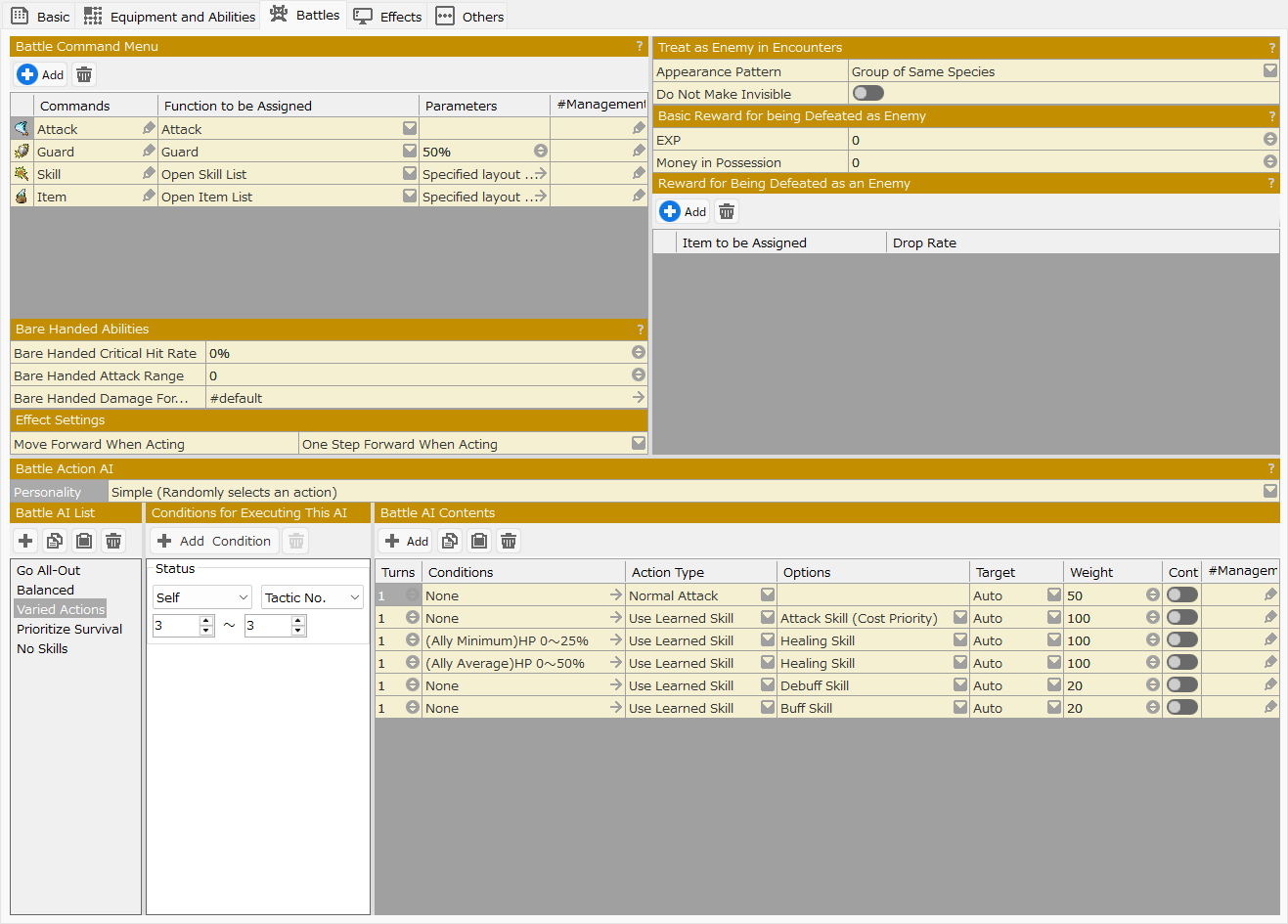
Battle Command Menu†
Specify the commands to be used in battle.
- Add button / Delete button
Add/delete battle commands.
If none of the battle commands are specified for a cast, the command selection during battle will be skipped.
- Icon and Command Name
The icon is selected from the asset picker. The command name can be specified freely.
- Function to be Assigned
Select the function of the command by pressing a pull down.
There are ten types to choose from: None, Attack, Charge, Guard, Open Skill List, Open Item List, Same Effect as Skill, Swap Places, Switch Members and Same Effect as Skill(Consumption).
- "Swap Places" is a feature that consumes one turn to change the order of the party in battle.
- “Switch Members” is a feature that displays the Replace Members screen and allows you to replace a member with a reserve member, consuming one turn.
- “Same Effect as Skill” allows you to select abilities from registered skills.
- With “Same Effect as Skill (Consumption),” when the skill activates, the elements assigned to that skill (such as MP) are consumed.
- Parameters
The following settings can be made according to "Function to be Assigned".
- The "Charge" and "Guard" can specify a percentage of the effect.
- The "Open Skill List," "Open Item List" and “Switch Members” allow you to assign the layout to be used as a list.
You can choose from the layouts registered on the "Battle Skill Selection," "Battle Item Selection" and “Replace Members” screens, respectively.
- For "Same Effect as Skill" and "Same Effect as Skill(Consumption)," you can select an effect from the registered skills.
- Management Tags
You can tag battle commands.
You can assign the tag you have applied here under “Disable Command” in State Definition > State Abilities.
Note that the actions that can be selected in “Function to be Assigned” are assigned a system-defined tag, so there is no need to specify the tag again.
Bare Handed Abilities†
- Bare Handed Critical Hit Rate
Sets the critical hit rate when attacking bare handed.
If a weapon is equipped, the weapon’s critical rate is used and this setting is ignored.
- Bare Handed Attack Range
Specify the range of an unarmed attack.
This setting is enabled when "Use Attack Range" is turned on in Game Definition > Rules and Rendering.
The unit of attack range is the grid on the battle layout.
The possible attack range by range value depends on the setting of Game Definition > Rules and Rendering > Attack Range Judgment Type.
See below for details.
Rules and Rendering#AttackRange
- Bare Handed Damage Formula
You can specify the damage formula for a physical attack by this cast without an item.
Effect Settings†
- Move Forward When Acting
You can specify whether or not this cast should take one step forward when performing actions such as a normal attack or a critical hit.
You can also choose whether or not to have a walking motion when moving forward.
Treat as Enemy in Encounters†
Specify the characteristics to be used as an enemy in an encounter battle.
- Appearance Pattern
Select the appearance pattern for encounters from "Always Alone", "Group of Same Species", and "Group of Multi-species".
- Do Not Make Invisible
When checked, this cast will not become invisible even if it is KOed after an encounter battle.
Basic Reward for Being Defeated as an Enemy†
Specify the basic rewards available in the result after a victory when this cast is used as an enemy.
- EXP
Specify the experience obtained by the main cast when defeated as an enemy.
- Money in Possession
Specify the money obtained by the protagonist when defeated as an enemy.
Reward for Being Defeated as an Enemy†
Specify the rewards available in the result after a victory when this cast is used as an enemy.
- Item to be Assigned
Specify the drop items that will be available when winning a battle with this cast.
- Drop Rate
Specify the probability of dropping that item as a percentage.
Battle Action AI†
When a cast appears in battle as an enemy, you can configure how they will behave depending on the battle turn and situation.
Multiple Battle AIs can be configured and switched between according to specified conditions.
The action to be taken on a given turn is selected randomly from the actions whose conditions are met, taking into account the "Weight" assigned to each action.
- Personality
Specify which pattern of actions set in "Battle Action AI" will be used.
- When a cast member with this option set to "Intelligent" or "Cunning" activates a skill, if the target of the action meets any of the following conditions, the use of the skill will be abandoned or the target of the skill will be changed.
- Skill targets all, and someone is in "reflection" state
- Skill targets a single target, but everyone is in a "reflection" state
- When the target of the skill is a single target, if someone is in the "reflection" state, he/she is not a candidate for the target.
- Battle AI List
You can add Battle AIs.
A Battle AI whose conditions specified in "Conditions for Executing This AI" are met will be executed.
If there is no Battle AI whose execution conditions are met, the cast member will take no action.
- Add/Copy/Paste/Delete Buttons
Add, copy, paste, or delete a Battle AI.
- Conditions for Executing This AI
Set the conditions under which the Battle AI will be executed.
- Add Condition Button
Add a condition under which the Battle AI will be executed.
You can specify conditions by combining the following:
| Event Switch | The condition is met depending on whether the event switch is ON or OFF. | Both numerical variables and local numerical variables can be referenced. However, local numerical variables are not shared with the cast member's custom events. |
| Variable Box | The condition is met when the value of the variable box is within the specified range. | Both numerical variables and local numerical variables can be referenced. However, local numerical variables are not shared with the cast member's custom events. |
| String Variable | The condition is met when the value of the string variable is within the specified range. | |
| OR (A or B) | Specify multiple conditions. The condition is met if either of the specified conditions is satisfied. | |
| HP | The condition is met when the HP value of the specified target is within the specified percentage (%). | |
| MP | The condition is met when the MP value of the specified target is within the specified percentage (%).
("MP" refers to a status for which the keyword: mmp is specified.) | |
| Level | The condition is met when the level of the specified target is within the specified percentage (%). | |
| Turn | The condition is met when the battle turn is within the specified number of turns. | The first turn is counted as Turn 1. |
| State Changes | The condition is met depending on whether the specified "State" is applied to the specified target. | |
| Status | The condition is met when the specified status value of the specified target is within the specified range. | |
| Consumption Status (%) | The condition is met when the specified consumption status value of the specified target is within the specified range. | |
| Distance (Attack Range) | The condition is met when the attack range of the specified target is within the specified range. | |
| Equipment | The condition is met depending on whether this cast member has the specified equipment equipped. | |
| Class | The condition is met depending on whether this cast member has or does not have the specified class assigned. | |
- Delete Button
Delete the selected condition.
- Battle AI Contents
Set the actions that the cast member can take during battle.
Configure the conditions for determining which action to execute and the behavior when the action is executed.
- Add Button
Add an action that the cast member can take during battle.
- Copy/Paste/Delete Buttons
Copy, paste, or delete the selected action.
- Turns
For actions, turns can be specified separately from the "Conditions" section.
Add turns with the + button.
If more than 1 turn is specified, the action will be chosen only for that turn.
Unlike "Conditions," this turn loops, so if you specify actions for turns 1 to 3, the fourth turn will be the action that specifies 1 in the turn section.
If 0 is specified, it will be selected in all turns in which there is no turn-specified action. However, if "counterattack" is specified as a condition for action, the counterattack will be made against enemy attacks in any turn.
If multiple actions are set for the same turn, the method for selecting which action to execute is described in “Weights”.
- Example 1:
In this case, the turn 1 action is repeated for all subsequent turns.
- Example 2:
In this case, the specified action "Critical" is selected in turn 1.
In turn 2 without turn specification, the choice is made among actions with 0 in the turn specification. In this case, it will be "Attack".
In turn 3, the specified action "Guard" is selected.
After turn 4, it will be Critical -> Attack -> Guard -> Critical -> Attack -> Guard ......
- Conditions
Set the conditions that determine whether this action will be executed.
The conditions that can be set are the same as "Conditions for Executing This AI", except for the condition below, When Attacked (Counterattack).
| When Attacked (Counterattack) | When enabled, the same action will be executed again immediately after being attacked. | - An action with this condition enabled will no longer be selected when its turn comes around.
-If the action performed under this condition targets a single opponent, the target will be the opponent who attacked the cast.
-If the action performed under this condition targets the cast alone, the target will be the cast.
-When this condition is set, the Continuous setting is turned off.
-If Turn 0 is specified, the cast will counterattack against enemy attacks on any turn, as long as the other conditions are met.
-If a turn other than Turn 0 is specified, the cast will counterattack on the specified turn and on turns where no action with a specified turn is set. |
- An action with multiple conditions specified will not be executed unless all of its conditions are met.
- If there are no actions that meet the action conditions, the action type Do Nothing will be selected for that turn.
- Action Type
Specifies the action that the cast will perform during the turn.
The available action types are as follows.
| Normal Attack | Performs a normal attack. |
| Critical | Performs a normal attack. If this attack hits, it is treated as a critical hit. |
| Critical Hit (Sure Hit) | Performs a normal attack. This attack is guaranteed to hit and is treated as a critical hit. |
| Do Nothing | Does nothing. |
| Use Skill | Uses the skill specified in the options. |
| Use Learned Skill | Uses a learned skill that meets the conditions specified in the options. |
| Guard | Reduces damage received during that turn according to the percentage specified in the options. |
| Charge | When performing a normal attack on the next turn, the cast's attack power is increased by an amount equal to the attack power multiplied by the percentage specified in the options. |
| Escape | Attempts to flee from the battle.
Party Casts: Success or failure is determined by "Escape" Command Success Rate. If the escape succeeds, the entire party leaves the battle.
Enemy Casts:Escape is always successful. Only the enemy cast that successfully escapes leaves the battle. |
- Options
Depending on the action type, the following elements can be specified.
| Guard | The percentage by which received damage is reduced. If 50 is specified, damage is reduced by half. |
| Charge | The percentage applied to attack power. If 50 is specified, an amount equal to 50% of the attack power is added to the attack power. |
| Use Skill | The skill to use. A skill that the cast has not learned can also be specified. |
| Use Learned Skill | Specifies the conditions used to determine which skill to use from among the skills learned by the cast. |
- “Attack Power” refers to the status that corresponds to the keyword: atk.
- If “Attack Power” is modified by weapons or other factors, the adjustment resulting from “Charge” is calculated based on that value.
When Use Learned Skill is specified as the action type, you can specify the conditions for selecting the skill to use.
A usable skill that matches the respective conditions below will be executed.
| Attack Skill (Power Priority) | The skill's targets include enemies, and at least one of its enemy effects is either "Damage Formula" or "Consumption Status Change (Reduce)."
At least one living enemy that is not under a magic-reflecting effect exists.
For skills that target all enemies, the skill is excluded entirely if even one enemy is under a magic-reflecting effect. |
| Attack Skill (Cost Priority) | Same as Attack Skill (Power Priority). |
| Debuff Skill | The skill's targets include enemies, and at least one of its enemy effects is "Ability Value Change," "Attribute Resistance Change," "State Resistance Change," or "State Granting." |
| Buff Skill | The skill's targets include allies, and at least one of its ally effects is "Ability Value Change," "Attribute Resistance Change," "State Resistance Change," or "State Granting." |
| Healing Skill | The skill's targets include allies, and at least one of its ally effects is "Healing Formula," "Consumption Status Change (Recovery)," or "State Removal." |
- Target
Specifies the target when executing an action.
If the target setting of the skill being used is "Single," the target is determined again according to the conditions specified here.
| Auto | Determines the action target according to the action type or the skill's target setting. |
| Ally | Targets an ally, including the cast. |
| Enemy | Targets an enemy. |
| Oneself | Targets the cast. |
| Anyone Except Oneself | Targets an "Ally" other than the cast. |
- Weight
Specifies the weighting value used when determining which action to ultimately execute from among the actions that can be executed during the same turn.
Selection Probability = Weight of the row / Total Weight of Candidate Rows'
- Example of the Effect of "Weight"
Suppose the three actions above are set for the same turn and all three are executable. The total "Weight" is 250.
Normal Attack (Weight 100) = 100/250 = 40%
Normal Attack (Weight 50) = 50/250 = 20%
Guard (Weight 100) = 100/250 = 40%
As a result, an action is selected with a probability of Normal Attack 60% / Guard 40%.
| Condition | Behavior |
| A row accounting for less than 1% of the total | The row is excluded from the selection candidates (it will never be selected).
Conversely, if the weight of one row is two or more orders of magnitude greater than the others, it can effectively be used to represent the "highest-priority action. |
| Weight 0 | The row will not be selected if there are other rows with a non-zero weight (because 0 is less than 1%). |
| All rows have Weight 0 | Rows are selected with equal probability. |
| Only one candidate row | That row is executed regardless of its weight. |
| Setting Range | 0 to 9,999,999 (default: 100). |
- Continuous
If checked, after performing this action, perform the actions for the next turn continuously.
If an action is selected that is not checked in continuous, or if the number of turns loops back to this action, the continuous action ends.
Examples of Battle AI†
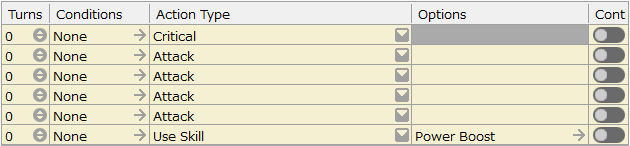
- The simplest example
This is an example of a simple enemy that repeats its normal attack each turn, occasionally uses skills, and also occasionally unleashes a critical attack.
Enemy actions can be specified in this way, and several of them will be chosen at random.
By arranging several of the same action, as in the normal attack in this example, the probability that it will be chosen can be increased. In this example, there are six actions to choose from, so the probability of a non-critical normal attack is 2/3 (about 67%).
(If neither critical nor skill use is needed, just specify one line for normal attack.)
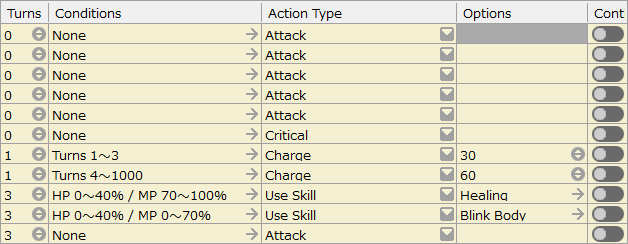
- Example of using simple conditions such as current HP and MP in the concept of turn to act and action conditions
This is an example of a slightly complex enemy that repeats the cycle of charging its strength in the first turn, launching an attack in the second turn, and then doing something else in the third turn.
The "turn" in the first column of the table determines the order in the cycle, and the action conditions further narrow down the candidate actions.
The first turn has two "Charge" specified, and each turn is further specified in terms of action conditions. In this example, the cycle is one of three turns, so the action "Charge," which is specified as an action condition for turns 1 to 3 and an optional attack power increase of 30%, will work only the first time, and "Charge" with an attack power increase of 60% will be selected for the rest of the cycle. In addition, there are actions with a turn 1 specified, so actions with a turn 0 specified are not candidates for selection.
Since nothing is specified for the second turn, turn 0 actions, five normal attacks and a critical are candidates.
In the third turn, action conditions based on the enemy cast's own HP/MP remaining are specified for two actions except for the normal attack. If two or more action conditions are specified in this way, only actions that satisfy all of them will be selected as candidates. Since normal attacks are unconditional, they are chosen as candidates regardless of HP/MP remaining.
After the fourth turn, the cycle repeats itself again.
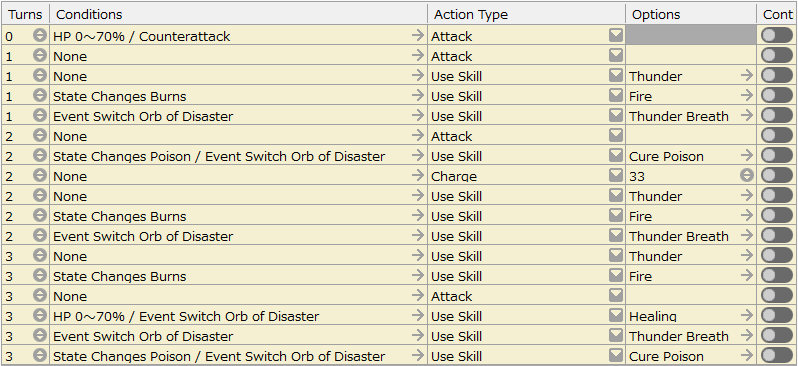
- Those with complex conditions, such as found in event battles, etc.
This is an example of a powerful event boss that launches a variety of skill attacks in a single three-turn cycle.
In this example, the action condition "when the event switch "Orb of Disaster" is ON" is specified for a skill attack. If the player can take some countermeasures before the boss battle in the game and start the boss battle with this event switch turned off, he or she will be able to battle with the advantage of sealing off the overall attack and recovery skills. In this way, the results of prior events can be reflected in the battle.
The skill "Fire" specifies as a condition of action in any turn a change of state of "Burns" created by the state definition in the Database. Only when this cast is in a "Burns" state with this specification will "Fire" be selected.
For example, if you create and specify a state change such as "Awakening" or "Rampage", maybe you can come up with a way for the boss to attack according to the state of the battle.
Also, a counterattack is specified for turn 0. If the enemy's own HP is 70% or less, it will counterattack against attacks by allied casts. In this example, the enemy is returning a normal attack, but it can also use a skill to attack, heal, and so on.
Cast Ability Values: Effects†
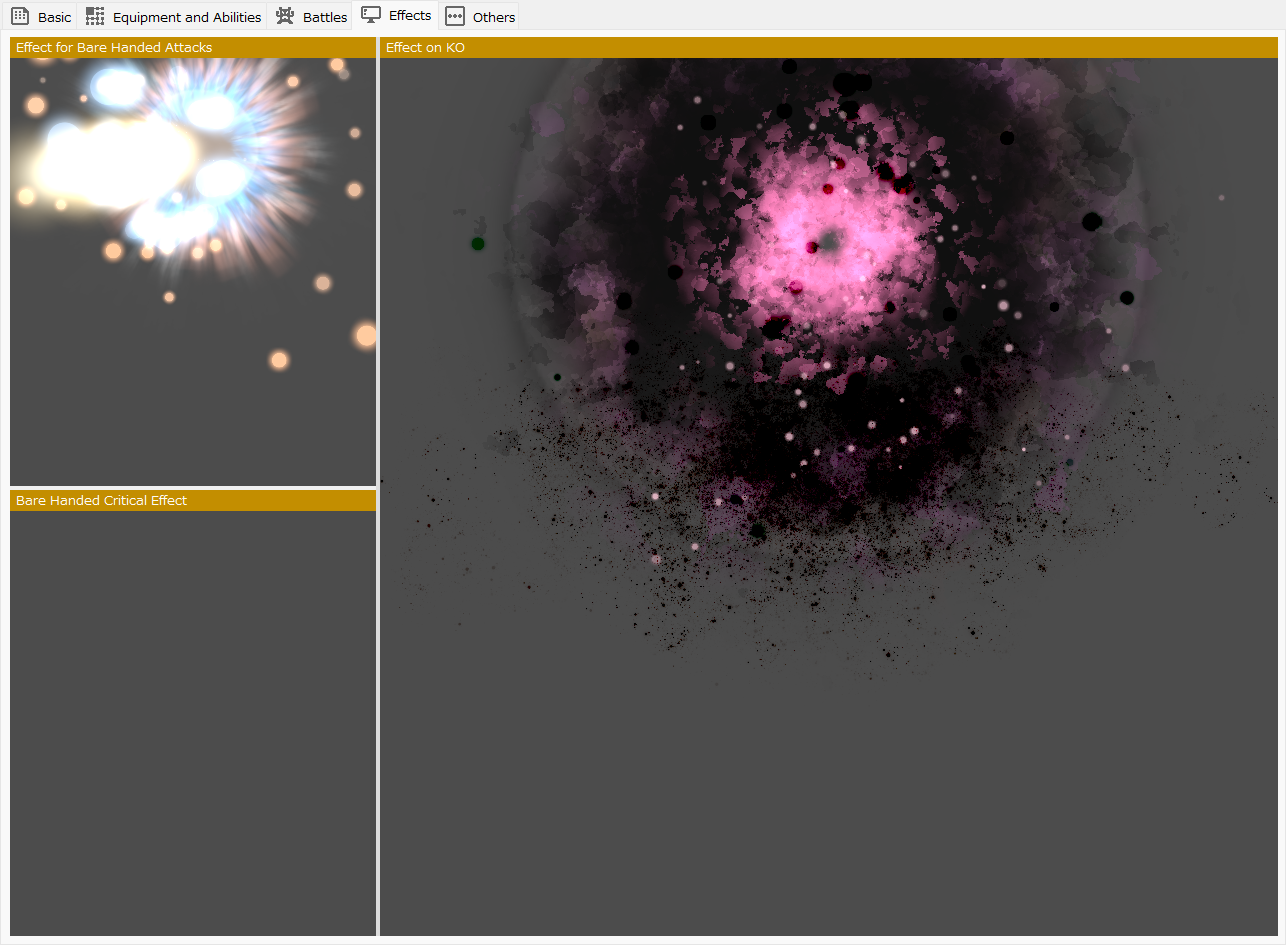
Effect for Bare Handed Attacks†
Specify the effect when a cast member attacks with bare hands and no weapon.
Bare Handed Critical Effect†
Specify the effect when a cast member attacks with bare hands and no weapon and delivers a critical hit.
Effect on KO†
Specify the effect when a cast member is disabled from battle.
Cast Ability Values: Others†
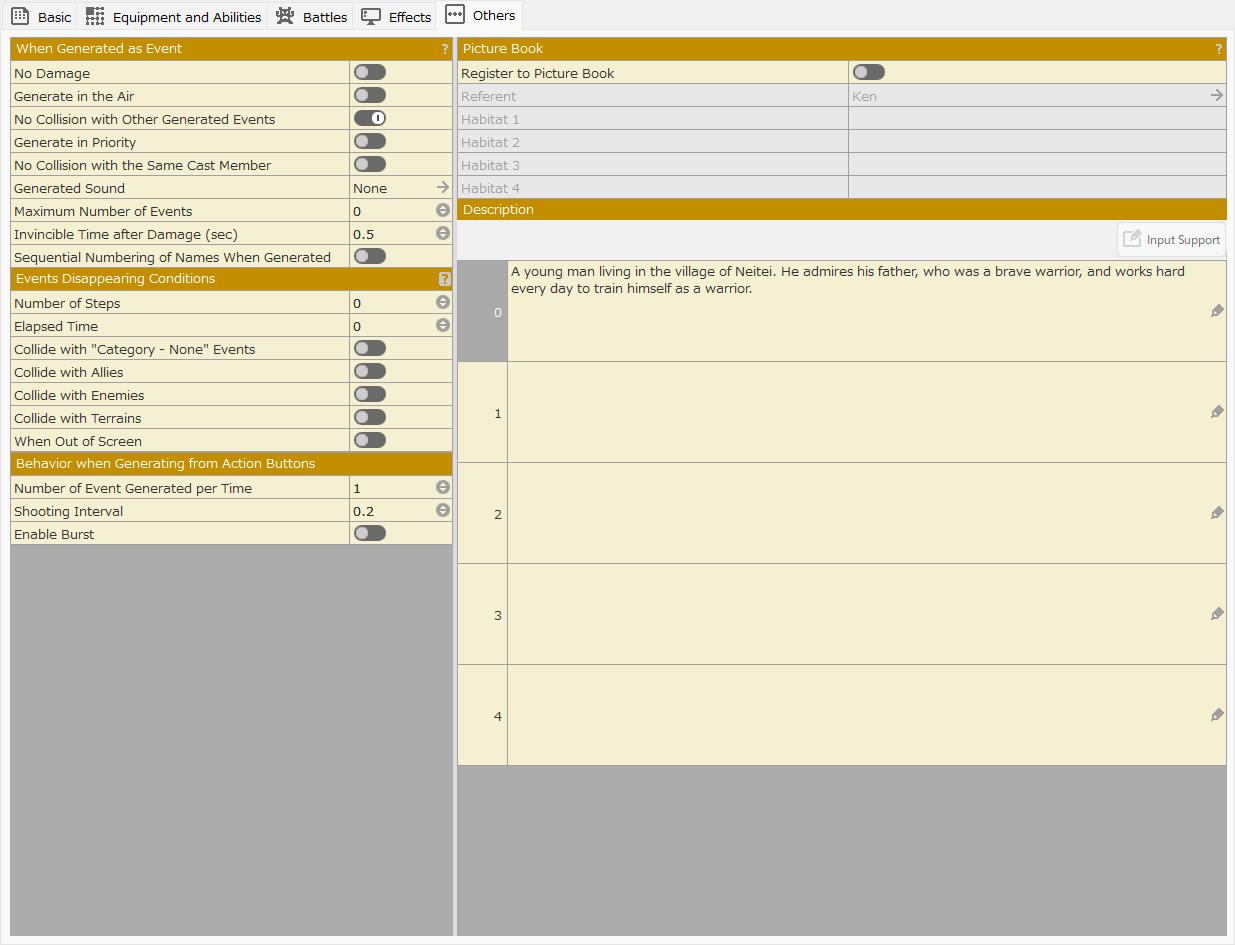
Generate Events†
Specify the characteristics and conditions for dynamically generated
- No Damage
By turning it on, damage will not be counted even if it collides with another cast member.
- Generate in the Air
Generate from the specified Y coordinate.
- No Collision with Other Generated Events
The generated events will no longer collide with each other.
- Generate in Priority
When turned on, when the "Maximum Number of Events Generated" is reached, the oldest events on the screen are deleted and newer events are generated with priority.
The "Maximum Number of Events Generated" is specified in "Game Definition" -> "Move and Operate" -> "Shooting Events (Dynamic Generation)".
- No Collision with the Same Cast Member
The same cast members will not collide with each other even if "Collide with Other Events" is turned on in the cast event setting.
- Generated Sound
Select the sound to be played when the event is generated from the asset picker.
- Maximum Number of Events
Specify the number of events that can exist in the screen at the same time. (0=infinity)
- Invincible Time after Damage (sec)
You can specify the number of seconds of invincibility after taking damage.
- Sequential Numbering of Names When Generated
If turned on, when this cast is generated as cast events, the event name is automatically given a unique name (with a sequential number at the end).
(!)The maximum number to be assigned is the value specified in "Maximum Number of Events Generated" under Game Definition>Move and Operate>Shooting Events. Please note that the number will loop if it is exceeded.
Events Disappearing Conditions†
Specify the disappearing condition for the cast specified as events.
- Number of Steps
Enter the number of steps when the distance moved by the cast is used as a condition.
- Elapsed Time
Enter the time in 0.1 second increments when the cast's movement time is a condition.
- Collide with Non-Attributed Events
If turned on, it disappears when it collides with non-attributed casts of the "Category".
- Collide with Allies
If turned on, it disappears when it collides with allied casts of the "Category".
- Collide with Enemies
If turned on, it disappears when it collides with enemy casts of the "Category".
- Collide with Terrains
If turned on, it disappears when it collides with terrains.
- When Out of Screen
If turned on, the cast disappears when it goes out of the screen.
Behavior when Generating from Action Buttons†
Specify the behavior of this cast when it is assigned to "Game Definition > Move & Operate > Shooting Events" so that it can be generated.
- Number of Event Generated per Time
Specify how many events will be generated per shot.
- Shooting Interval
Specify the interval, in increments of 0.1 second, before the next event is generated.
- Enable Burst
Specify the continuous shooting ON/OFF.
Picture Book†
You can specify the settings to be displayed in the "Picture Book" screen.
The "Picture Book" screen can be created using the Layout Tool.
You can specify when they will be registered in the "Picture Book" by going to Game Definition > Rules and Rendering > Register to Picture Book.
- Register to Picture Book
Specify the data of the cast to be displayed on the picture book.
- Referent
Various data on the cast specified here can be displayed in the Picture Book.
- Habitat
Up to 4 habitats can be specified.
Description†
You can set up to five pieces of text, such as descriptions for this cast, for use in picture books and similar contexts.
The text entered here can be displayed using the special format \(xxxx)desc[] in the Layout Tool > Text Panel. (Specify the text number inside the [] brackets.)
- Input Support
You can insert commands for text formatting such as bold or italic, as well as commands for inserting variables into text.
For available commands, please check theText Formatting and Text Commands page.
Formula for Each Status Increase†
Formula for Each Status Increase†
The "Growth Type" is preset data for the increase rate of each status value when leveling up.
The increase in status with level-up varies depending on the "growth type," but the value is determined by the following formula.
- Formula
Value of Status after Level Up = (Current Value) + (Value of Increase at Previous Level) * (Coefficients for Each Growth Type)
Example: If the basic increase value is 3 and the growth type is "Accelerated," 3*1.02 is added for LV1 to LV2, and 3*1.02*1.02 for LV2 to LV3.
Decimal points are rounded down in the calculation results. However, only the "Value of increase at previous level" is retained as a decimal.
- Coefficients for Each Growth Type
| Accelerated | 1.02 |
| Slightly Accelerated | 1.01 |
| Average | 1.00 |
| Slightly Decelerated | 0.99 |
| Decelerated | 0.98 |
Formula for Level Increase by Experience†
"Growth Speed" is preset data for the rate of increase in experience required to level up.
The amount of experience required to level up varies depending on the "Growth Speed".
The experience table below is based on the case of "Average" growth speed. If other is selected, each factor is calculated and applied to the formula below.
- Formula
Experience Required for Next Level = Value of the Experience Table * Coefficient for Each Growth Speed
- Coefficient for Each Growth Speed
| Early Maturing | 0.98 |
| Slightly Early Maturing | 0.99 |
| Average | 1.00 |
| Slightly Late Maturing | 1.01 |
| Late Maturing | 1.02 |
- Experience Table for "Average" Growth Speed
| Level | Experience Required for Next Level | Total Experience |
| 1 | - | 0 |
| 2 | 26 | 26 |
| 3 | 58 | 84 |
| 4 | 102 | 186 |
| 5 | 164 | 350 |
| 6 | 250 | 600 |
| 7 | 366 | 966 |
| 8 | 518 | 1,484 |
| 9 | 712 | 2,196 |
| 10 | 954 | 3,150 |
| 11 | 1,250 | 4,400 |
| 12 | 1,606 | 6,006 |
| 13 | 2,028 | 8,034 |
| 14 | 2,522 | 10,556 |
| 15 | 3,094 | 13,650 |
| 16 | 3,750 | 17,400 |
| 17 | 4,496 | 21,896 |
| 18 | 5,338 | 27,234 |
| 19 | 6,282 | 33,516 |
| 20 | 7,334 | 40,850 |
| 21 | 8,500 | 49,350 |
| 22 | 9,786 | 59,136 |
| 23 | 11,198 | 70,334 |
| 24 | 12,742 | 83,076 |
| 25 | 14,424 | 97,500 |
| 26 | 16,250 | 113,750 |
| 27 | 18,226 | 131,976 |
| 28 | 20,358 | 152,334 |
| 29 | 22,652 | 174,986 |
| 30 | 25,114 | 200,100 |
| 31 | 27,750 | 227,850 |
| 32 | 30,566 | 258,416 |
| 33 | 33,568 | 291,984 |
| 34 | 36,762 | 328,746 |
| 35 | 40,154 | 368,900 |
| 36 | 43,750 | 412,650 |
| 37 | 47,556 | 460,206 |
| 38 | 51,578 | 511,784 |
| 39 | 55,822 | 567,606 |
| 40 | 60,294 | 627,900 |
| 41 | 65,000 | 692,900 |
| 42 | 69,946 | 762,846 |
| 43 | 75,138 | 837,984 |
| 44 | 80,582 | 918,566 |
| 45 | 86,284 | 1,004,850 |
| 46 | 92,250 | 1,097,100 |
| 47 | 98,486 | 1,195,586 |
| 48 | 104,998 | 1,300,584 |
| 49 | 111,792 | 1,412,376 |
| 50 | 118,874 | 1,531,250 |
| 51 | 120,000 | 1,651,250 |
| 52 | 120,000 | 1,771,250 |
| 53 | 120,000 | 1,891,250 |
| 54 | 120,000 | 2,011,250 |
| 55 | 120,000 | 2,131,250 |
| 56 | 120,000 | 2,251,250 |
| 57 | 120,000 | 2,371,250 |
| 58 | 120,000 | 2,491,250 |
| 59 | 120,000 | 2,611,250 |
| 60 | 120,000 | 2,731,250 |
| 61 | 120,000 | 2,851,250 |
| 62 | 120,000 | 2,971,250 |
| 63 | 120,000 | 3,091,250 |
| 64 | 120,000 | 3,211,250 |
| 65 | 120,000 | 3,331,250 |
| 66 | 120,000 | 3,451,250 |
| 67 | 120,000 | 3,571,250 |
| 68 | 120,000 | 3,691,250 |
| 69 | 120,000 | 3,811,250 |
| 70 | 120,000 | 3,931,250 |
| 71 | 120,000 | 4,051,250 |
| 72 | 120,000 | 4,171,250 |
| 73 | 120,000 | 4,291,250 |
| 74 | 120,000 | 4,411,250 |
| 75 | 120,000 | 4,531,250 |
| 76 | 120,000 | 4,651,250 |
| 77 | 120,000 | 4,771,250 |
| 78 | 120,000 | 4,891,250 |
| 79 | 120,000 | 5,011,250 |
| 80 | 120,000 | 5,131,250 |
| 81 | 120,000 | 5,251,250 |
| 82 | 120,000 | 5,371,250 |
| 83 | 120,000 | 5,491,250 |
| 84 | 120,000 | 5,611,250 |
| 85 | 120,000 | 5,731,250 |
| 86 | 120,000 | 5,851,250 |
| 87 | 120,000 | 5,971,250 |
| 88 | 120,000 | 6,091,250 |
| 89 | 120,000 | 6,211,250 |
| 90 | 120,000 | 6,331,250 |
| 91 | 120,000 | 6,451,250 |
| 92 | 120,000 | 6,571,250 |
| 93 | 120,000 | 6,691,250 |
| 94 | 120,000 | 6,811,250 |
| 95 | 120,000 | 6,931,250 |
| 96 | 120,000 | 7,051,250 |
| 97 | 120,000 | 7,171,250 |
| 98 | 120,000 | 7,291,250 |
| 99 | 120,000 | 7,411,250 |
| - | 120,000 | 7,531,250 |




 Database_Cast_Battle_Weight.png 38 download
[Information]
 Database_Cast_Battle.png 29 download
[Information]
 Database_Cast_StatusEditor.png 31 download
[Information]
 Database_Cast_Equipment_Definition.png 176 download
[Information]
 Database_Cast_Others.png 151 download
[Information]
 Database_Cast_Name_EN.png 147 download
[Information]
 Database_Cast_Equipment.png 137 download
[Information]
 Database_Cast.png 172 download
[Information]
 Database_Cast_Basic.png 493 download
[Information]
 Databese_Cast_Effects.png 558 download
[Information]
 Database_Cast_StatusCurve.png 802 download
[Information]
 Database_StatusCurve_Curve_Generation_Settings.png 739 download
[Information]
 Database_Cast_LevelCurve.png 922 download
[Information]
 Databese_BattleAI_eg3.png 1021 download
[Information]
 Databese_BattleAI_eg2.png 936 download
[Information]
 Databese_BattleAI_eg1.png 924 download
[Information]
 Databese_BattleAI_turn2.png 892 download
[Information]
 Databese_BattleAI_turn1.png 930 download
[Information]
 Database_Cast_1_EN.png 873 download
[Information]
 Others.png 752 download
[Information]
 Function Description.png 1066 download
[Information]


