What are Skills†
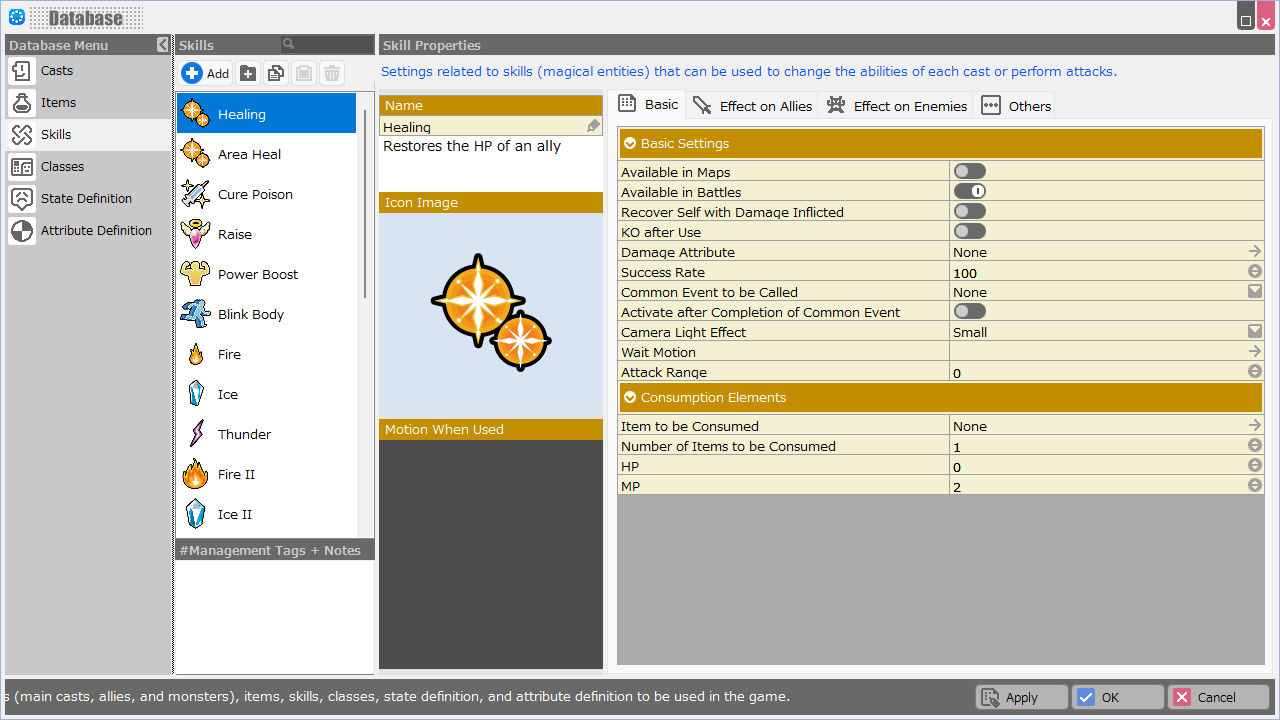
Magic and special skills used by the cast in the game are called skills. Here, you can register and create data for various skills. Various skills can be specified, such as those that change the cast's abilities or those that can perform attacks.
Function Description†
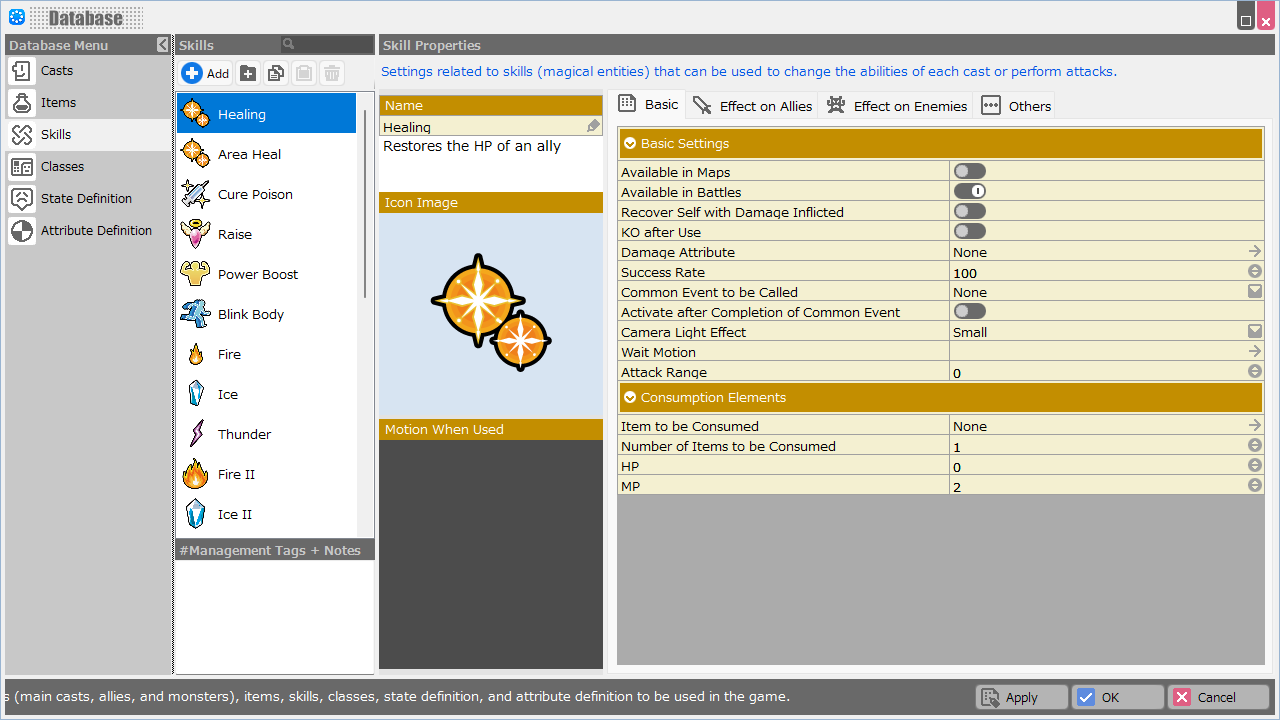
Skill List†
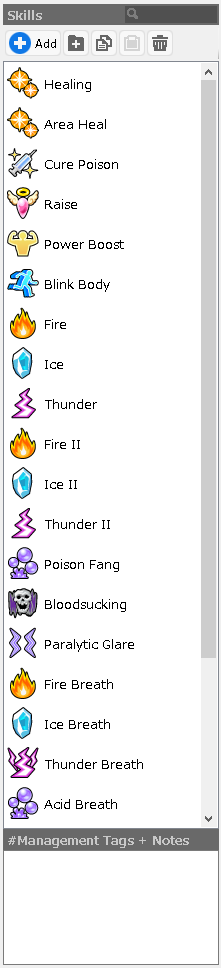
This is a list of registered skills.
- Add Folder
Create a folder.
- Copy
Copy the data for the selected skill.
- Paste
Paste the copied skill data into the last column.
- Delete
Delete skill data.
- Management Tags + Notes
You can add management tags and jot down memorandums.
Tags are registered by adding # to the beginning of the line. Tags and notes entered in this field will not appear in the game.
The specified tags can be used to narrow down the entries displayed in the "Picture Book" screen, etc., by specifying them in the Layout Tool function.
(!) When specifying multiple tags, please DO NOT leave spaces between them.
If you put #atk#def, it will be displayed regardless of whether you filter by #atk or #def.
if you put a space like #atk #def, it will not be displayed when you filter by #atk, but only when you filter by #def.
Skills Properties†
- Name
Enter a name for the skill.
You can also write a description of the skill to be displayed during the game.
- Icon Image
Specify an icon for this skill to be displayed in the game from the asset picker.
- Motion When Used
Specify the motion for this skill to be displayed in the game from the asset picker.
- Wait Motion
Specify from the Asset Picker the motion to wait for before executing this skill to be displayed in the game.
Skills Properties: Basic†
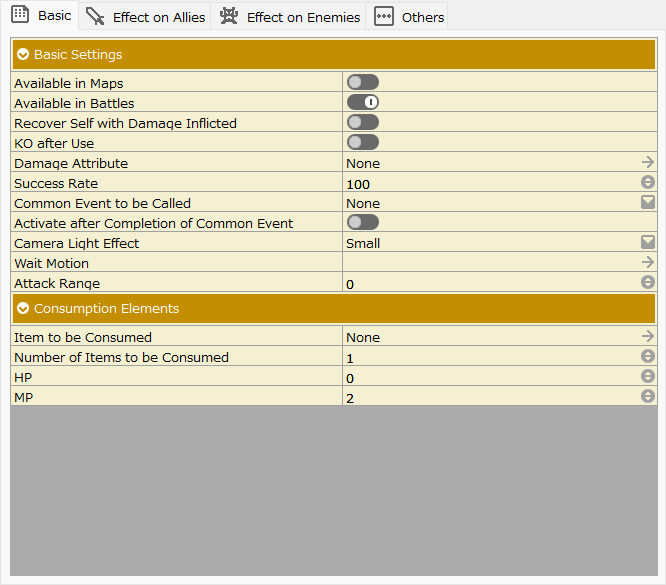
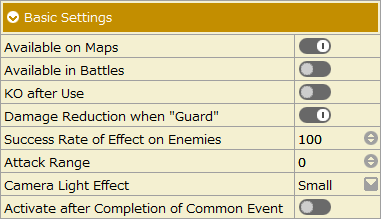
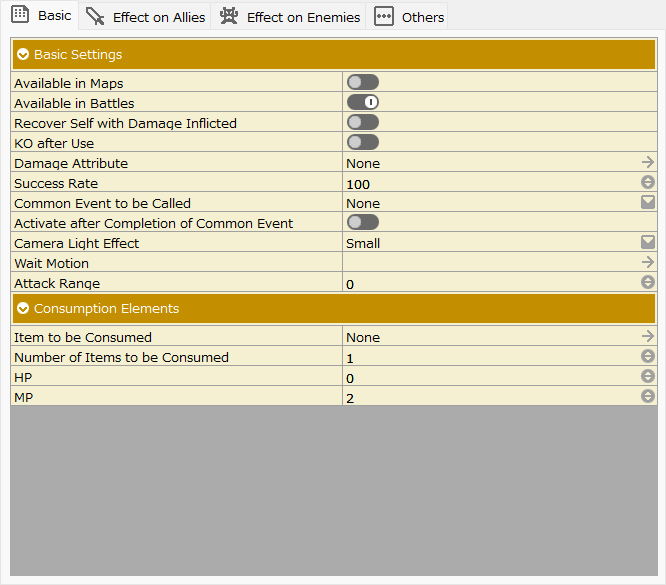
Basic Settings†
Specify basic settings related to the skill.
- Available on Maps
When turned on, this skill is available on maps.
- Available in Battles
When turned on, this skill can be used during battles.
(!)Since Ver. 1.10, when a new skill is created, both of the above two options are now generated with both of them turned on.
Turn off options as needed.
- KO after Use
When turned on, after using this skill, the user will be unable to fight.
- Damage Reduction when "Guard"
When turned on, this skill is subject to damage reduction when "Guard" is selected in the Battle Command.
- Success Rate
Specify the success rate for skill use between 0 and 100.
- Attack Range
Specify the attack range at which the skill is effective.
Attack range "0" is treated as infinite range.
This specification is enabled when "Use Attack Range" is turned on in Game Definition > Rules and Operations.
The unit of attack range is the grid on the battle layout.
The possible attack range by attack range value depends on the setting of Game Definition > Rules and Operations > "Attack Range Judgment Type".
See Rules and Operations#AttackRange for more information.
- Camera Light Effect
Specify the degree to which the light is applied to the effect from "None" to "Large".
- Activate after Completion of Common Event
When turned ON, the skill will be activated after the common event specified in "Common Event to be Called" is completed.
It can be used for things such as to trigger a skill after performing a pre-skill activation effect with a common event.
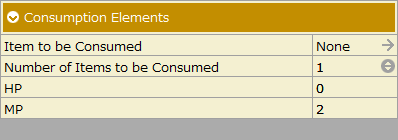
Consumption Elements†
Specify the elements to be consumed when this skill is used.
- Item to be Consumed
Specify the item to be consumed when the skill is used.
- Number of Items to be Consumed
Specify the number of items to be consumed.
- Consumption Statuses
Consumption statuses specified in Databases > Casts and Classes.
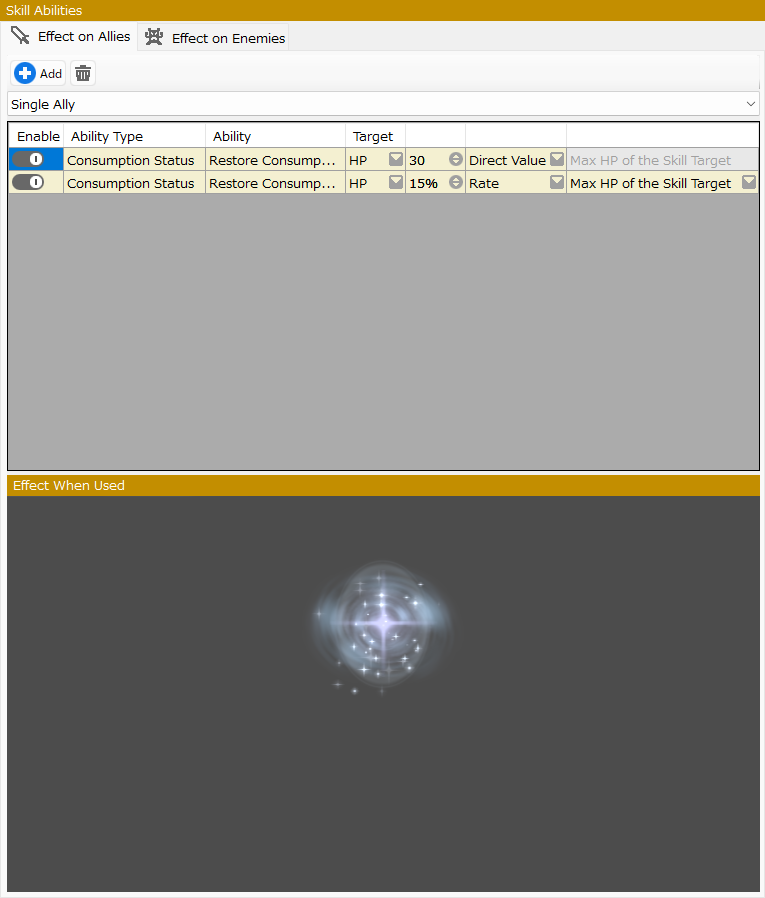
Skill Abilities†
Specify the ability when using the skill.
There are tabs for "Effect on Allies" and "Effect on Enemies," respectively.
The Add button opens the "Ability Selector".
Selecting an ability closes the dialog and allows you to specify the parameters of the ability (e.g., the amount of damage).
- Add button
The Add button opens the "Ability Selector".
Selecting an ability closes the dialog and allows you to specify the parameters of the ability (e.g., the amount of damage).
- Target Settings
Select the range of the skill's ability target.
"Effect on Allies" tab: "None", "Single Ally", "All Allies", "Only Oneself", and "Except Oneself"
"Effect on Enemies" tab: "None", "Single Enemy", and "All Enemies"
(!) If "Single Ally" is selected, "Single Enemy" cannot be selected as the target, and vice versa.
(!) Skills with "None" specified in the "Effect on Allies" tab cannot be used on maps.
- Enable Switch
Turning it off will disable the entry.
Please use this function for debugging and other purposes.
- Target
The “target status” can be switched using the “Change Status” abilities.
Ability Selector†
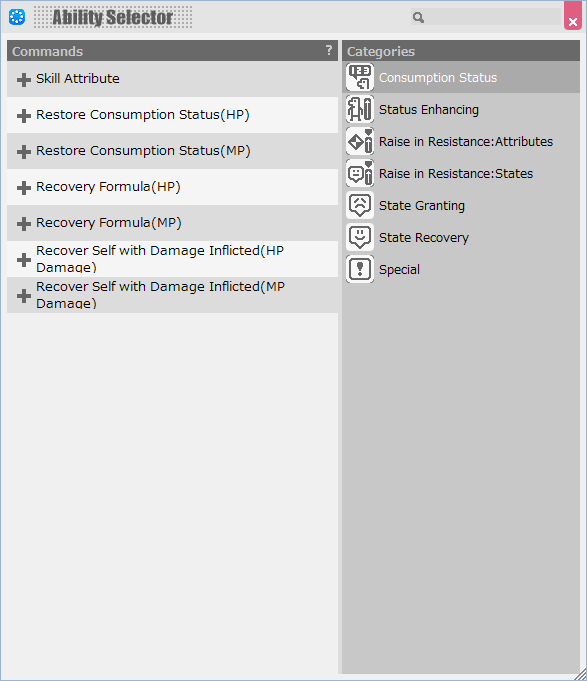
Switch the "Categories" and select the "Ability" that you wish to specify.
The abilities that can be set vary depending on whether it is the "Effect on Allies" tab or the "Effect on Enemies" tab.
If you specify an "Ability" that can only be set one for a skill, it will not appear in this dialog.
- "Effect on Allies" tab
The abilities that are performed on the party members can be specified.
- Consumption Status
It is an ability that affects the consumption value of the consumption status.
- Attribute
It is the ability to add an attribute that affects the damage caused by a skill.
(Assigning a negative value to an ability that restores the consumption value causes the damage to be treated as if it were the consumption value).
The damage is increased or decreased according to the Resistance Between Attributes (%) specified in "Attribute Definition" in relation to the attributes of the target to be damaged.
- Recover (HP)
The ability to set the amount of recovery of consumption status value consumed by a skill.
The status name in parentheses () indicates the consumption value for which the ability is targeted.
The amount of recovery can be specified as a direct value or as a rate.
If specified as a rate, you may further assign a "source status of the rate".
Ex.) If the maximum HP of the target of the skill is "50", the amount of increase will be the maximum HP of the target of the skill multiplied by 50%.
- Recovery Formula (HP)
The ability to set the amount of recovery of consumption status consumed by a skill with a formula.
The status name in parentheses () indicates the consumption value for which the ability is targeted.
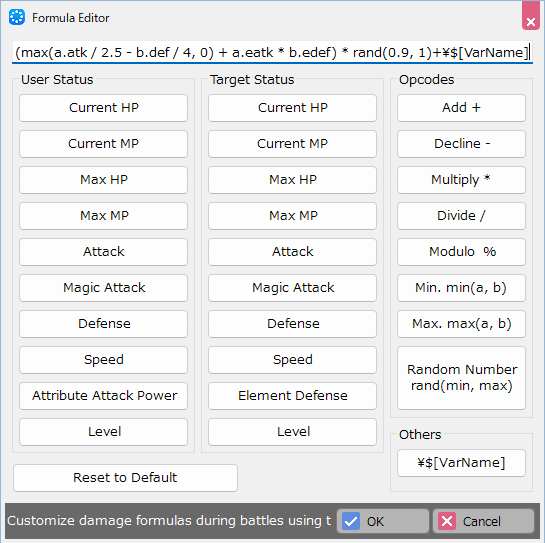
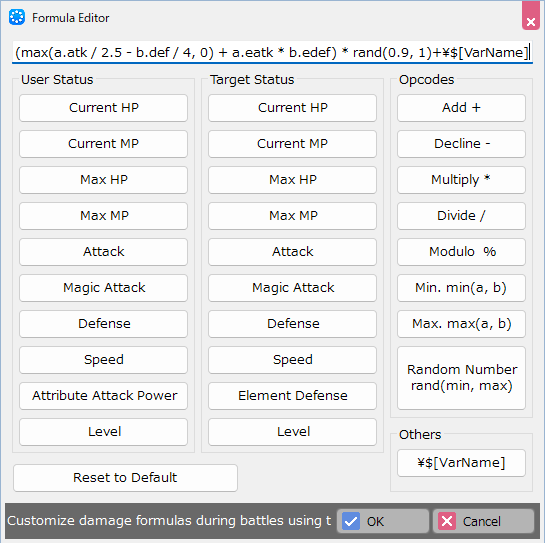
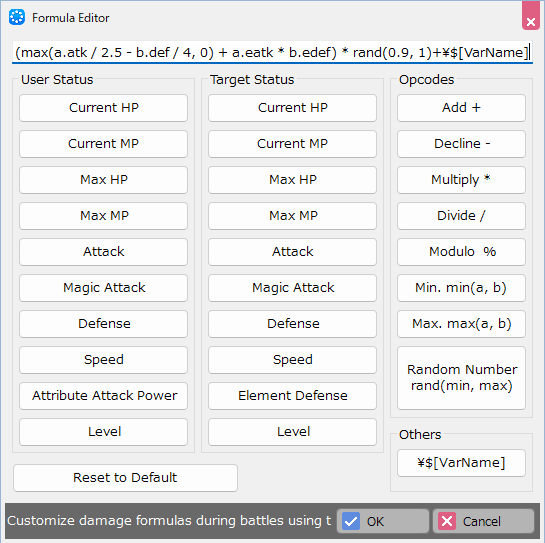
Formula Editor
Damage formulas can be customized using four arithmetic operations, etc.
- Recover Self with Damage Inflicted (HP Damage)
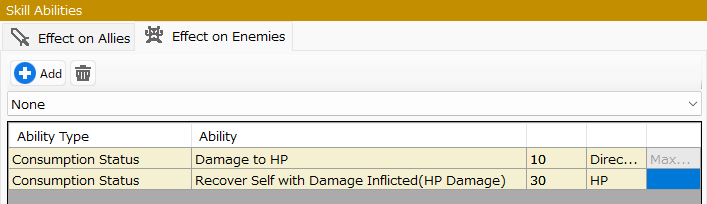
It is the ability to recover the consumption status consumed by the user of this skill for the amount of damage inflicted on the enemy by this skill.
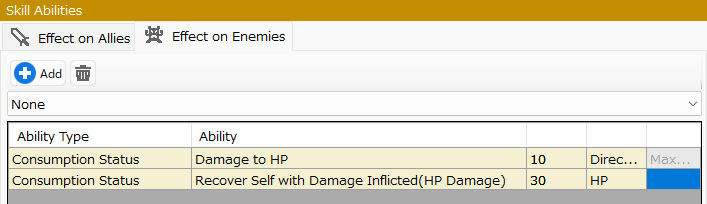
(!) This ability is "the ability to inflict damage" and "damage to the same type of status" specified in the same tab, as shown below, and is also the ability to restore the assigned status.
(!) When this ability is specified, the maximum damage inflicted by this skill on an opponent will be "the current consumption value of the opponent's target status".
With a skill with this ability specified, even if you inflict HP:120 damage on an opponent with HP:90, the recovery value will be calculated as if you had inflicted 90 damage.
- Ability Enhancement
It is an ability to change the value of each status of the target cast.
Increase the status by the entered value. (Specifying a negative value will decrease the status.)
The increase range can be specified as a direct value or as a rate.
There is a limit to the final status value that reflects the increase or decrease in value due to ability.
Please refer the Growth Factors.
Ex.) The status of the keyword "mhp" (default name is "Max HP") cannot be less than 1.
(!) The following restrictions apply to the ability to "Change in Abilities" by skill.
- Valid only during battles.
- The abilities are attenuated by 20% per battle turn. (ex. If you increase attack power by "10", the increase will be "8" in the next turn.)
- Ability cannot be multiplexed.
- Raise in Resistance (Attributes)
This ability increases the resistance of the cast to the "attribute" of the target cast by a value. (Specifying a negative value will decrease the resistance.)
(!) The following restrictions apply to the ability to "Raise in Resistance" by skill.
- Valid only during battles.
- The abilities are attenuated by 20% per battle turn.
- Ability cannot be multiplexed.
- Raise in Resistance (States)
This ability increases the resistance of the cast to the "state" of the target cast by a value. (Specifying a negative value will decrease the resistance.)
(!) The following restrictions apply to the ability to "Raise in Resistance" by skill.
- Valid only during battles.
- The abilities are attenuated by 20% per battle turn.
- Ability cannot be multiplexed.
- State Changes
It is an ability that grants a "state" to the target cast.
- State Recovery
The ability to recover a cast from an assigned "state" if the target cast is in that "state".
- State Recovery (Valid Only for Those KO)
This ability is only available when State Recovery (Instant Death) is specified.
It can also be selected only in the "Effect on Allies" tab.
Skills with this ability will only be performed if there is a KOed (0 HP) member in the party.
(You can choose it as an execution skill, but it does not consume status. Only battle turns are consumed during battle).
- Advanced Settings
- Common Event to be Called
Specify a registered common event.
If you want the skill to be activated after the completion of the processing of the common event, turn on Activate after Completion of Common Event in the Basic Settings.
- ”Effect on Enemies" tab
You can specify the abilities that will be performed against enemies in battles.
Only those abilities that differ in meaning from the "Effect on Allies" tab are explained below.
- Consumption Status
- Attribute
It is the ability to add an attribute that affects the damage caused by a skill.
The damage is increased or decreased according to the Resistance Between Attributes (%) specified in "Attribute Definition" in relation to the attributes of the target to be damaged.
- Damage to (HP)
The status name in parentheses () indicates the consumption value for which the ability is targeted.
The amount of damage can be specified as a direct value or as a rate.
If specified as a rate, you may further assign a "source status of the rate".
Ex.) If the maximum HP of the target of the skill is "50", the amount of increase will be the maximum HP of the target of the skill multiplied by 50%.
- Damage Formula (HP)
The ability to set the damage formula to the consumption value of the consumed status by the skill.
The status name in parentheses () indicates the consumption value for which the ability is targeted.
- Recover Self with Damage Inflicted (HP Damage)
It is the ability to recover the consumption status consumed by the user of this skill for the amount of damage inflicted on the enemy by this skill.
(!) This ability is "the ability to inflict damage" and "damage to the same type of status" specified in the same tab, as shown below, and is also the ability to restore the assigned status.
(!) When this ability is specified, the maximum damage inflicted by this skill on an opponent will be "the current consumption value of the opponent's target status".
With a skill with this ability specified, even if you inflict HP:120 damage on an opponent with HP:90, the recovery value will be calculated as if you had inflicted 90 damage.
- Ability Weakening
It is an ability to change the value of each status of the target cast.
The increase range can be specified as a direct value or as a rate.
There is a limit to the final status value that reflects the increase or decrease in value due to ability.
Please refer the Growth Factors.
Ex.) The status of the keyword "mhp" (default name is "Max HP") cannot be less than 1.
(!) The following restrictions apply to the ability to "Change in Abilities" by skill.
- Valid only during battles.
- The abilities are attenuated by 20% per battle turn. (ex. If you increase attack power by "10", the increase will be "8" in the next turn.)
- Ability cannot be multiplexed.
- Reduce in Resistance (Attribute)
This ability reduces the resistance of the cast to the "attribute" of the target cast by a value. (Specifying a negative value will increase the resistance.)
(!) The following restrictions apply to the ability to "Reduce in Resistance" by skill.
- Valid only during battles.
- The abilities are attenuated by 20% per battle turn.
- Ability cannot be multiplexed.
- Reduce in Resistance (State)
It is an ability that reduces the resistance of the cast to the "state" of the target by a value. (Specifying a negative value will increase the resistance.)
(!) The following restrictions apply to the ability to "Reduce in Resistance" by skill.
- Valid only during battles.
- The abilities are attenuated by 20% per battle turn.
- Ability cannot be multiplexed.
- State Changes
It is an ability that grants a "state" to the target cast.
- State Recovery
The ability to restore a cast to an assigned "state" if the target cast is in that "state".
- Advanced Settings
- Common Event to be Called
Specify a registered common event.
If you want the skill to be activated after the completion of the processing of the common event, turn on Activate after Completion of Common Event in the Basic Settings.
Effect When Used†
Specify the effect when this skill is used.
Effects can be set for the "Effect on Allies" and "Effect on Enemies" tabs respectively.
Skill Properties: Others†
- Picture Book
You can specify the settings to be displayed in the "Picture Book" screen.
The "Picture Book" screen can be created using the Layout Tool.
You can specify when they will be registered in the "Picture Book" by going to Game Definition > Rules and Operations > Register to Picture Book.
- Register to Picture Book
If turned on, this skill will be displayed in the Picture Book.
- Referent
Various data on the skill specified here can be displayed in the Picture Book.
![[PukiWiki]](./skin/BAKIN_logo_92.png "[PukiWiki]")


 Database_Skills_AbilitySelector.png 1 download
[Information]
Database_Skills_AbilitySelector.png 1 download
[Information]
 Database_Skills_Basic.png 21 download
[Information]
Database_Skills_Basic.png 21 download
[Information]
 Database_Skills.png 31 download
[Information]
Database_Skills.png 31 download
[Information]
 Database_Skills_SkillAbilities.png 15 download
[Information]
Database_Skills_SkillAbilities.png 15 download
[Information]
 Database_Skills_BasicSettings.png 55 download
[Information]
Database_Skills_BasicSettings.png 55 download
[Information]
 Database_Skills_RecoverSelfwithDamageInflicted.png 79 download
[Information]
Database_Skills_RecoverSelfwithDamageInflicted.png 79 download
[Information]
 Database_Skills_ConsumptionElements.png 75 download
[Information]
Database_Skills_ConsumptionElements.png 75 download
[Information]
 Database_Skills_Name.png 84 download
[Information]
Database_Skills_Name.png 84 download
[Information]
 Database_Skills_Others.png 92 download
[Information]
Database_Skills_Others.png 92 download
[Information]
 Databese_FormulaEditor.png 214 download
[Information]
Databese_FormulaEditor.png 214 download
[Information]
 Skills Add.png 321 download
[Information]
Skills Add.png 321 download
[Information]


