Text and Special Formats Insert Support Dialog†
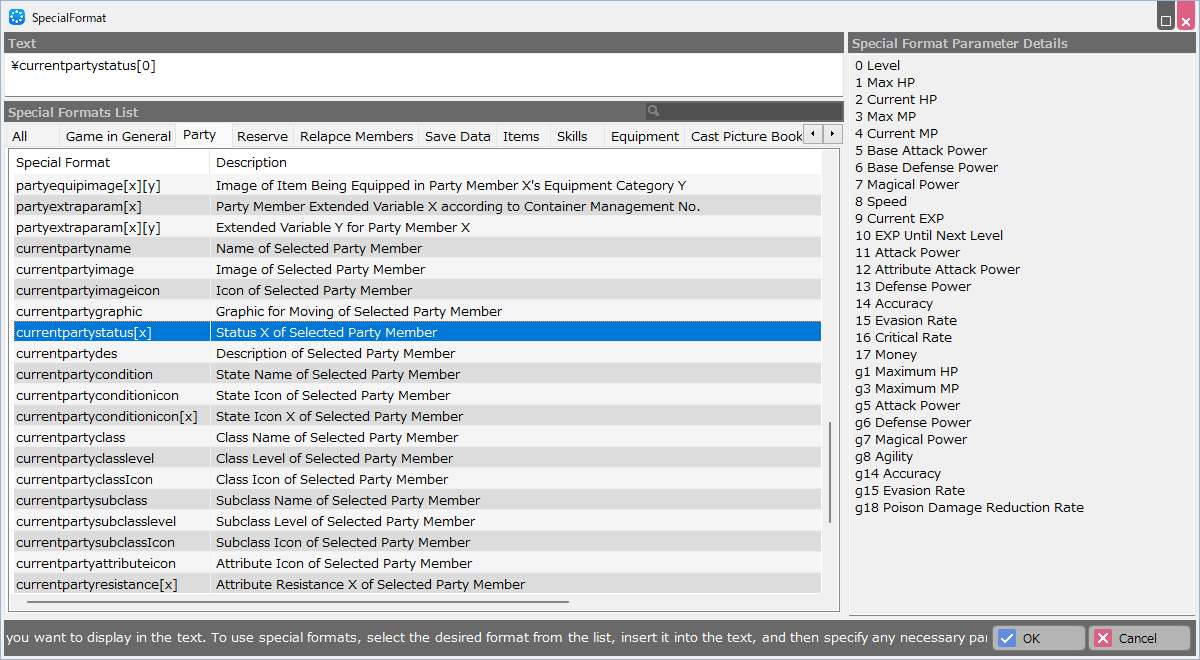
This dialog supports the insertion of text and special formatting, which will be displayed when you specify Panel for Rendering Strings -> Properties -> Specify What to Display in the Panel.
- Text
If you enter a string, the text will be displayed as it is.
When a special format is selected in the Special Format Selection column, it will be inserted into this text field.
If the special format requires setting parameters, rewrite the values accordingly.
(You can also display a combination of strings and special formatting.)
Example: Party Member's Name:\partyname[0] ... String+Special Format
- Special Format List
In the left column, select the use or scene for which you want to use the special format, then select the tabs.
Please see below for the contents of the tabs.
| Tab Name | Description |
| Unspecified | The formats on this tab behave as described in the format description.
Ex:\partyname[x] (Name of Party Member X) displays the name of the party member whose number is assigned to [X]. |
| According to Container Management No. | The formats of this tab are affected by the Container Management Number of the parent container of the panel you specify.
Ex: \partyname (Name of Party Member) displays the name of party member 1 if the Container Management Number of the parent container of the panel for which this special format is specified is "1". |
| Selected | The formats on this tab are those that display the parameters of the selected target in the menu. |
| In Battles | The formats in this tab relate to party members in battles. |
- Special Format Parameter Details
Show what the values you put in the special format parameters represent.
For example, this field is not displayed in special formats that specify party members by parameters.
This is because the parameter you specify represents the party member number itself.
[Attention]
For statuses related to casts and classes, such as maximum HP, numbers with "g" may be displayed since Ver. 1.5.
For example, if you select \currentpartystatus[0], this column will have "1 Max HP" and "g1 Max HP".
The number with "g" is used to display the status settings in the "Status Editor" added to the Database in Ver. 1.5.
The numbers without "g" are left for displaying layout data created in Ver. 1.4.x or earlier without modification in Ver. 1.5 or later.
When creating layout data with Ver. 1.5 or later, we recommend that you use the number with "g".
![[PukiWiki]](./skin/BAKIN_logo_92.png "[PukiWiki]")


 LayoutTool_LayoutTextDialog.png