Camera Registration†
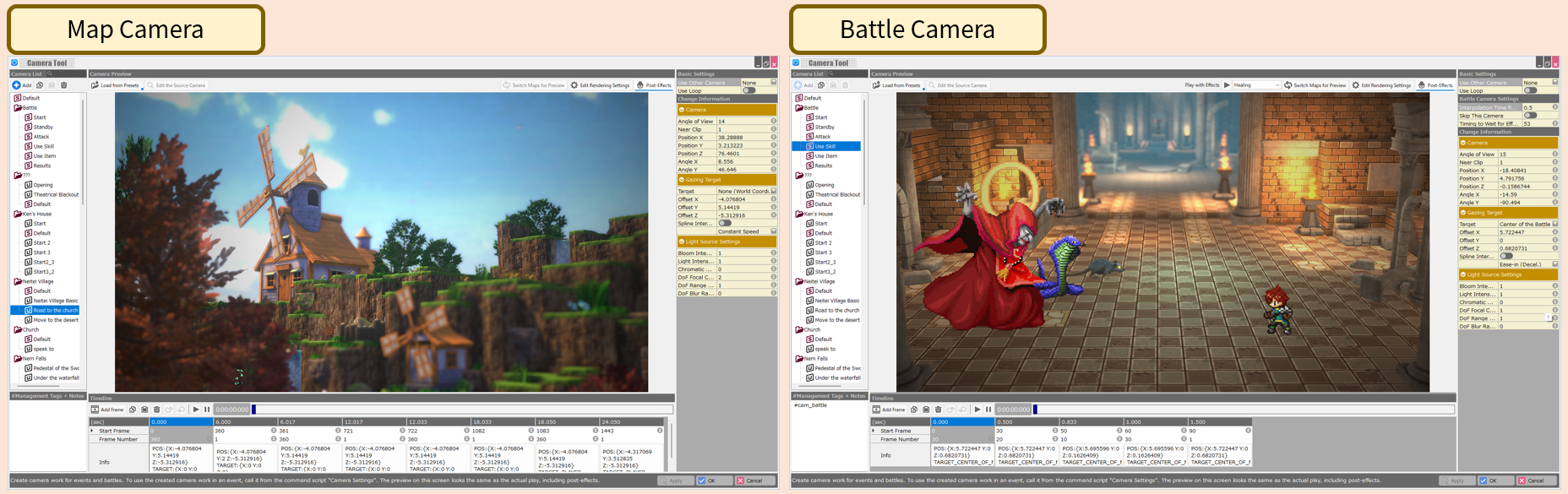
There are two types of camera work used in the game: the "camera used on the map" and the "battle camera" used during battles. Here, you can create each type of camera work using the camera tool and specify various settings.
The main functions of the camera tool are as follows:
- Camera List
Create and select camera works for battles and for each map or event. By default, the basic settings for the battle camera are specified.
- Preview
The created camera works, including the specified effects, can be viewed as they were during gameplay.
- Timeline
Add frames, specify timing and number of frames to be displayed, and create the camera work.
- Rendering Settings
Specify rendering settings for each map. You can choose from a large number of presets and even specify your own effect settings.
- Various Property Settings
You can specify the camera's angle of view, gazing target, light source, and more.
![[PukiWiki]](./skin/BAKIN_logo_92.png "[PukiWiki]")


 CameraTool_Overview.png